
What is Migo
Migo is an AI-driven learning and research innovation platform that provides users with efficient knowledge integration, content generation, and data analysis services. It has powerful multimodal AI capabilities, supports text, language, vision, and data processing, and can meet diverse interdisciplinary needs. Users can access it via the cloud, achieve seamless switching across multiple devices, and enjoy real-time collaboration and offline functionality. The browser extension supports webpage word-selection search, inquiry, translation, summarization, and text recognition from screenshots, and can provide intelligent Q&A services in the form of a conversation on the right side of the webpage.
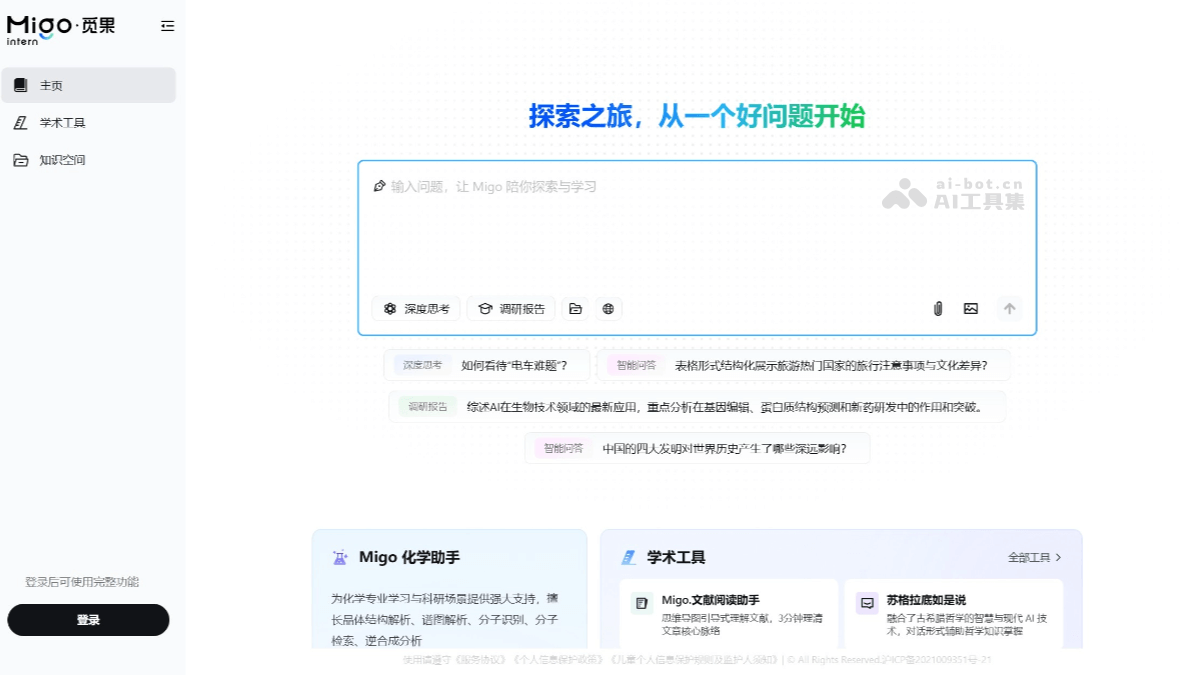
Main features of Migo
- Intelligent Q&A: Provides multimodal conversation capabilities, supports multi-turn conversations, can answer complex questions, and is suitable for learning, office, and research scenarios.
- Webpage-assisted reading: Supports activation by selecting text on a webpage, performs search, inquiry, translation, summarization, and other operations on the selected text, and displays the results in a floating window. Supports activation by screenshot, recognizes text in images and translates it, and can even intelligently generate charts based on screenshot content.
- Literature reading: Supports users in uploading PDF documents, builds mind maps through Q&A, helps users deeply analyze literature content, and inspires research ideas.
- Academic writing: Provides manuscript polishing, grammar correction, and intelligent rendering of LaTeX formulas, and performs especially well within the Overleaf webpage.
- Paper reading: Supports customized functions within the Arxiv webpage, including summarization, translation, Q&A, etc., and allows one-click import of papers for further discussion.
- Chemistry assistant: Provides crystal structure analysis, spectrum analysis, molecular recognition, molecular retrieval, retrosynthetic analysis, and other functions, offering strong support for chemistry professional learning and research.
- Multimodal interaction: Supports multiple input methods such as text and images, enabling more flexible information processing and interaction experience.
- Seamless multi-device experience: Users can access the platform via the cloud, supporting seamless switching across multiple devices and ensuring continuity on desktop, laptop, tablet, or smartphone.
How to use Migo
- Use the web version online: Visit Migo'sofficial website, register and log in to use it online.
- Download and install the browser extension:
- Chrome browser extension: Can be downloaded from the Chrome Web Store.
- Edge browser extension: Can be downloaded from the Microsoft Edge Add-ons store.
- Webpage-assisted reading: Supports activation by selecting text on a webpage, performs search, inquiry, translation, summarization, and other operations on the selected text, and can display the results in a floating window. Supports activation by screenshot, recognizes text in images and translates it, and can intelligently generate charts based on screenshot content.
- Intelligent Q&A: Users can invoke Migo in the conversation form on the right side of the webpage, converse with the large language model, and support multimodal conversations with documents and images as well as further discussion of selected webpage content.
- Paper reading: Supports customized functions within the Arxiv webpage, including summarization, translation, Q&A, etc., and supports one-click import of papers into the webpage extension for further discussion.
Migo Application Scenarios
- Literature Reading and Organization: Supports uploading PDF documents and building mind maps through a Q&A format, helping students and researchers deeply analyze literature content and spark research inspiration.
- Academic Writing Assistance: Provides functions such as manuscript polishing, grammar correction, and intelligent LaTeX formula rendering, with outstanding performance within the Overleaf web page, helping users improve academic writing efficiency.
- Course Learning and Tutoring: Through intelligent Q&A functionality, students can quickly obtain knowledge answers during the learning process, supporting multimodal interaction, including document and image input.
- Chemical Research: The chemistry assistant function provides tools such as crystal structure analysis, spectrum analysis, molecular recognition, molecular retrieval, and retrosynthetic analysis, providing strong support for researchers in chemistry.
- Content Generation and Optimization: Generates written content based on AI technology, such as articles, abstracts, or research summaries, and supports natural language processing functions to help users quickly generate high-quality content.