
What is What to Learn Today
What to Learn Today is an innovative AI learning tool launched by Metaso AI. Users only need to enter keywords, upload documents, or paste webpage links, and the AI can automatically transform the content into personalized interactive courses, generating accompanying PPTs and narrated audio. It supports multiple explanation styles, such as "Classroom," "Dialogue," "Grumpy Bro," and more, and can adjust the explanation difficulty based on the user's knowledge level (beginner, intermediate, expert), providing real-time interaction and quiz challenge features, making learning lively and interesting. It breaks down professional barriers, lowers the threshold for learning, makes knowledge dissemination more equal, helps users efficiently acquire personalized knowledge, and makes learning as addictive as binge-watching a show.
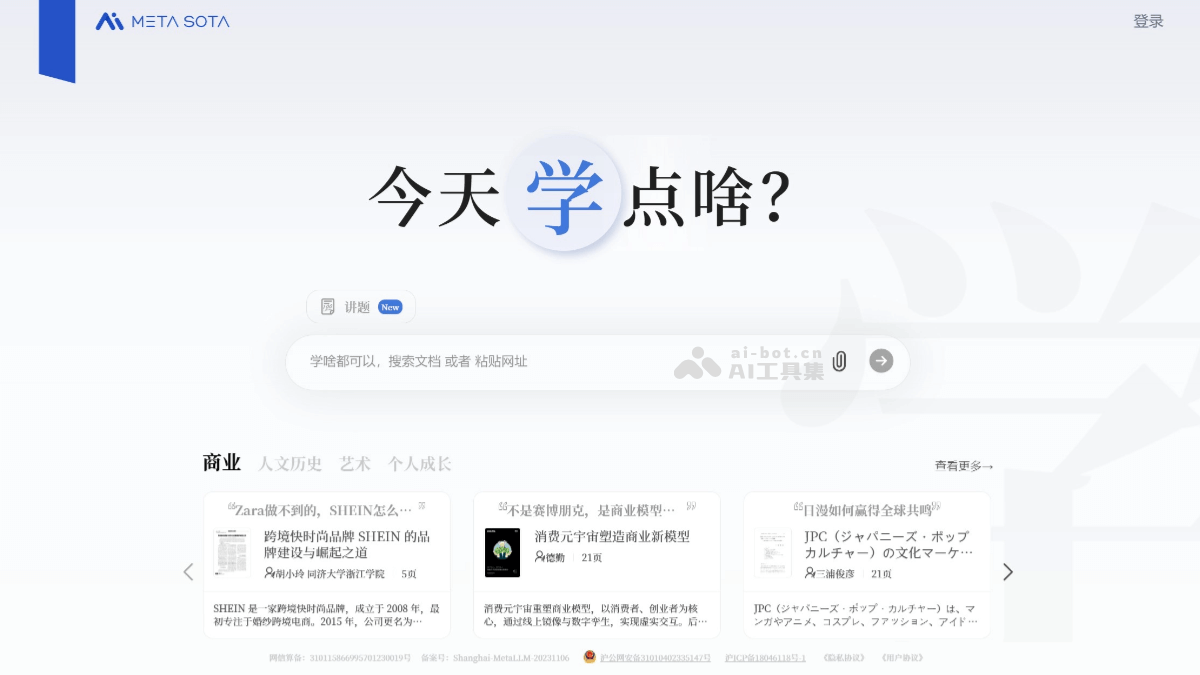
Main Features of What to Learn Today
- Content Transformation: Users can search keywords, upload documents, or paste webpage links, and the AI will automatically transform this content into personalized interactive courses, generating accompanying PPTs and narrated audio.
- Personalized Customization: Supports multiple explanation styles, such as "Classroom," "Dialogue," "Memorial," "Storytelling," "Grumpy Bro," and more. Users can also choose their preferred level of knowledge mastery (beginner, intermediate, expert) and voice tone.
- Real-Time Interaction: During the course, users can ask questions at any time, and the AI teacher will provide precise answers based on the context. Users can interact with the teacher through "applause," "sending flowers," "likes," and other methods, enhancing the fun and participation of learning.
- Learning Outcome Assessment: After each lesson, a "quiz challenge" is triggered. The AI teacher generates level-clearing questions based on the course content. Correct answers unlock achievement rewards, and users can also invite friends to PK, increasing the fun and competitiveness of learning.
- Intelligent Recommendation: The system intelligently recommends related courses based on the user's browsing, interaction, and quiz data, helping users continuously expand their knowledge areas and achieve continuous learning.
How to Use What to Learn Today
- Visit "What to Learn Today": Visit the official website of Metaso AI's What to Learn Today https://metaso.cn/study , or visit Metaso AI's official website and click "What to Learn Today" in the left sidebar or the small blue bar in the upper right corner of the screen to enter the "What to Learn Today" interface.
- APP Version: Visit the official app store ofWhat to Learn Todayand choose the download and installation according to your phone model.
- Enter Learning Materials
- Search Documents: Enter keywords in the input box, such as "Nonviolent Communication." The system will automatically recommend related documents. Select the document you are interested in and click "Explain."
- Paste URL: You can directly paste URLs such as WeChat official account articles and Bilibili videos.
- Upload Local Files: Supports multiple file formats such as PDF, Word, PPT, TXT, and more.
- Analyze Materials and Select Chapters: The system will analyze and process the material content. If there is a lot of material, it will be split into multiple chapters and marked with page numbers. Select the chapters you are interested in, click "Confirm," and enter the course settings interface.
- Course Settings
- Choose Knowledge Mastery Level: According to your level of knowledge mastery, choose "Beginner," "Intermediate," or "Expert." The system will adjust the depth of explanation based on your choice.
- Choose Explanation Style: The system offers more than 20 narration styles, such as "Classroom," "Grumpy Guy," and "Li Bai Style."
- Advanced Settings: You can choose the language, voice, and more to further personalize the course.
- Generate Course: After setup is complete, the system will automatically organize knowledge points, write courseware, and generate PPT and voice narration. After the course is generated, you can turn pages with the left and right arrows and adjust the volume, speech rate, subtitles, and more.
- Real-time Interaction: For questions you do not understand during the course, you can ask anytime in the input box below.
- Review and Share: After the course ends, you can save the course to the "Bookshelf" for review anytime, and you can also share the course via a link.
- Learning Outcome Assessment: Click "Quiz Me," and the system will create questions based on the course content; when you answer incorrectly, it will also provide an explanation of the answer.
Application Scenarios of What to Learn Today
- Academic Learning: Academic papers, industry reports, or meeting minutes, etc., can be transformed into vivid courses through "What to Learn Today," helping users better understand and absorb knowledge.
- Professional Skill Improvement: For users who want to learn new skills or improve existing professional skills, relevant tutorials, cases, and more can be transformed into personalized learning courses, helping users quickly master the skills they need.
- Interest Expansion: Users can search for content in various fields according to their interests and hobbies, such as history, culture, art, technology, and more, and through the AI teacher's explanations, gain a deeper understanding of the fields they are interested in and broaden their knowledge.
- Educational Assistance: Teachers can use the tool to transform teaching materials into interesting courses to improve teaching effectiveness; students can also consolidate classroom knowledge or preview new knowledge in advance through independent learning.