
What is Meshy 3D Agent
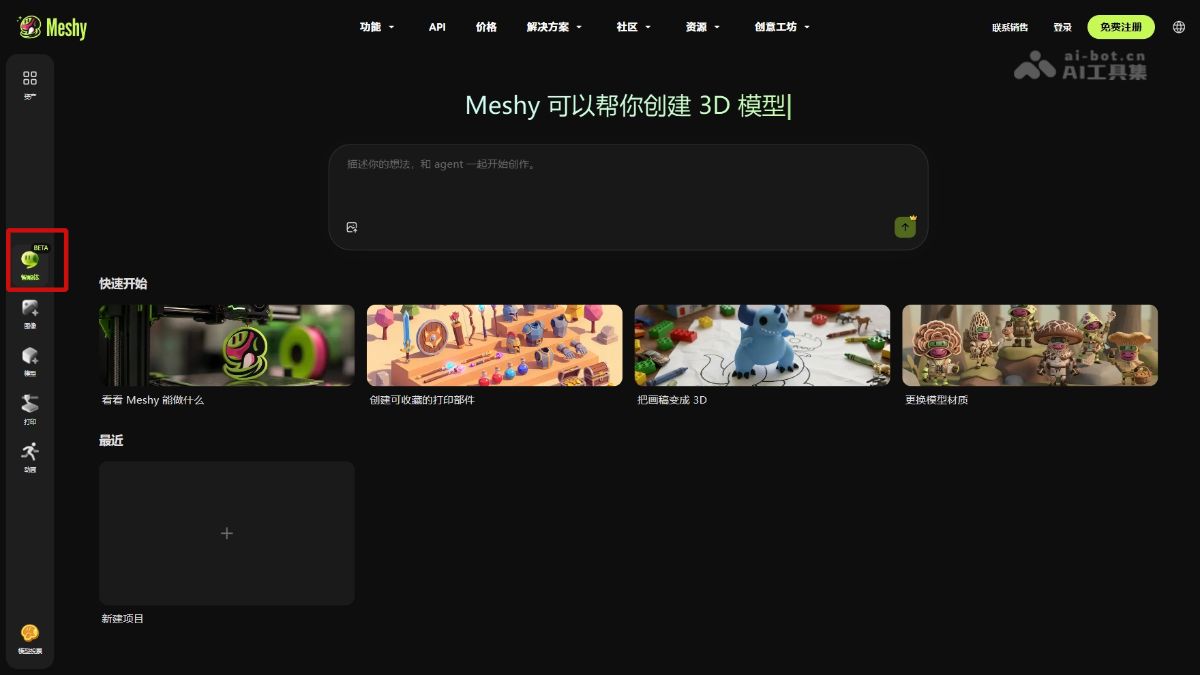
Meshy 3D Agent is Meshy 's first 3D creation AI Agent, which transforms users' vague ideas into ready-to-use 3D assets through multi-turn conversations. The tool can proactively understand intent, break down tasks, and invoke capabilities such as image generation, model modeling, texture UV mapping, and print adaptation, completing the full chain from concept exploration to finished product export. It supports multiple scenarios such as 3D printing, game development, and AR preview, greatly lowering the barrier to 3D creation.
Main Features of Meshy 3D Agent
-
Multi-turn Dialogue Co-creation: Interact with the Agent through natural language, driving the entire process from concept divergence to final model approval through conversation.
-
Concept Proposal Recommendations: After entering a vague idea, the Agent proactively provides multiple style directions for the user to choose and confirm.
-
Intelligent Model Generation: Supports generating high-fidelity 3D models from photos, sketches, and text descriptions, with real-time preview of the solid and rendered states.
-
Canvas Branch Management: Retains historical versions such as concept images, models, and textures, and supports expanding branch modifications from any node.
-
Print Feasibility Detection: Automatically detects model holes and structural issues, repairs them with one click, and converts them to printing formats such as 3MF/STL.
-
Multi-format Export: Supports 8 mainstream formats in total: FBX, OBJ, GLB, USDZ, STL, Blend, 3MF, and DXF.
-
Direct Connection to Slicing Software: One-click sending to mainstream 3D printing software such as Bambu Studio, Creality Print, OrcaSlicer, and Cura.
-
Batch Generation with Unified Style: For game asset needs, generate an entire set of stylistically consistent character, prop, and scene models at once.
-
Animation Rigging Integration: Generated models can be directly integrated into the Meshy animation page for skeletal rigging and motion design.
How to Use Meshy 3D Agent
- Visit the Official Website: Visit the Meshyofficial website, register, and complete account login.
- Enter the Agent Dialog Box: Find the Meshy 3D Agent entry point on the homepage and enter the chat interface.
- Describe the Creative Idea: Enter the request in natural language, such as "I want to make a kitten with wings" or "generate a set of Low Poly island game assets."
- Choose a Concept Proposal: The Agent will return concept images in multiple styles; choose the direction you like or ask for adjustments.
- Generate and Preview the Model: After confirming the concept, the Agent generates a 3D model, and the user rotates and previews the solid and rendering effects on the canvas on the right.
- Iterative Modification: Directly raise modification requests in the conversation, or select a historical node on the canvas to expand a new branch.
- Detection and Export: If used for 3D printing, the Agent automatically detects structural issues and repairs them; choose the required format (STL/FBX/GLB, etc.) and export.
- Connect to Production Tools: Click the "Send to Printer" button to directly connect to slicing software such as Bambu Studio, or download the file to import into a game engine/Blender.
Core Advantages of Meshy 3D Agent
-
End-to-end Agentization: The tool can understand the full chain "from idea to finished product," proactively breaking down tasks and invoking tools.
-
Zero-threshold interaction: No need to learn the complex interfaces of Blender/C4D; professional-grade 3D creation can be completed through natural language conversation.
-
Production-grade usability: Automatically handles engineering details such as topology, UV, texturing, and print structure repair, outputting results that can be directly put into production.
-
Style consistency assurance: When batch-generating game assets, it automatically self-checks for stylistic consistency, avoiding the visual fragmentation of "Frankenstein" games.
-
Direct ecosystem connection: Natively compatible with mainstream 3D printing slicing software and game engine formats, eliminating intermediate conversion steps.
Comparison of Meshy 3D Agent with similar competitors
| Comparison dimension | Meshy 3D Agent | Rodin |
|---|---|---|
| Product positioning | The world's first end-to-end 3D creation AI Agent, taking over the complete task chain from idea to delivery | A high-quality text-to-3D/image-to-3D foundation model platform, focused on single-point generation quality |
| Interaction depth | Multi-turn dialogue; the Agent proactively understands intent, recommends style options, breaks down tasks, and drives progress | Single-turn prompt input directly outputs a model; modifications require regeneration or external tools |
| Core Agent capabilities | Equipped with Agent-based orchestration logic such as memory, planning, tool calling, self-checking, and repair | Mainly relies on underlying generative model capabilities, with no upper-layer Agent task chain management |
| Post-processing and delivery | Built-in print feasibility detection, hole repair, material recommendations, and one-click direct export to slicing software | Stops at model generation, with no native print detection, repair, or direct production tool connection capabilities |
| Batch asset consistency | Supports batch generation and style self-checking for entire sets of game assets, ensuring visual consistency | Mainly focuses on single-model generation; the style consistency of batch assets requires manual control |
| Target users | 3D enthusiasts and independent developers with zero foundation, who do not need to master professional modeling software | Designers and developers with a 3D foundation, who need to use external tools to complete the production pipeline |
Application scenarios of Meshy 3D Agent
-
3D printing enthusiasts: Turn photos, sketches, or text ideas into printable physical figurines, ornaments, and functional stands.
-
Independent game development: Quickly generate a full set of game assets with a consistent style, such as protagonists, NPCs, props, and buildings, reducing art costs.
-
AR/VR content creation: Export in USDZ/GLB format for direct use in augmented reality previews and virtual reality scene construction.
-
Education and design prototyping: Teachers or designers can quickly validate 3D concepts through conversation, accelerating teaching demonstrations and product iteration.
-
Personalized customization: Generate unique 3D models from children's doodles or pet photos, enabling emotionally personalized custom production.