
What is MCP Servers
MCP Servers is a large model ecosystem plaza launched by ByteDance, providing developers with an efficient and flexible environment for large model development and deployment. Combining MCP Market, Volcano Ark, and the Trae development environment, it enables a complete workflow from tool invocation to application deployment. ThroughMCP(Model Context Protocol), it connects a rich set of tools and models, supports one-click integration of high-frequency tools such as search, databases, and APIs, and enables modular development.
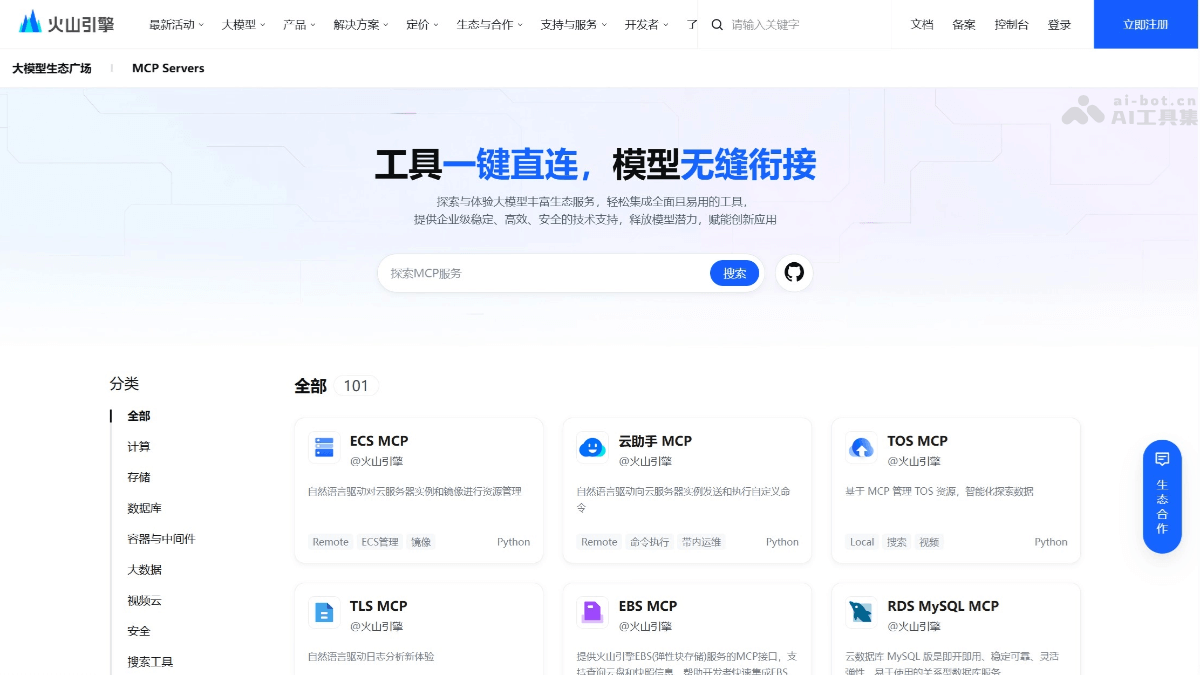
Main Features of MCP Servers
- Tool Integration: MCP Servers integrates numerous high-quality tools based on the MCP protocol, covering high-frequency application scenarios such as search, databases, and business system APIs.
- Modular Development: Developers can invoke the required tools through simple drag-and-drop operations, enabling modular development.
- Full-Chain Development Loop: Through the deep collaboration of "MCP Market (Tool Plaza) + Volcano Ark (Large Model Service) + Trae (Application Development Environment)," MCP Servers achieves a full-chain development loop from tool invocation and model inference to application deployment. It helps developers say goodbye to complex manual development processes through "modular assembly."
- Open Source and Ecosystem Co-Building: MCP Servers is already open source, and enterprises can package and upload their self-developed tools according to the MCP protocol and share them, forming a virtuous cycle of "using the ecosystem" and "building the ecosystem."
- Intelligent Interaction and Efficient Development: As a large model service platform, Volcano Ark enables models to shift from "passively executing instructions" to "actively invoking resources" to solve problems. For example, when a user plans a business trip, the model will automatically invoke a flight query tool to obtain real-time information, link with a navigation tool to plan the route, and integrate and output the results.
- Flexible Deployment Modes: MCP Servers supports Local and Remote deployment modes, flexibly adapting to the diverse application scenarios of enterprise customers.
- Rich Resource Integration: The platform integrates Volcano Engine's own cloud services (such as AI Data Lake LAS) and introduces high-quality third-party ecosystem tools (such as FlightMaster, Hand Precise Marketing, etc.).
How to Use MCP Servers
- View MCP Server Details: Visit the MCP Serversofficial website, select a suitable MCP Server, and view the details.
- Select the Platform Where the MCP Server Will Run: Check the platforms to which the current MCP Server has been adapted, and select a suitable platform.
- View and Compare Available Tools: View the functional descriptions of the available Tools and the required input parameters, and try running the corresponding functions.
- Obtain a Dedicated URL or Code Example: Check the account login status and service activation status, and generate a unique URL or code example.
- Go to the MCP Client for Installation and Use: Copy the URL or JSON and go to a supported MCP Client to install and use the MCP Server.
Application Scenarios of MCP Servers
- Automated Code Generation: By combining the Trae IDE with MCP Servers, developers can describe requirements in natural language and automatically generate code.
- Cross-Repository Debugging and Issue Localization: Connect to Filesystem MCP to access multiple repositories at the same time, assisting with issue tracking and debugging.
- Intelligent Database Operations and Maintenance: Connect to PostgreSQL MCP, query the database directly, and enable automatic generation and updating of database schemas.
- Automated modeling: Implement automated modeling in Blender, using Blender-MCP to automatically complete modeling according to user requirements.
- Automated web execution and testing: Connect to Puppeteer MCP to automate browser operations, such as clicking and form filling, with support for dynamic content.