
What is MathModelAgent
MathModelAgent is an Agent designed specifically for mathematical modeling and can automatically complete the entire workflow from problem analysis to paper generation. Based on multi-Agent collaboration, it automatically builds mathematical models, writes code, verifies results, and generates papers with standardized formatting. MathModelAgent supports multiple large language models (LLMs) and has a built-in local code interpreter that can debug and optimize code in real time. It is suitable for scenarios such as mathematical modeling competitions, data analysis, academic paper writing, and teaching assistance.
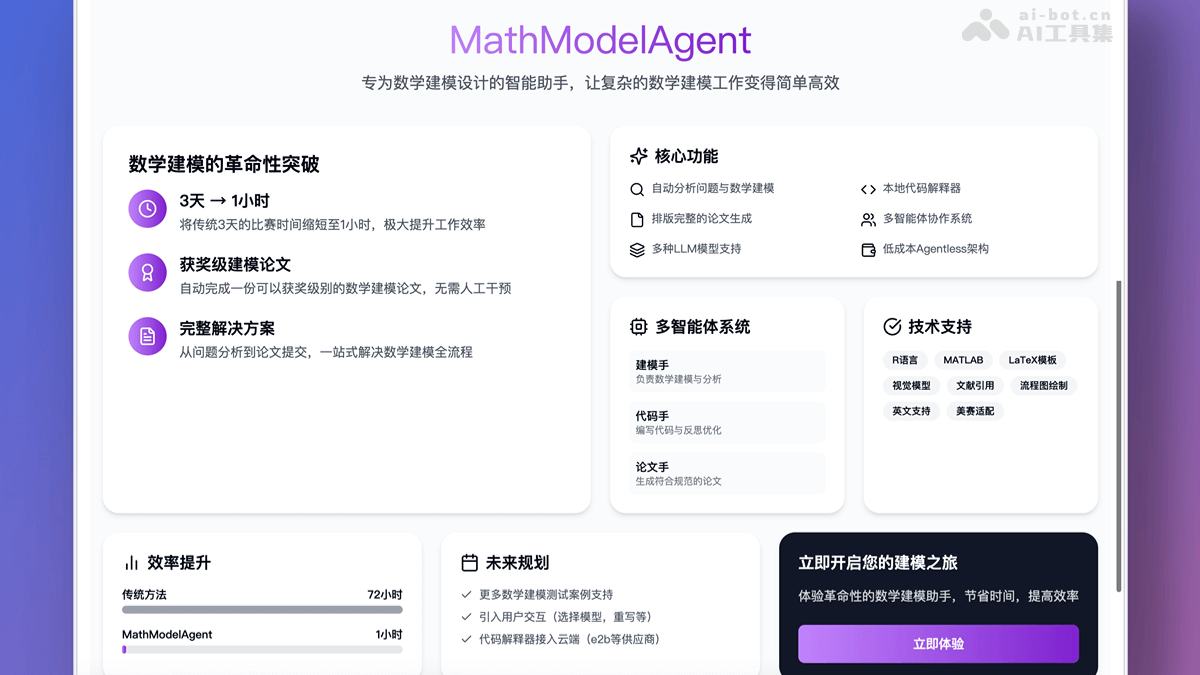
Main features of MathModelAgent
- Fully automated modeling workflow: Automatically analyzes the problem background, builds mathematical models, writes code implementations, verifies results, and generates papers with standardized formatting.
- Built-in code interpreter: Supports local code execution and debugging, with real-time error feedback to optimize code.
- Multi-Agent collaboration: Based on division of labor and cooperation among agents such as the code Agent and paper Agent, tasks are completed efficiently.
- Supports multiple LLM models: Each Agent can be individually configured with a different large language model, flexibly adapting to different needs.
- Low cost and high benefit: The cost of a single task can be as low as about 1 RMB, offering extremely high cost-effectiveness.
Technical principles of MathModelAgent
- Multi-agent architecture: Based on a multi-Agent system, complex modeling tasks are decomposed into multiple subtasks, each completed by a different agent.
- Problem analysis Agent: Responsible for understanding the problem background and requirements.
- Modeling Agent: Selects an appropriate mathematical model based on the problem analysis results.
- Code Agent: Converts the mathematical model into runnable code and performs debugging and optimization.
- Paper Agent: Organizes the modeling process and results into a formatted paper.
- Large language model (LLM)-driven: Each Agent is configured with a different large language model, using the powerful language generation and logical reasoning capabilities of LLMs to complete their respective tasks.
- Local code interpreter: The built-in code interpreter supports local code execution and debugging, providing real-time feedback on code errors for optimization and ensuring that the generated code is runnable and efficient.
- WebUI and command-line operation: Provides a WebUI interface and command-line mode, allowing users to operate the tool through an intuitive interface or command-line instructions, flexibly adapting to different users' needs.
- Automated task workflow: Based on automated design of the task workflow, from problem input to paper output, it achieves fully automated processing throughout the entire workflow, greatly improving the efficiency of mathematical modeling.
How to use MathModelAgent
- Environment preparation: Install Python, Node.js, and Redis.
- Clone the project:
git clone https://github.com/jihe520/MathModelAgent.git- Configuration files:
- Copy /backend/.env.dev.example to /backend/.env.dev.
- Copy /frontend/.env.example to /frontend/.env.
- Fill in the API key and model.
- Start the backend:
cd MathModelAgent/backend
pip install uv
uv sync
source .venv/bin/activate  # MacOS/Linux
venv\Scripts\activate.bat  # Windows
ENV=DEV uvicorn app.main:app --host 0.0.0.0 --port 8000 --reload- Start the frontend:
cd MathModelAgent/frontend
npm install -g pnpm
pnpm i
pnpm run dev- Access the WebUI: Open a browser and visit http://localhost:3000。
- View results: Results are saved in the backend/project/work_dir/xxx/ folder.
MathModelAgent's project address
- GitHub repository:https://github.com/jihe520/MathModelAgent
MathModelAgent's application scenarios
- Mathematical modeling competitions: Quickly generate modeling ideas, code, and formatted papers, saving time.
- Data analysis projects: Used in scenarios requiring modeling and programming, automatically generating analysis results documents.
- Academic paper writing: Provides paper drafts, assists in organizing ideas and optimizing content.
- Teaching assistance: Helps teachers and students verify modeling ideas and improve teaching effectiveness.
- Scientific research experiments: As an automated modeling platform, generates model comparison experiments and supports scientific research work.