
What is MAI-UI
MAI-UI is a full-size GUI agent foundation model launched by Tongyi Lab, featuring three core capabilities: user interaction, tool calling, and device-cloud collaboration. The framework achieves full-size coverage from 2B to 235B-A22B through an autonomous evolution data pipeline and large-scale online reinforcement learning technology, making it suitable for a variety of scenarios. It leads comprehensively in GUI visual grounding and task execution capabilities, topping multiple authoritative evaluation sets. MAI-UI's device-cloud collaborative architecture ensures privacy while improving performance, and its dynamic environment adaptability makes it perform excellently in real tasks, providing strong support for the next generation of human-computer interaction.
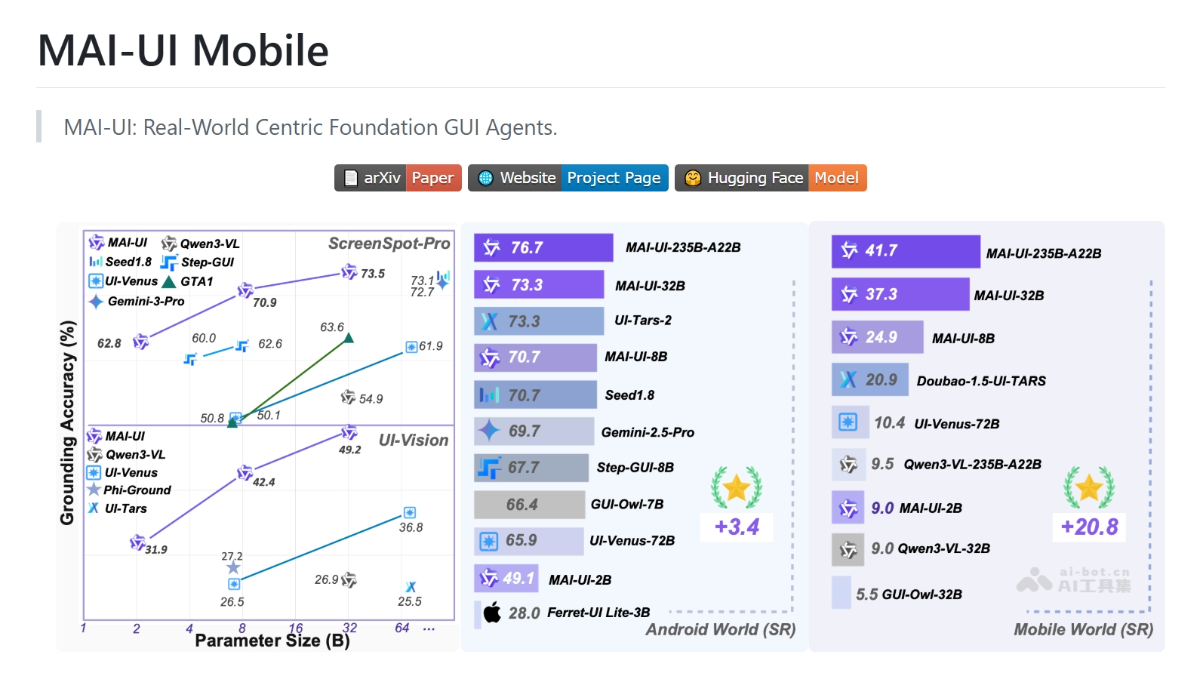
MAI-UI's main features
-
User interaction: When user instructions are incomplete or ambiguous, MAI-UI can proactively ask questions to clarify key information, ensuring task execution aligns with the user's true intent.
-
Tool calling (MCP): Through the Model-Callable Protocol (MCP), it directly calls external tools, simplifying complex UI operations into efficient and reliable API calls.
-
Device-cloud collaboration: Lightweight local models handle daily tasks, while complex tasks can seamlessly switch to cloud models, while ensuring user privacy and data security.
-
Task execution: Achieves efficient GUI task automation across multiple operating systems, supporting cross-application operations and task planning in complex scenarios.
-
Dynamic environment adaptability: When facing interference such as pop-ups, ads, and UI changes in real environments, MAI-UI can autonomously roll back or reposition, ensuring task continuity.
MAI-UI's technical principles
-
Autonomous evolution data pipeline: MAI-UI adopts an autonomous evolution data pipeline, integrating multi-dimensional data such as user interactions and MCP tool calls into the training process. Through manual annotation and automatic generation of high-quality training data by models, the data pipeline can continuously update, enabling the model to continuously evolve in complex scenarios and improve its understanding and execution capabilities for real tasks.
-
Large-scale online reinforcement learning: The model improves generalization and robustness through large-scale online reinforcement learning. Training in dynamic environments, it supports ultra-long trajectories (up to 50 steps) and dynamic perturbation injection mechanisms (such as pop-ups, permissions, and UI shifts). This enables the model to adapt to various interferences in real GUI tasks, ensuring task execution continuity and success rate.
-
Device-cloud collaborative architecture: MAI-UI designs a device-cloud collaborative architecture, with a lightweight local model acting as a "trajectory monitor" to determine in real time whether the task execution path deviates from user intent. When a task gets stuck on the device side and does not involve private information, the system triggers a cloud model to take over, ensuring successful task completion. At the same time, operations involving privacy are always executed locally, ensuring user data security.
-
Multimodal interaction capability: Based on multimodal large language models (such as Qwen3-VL), MAI-UI achieves visual perception and language understanding of GUI interfaces. The model supports various operations such as clicking, swiping, and typing, and can complete complex task sequences, thereby achieving efficient GUI task automation on multiple operating systems (such as mobile phones, computers, and web pages).
MAI-UI's project address
- GitHub repository:https://github.com/Tongyi-MAI/MAI-UI
- HuggingFace model library:https://huggingface.co/Tongyi-MAI/models
- arXiv technical paper:https://arxiv.org/pdf/2512.22047
MAI-UI's application scenarios
-
Home life scenarios: During family shopping, MAI-UI can proactively prompt whether to add items such as cherries and laundry detergent to the shopping cart based on to-do items in the calendar, ensuring that users do not miss important items.
-
Office scenario: During office work, assist users in handling files, such as finding resume files and sending them to HR colleagues, while proactively asking for key information to ensure the task is completed smoothly.
-
Travel scenario: Users can ask MAI-UI to plan the optimal route from one location to another and record the result in notes for easy viewing at any time.
-
Social scenario: Synchronize important information in social groups, such as arrival time, and @ relevant people in the group to ensure timely delivery of information.
-
Learning and education scenario: Users can ask MAI-UI to open the learning platform, find a specified course, and record the key content in the course for later review.