
What is Magic Copy
Magic Copy is an open-sourceAI cutout tool, supports a Chrome browser extension, and is based on Meta's Segment Anything Model technology. It automatically recognizes and extracts foreground objects from images and copies the objects to the user's clipboard. Magic Copy simplifies the process of extracting specific elements from images, requires no manual image editing, and improves work efficiency. Users only need to select an image, and Magic Copy intelligently analyzes and separates the desired object, making it convenient for users to paste and use directly.
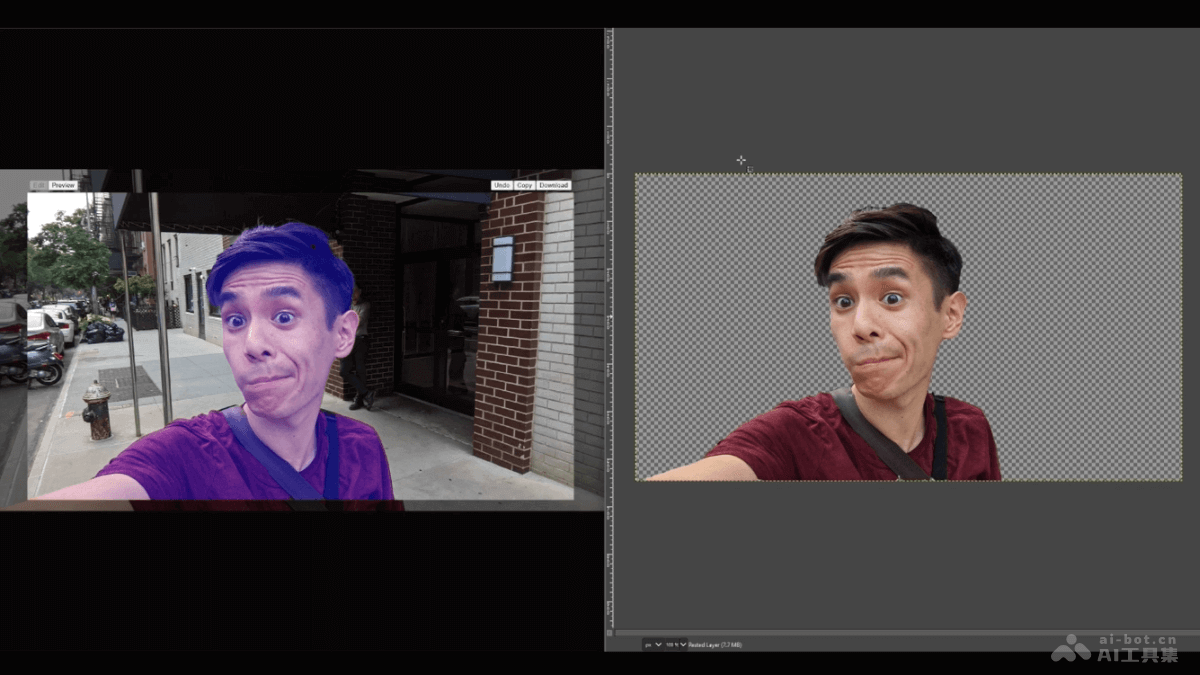
Magic Copy's main features
- Image object extraction: Recognizes and extracts foreground objects in images, quickly obtaining specific elements from images.
- Copy to clipboard: Extracted objects can be copied directly to the clipboard, making it convenient for users to paste and use in other applications.
- Intelligent recognition: Based on advanced image recognition technology, intelligently distinguishes foreground and background, improving extraction accuracy.
- Simplified operation process: Users can quickly obtain the desired image content without performing complex image editing operations.
Magic Copy's technical principles
- Deep learning model: Uses deep learning models, especially Meta's Segment Anything Model (SAM), an advanced image segmentation model that can recognize and segment different objects in images.
- Image segmentation: The model learns through training how to segment an image into multiple regions, each representing a different object or background part. This segmentation is performed at the pixel level, ensuring precise recognition of foreground and background.
- Feature extraction: The deep learning model analyzes features in the image, such as color, texture, shape, and edges, to recognize foreground objects. This helps the model distinguish foreground from background, as well as different foreground objects.
- User interaction: Users interact with the model through a simple user interface, such as clicking or box-selecting a specific area in the image, to indicate the specific object the model should focus on and extract.
How to use Magic Copy
- Install the plugin:
- Install from the Google Store: In the Chrome browser, visit the Chrome Web Store, search for "Magic Copy", find the plugin, and click "Add to Chrome" to install it.
- Manually download the plugin: Visit the Magic Copy GitHub repository, download the latest version of the
magic-copy.zipfile. In the Chrome browser, go tochrome://extensions/, enable Developer mode, and load the extracted plugin files.
- Activate the plugin: After installation is complete, make sure the plugin is enabled. Find the Magic Copy icon in the browser toolbar.
- Select an image: Find the image you want to cut out in the browser.
- Use the plugin to cut out the image:
- Right-click the image and select the "Magic Copy" option. The plugin will begin analyzing the image.
- After analysis is complete, clickable areas appear on the image. Click the part you want to cut out, and the selected area will be shown in light green.
- Preview and edit: Click the "preview" button to preview the cutout result. If some parts are not selected, click the "Edit" button to add them; if too much is selected, use the "Undo" button to cancel.
- Copy or Download:
- After the cutout is complete, select the "Copy" button to copy the selected part to the clipboard, then paste it into other applications for use.
- Alternatively, click the "Download" button to download the cutout result to your computer in png format.
- Close the plugin(if needed): After use, click the Magic Copy icon in the browser toolbar to close the plugin, or simply switch to another tab.
Magic Copy project address
- GitHub repository:https://github.com/kevmo314/magic-copy
Magic Copy application scenarios
- Designers and creative work: Designers extract specific graphic elements, such as icons or patterns, from existing design works, and then copy them directly into design software, saving the time of redrawing.
- Education and research: Researchers extract data charts from images in scientific articles or reports and copy them directly into documents to support the writing of research papers or reports.
- E-commerce and product management: Product managers of e-commerce platforms extract key information from product images, such as brand logos or product details, for product descriptions or comparative analysis.
- Content creators: Bloggers or social media content creators extract image content from the web and use it in article illustrations or social media posts to improve the appeal and professionalism of the content.
- Daily office work: Office workers extract image content, such as tables or charts, from scanned documents or PDF files and copy it directly into spreadsheets or presentations to improve work efficiency.