
What is Magentic-UI
Magentic-UI is an open-source research prototype released by Microsoft, used to explore human-in-the-loop AI Agent systems. Magentic-UI is a human-centered AI Agent that can collaborate with users to complete complex Web tasks, such as browsing web pages, executing code, and processing files. The core features of Magentic-UI are co-planning, co-tasking, action guards, and plan learning from experience. Magentic-UI is based on allowing users to participate in real time during task planning and execution, providing a transparent and controllable interaction experience. Magentic-UI improves task completion efficiency based on human feedback, reduces manual costs, and provides an experimental platform for studying collaboration between humans and AI Agents.
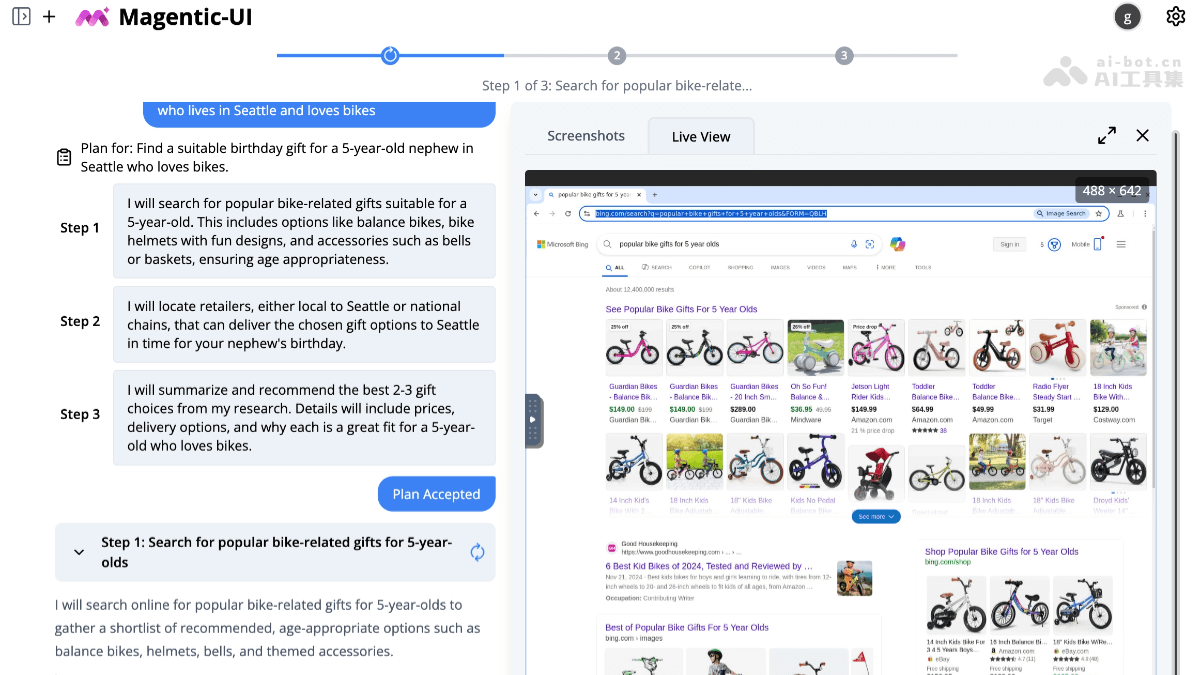
Main features of Magentic-UI
- Co-planning: Generates a step-by-step plan before executing a task; users can modify and approve it to ensure the task proceeds as expected.
- Co-tasking: Displays upcoming operations in real time; users can take over control at any time to ensure task execution meets their needs.
- Action guards: Seeks user approval before executing critical or irreversible operations, supports user-defined approval policies, and ensures operational safety.
- Learning and reuse: Saves execution plans after a task is completed; users can reuse or modify them in future tasks to improve efficiency.
Technical principles of Magentic-UI
- System architecture: Magentic-UI is based on AutoGen's Magentic-One system and is composed of multiple specialized agents that work together to complete tasks. The Orchestrator is driven by a large language model (LLM), is responsible for collaborative planning with users, decides when to seek user feedback, and assigns subtasks to other Agents for completion. WebSurfer is an LLM Agent equipped with browser control capabilities, can perform operations such as clicking, typing, and scrolling, and completes web browsing tasks assigned by the Orchestrator. Coder is an LLM Agent equipped with a Docker code execution container and feeds results back to the Orchestrator. FileSurfer is an LLM agent equipped with a Docker container and file conversion tools, can locate files, convert them to Markdown format, and answer questions about files.
- Interaction flow: Users interact with Magentic-UI by entering text messages and attaching images. The Orchestrator creates a natural-language step-by-step plan based on user input, and users modify it through the plan editing interface. Based on each step of the plan, the Orchestrator decides which Agent or user should complete it, sends a request, and waits for a response. When all steps are completed, the Orchestrator generates the final answer and presents it to the user. If the plan is found to be insufficient during execution, the Orchestrator replans and executes a new plan after obtaining user permission.
- Security and control: Users set the list of websites that Magentic-UI can access; accessing websites outside the list requires explicit user approval. Users can interrupt Magentic-UI at any stage of task execution to stop any pending code or web browsing operations. The browser and code executor controlled by Magentic-UI run in Docker containers, avoiding impact on the host environment and preventing security risks such as leakage of login credentials. Users configure action approval policies to determine whether Magentic-UI requires user approval when performing certain operations.
Magentic-UI project address
- Project website:https://www.microsoft.com/en-us/research/blog/magentic-ui
- GitHub repository:https://github.com/microsoft/magentic-ui
Application scenarios of Magentic-UI
- Complex task automation: Help users complete multi-step web tasks, such as comparing product prices, filling out online forms, or booking travel.
- Code writing and execution assistance: Generate code snippets and safely run code, for example data analysis or scripting.
- File processing and information retrieval: Convert file formats and search file contents to answer related questions.
- Research and development: Provide researchers with an experimental platform to explore ways of human-AI collaboration.
- Education and training: As a teaching tool, help with learning task planning and AI collaboration.