
What is Love Keyboard
Love Keyboard is a dating chat AI script application software designed for dating beginners and people with dating confusion. Its main function is to help users generate appropriate replies in online communication with ambiguous partners, lovers, etc. Love Keyboard provides quick reply options for different scenarios through preset high emotional intelligence replies, and supports customized exclusive keyboards and chat templates.
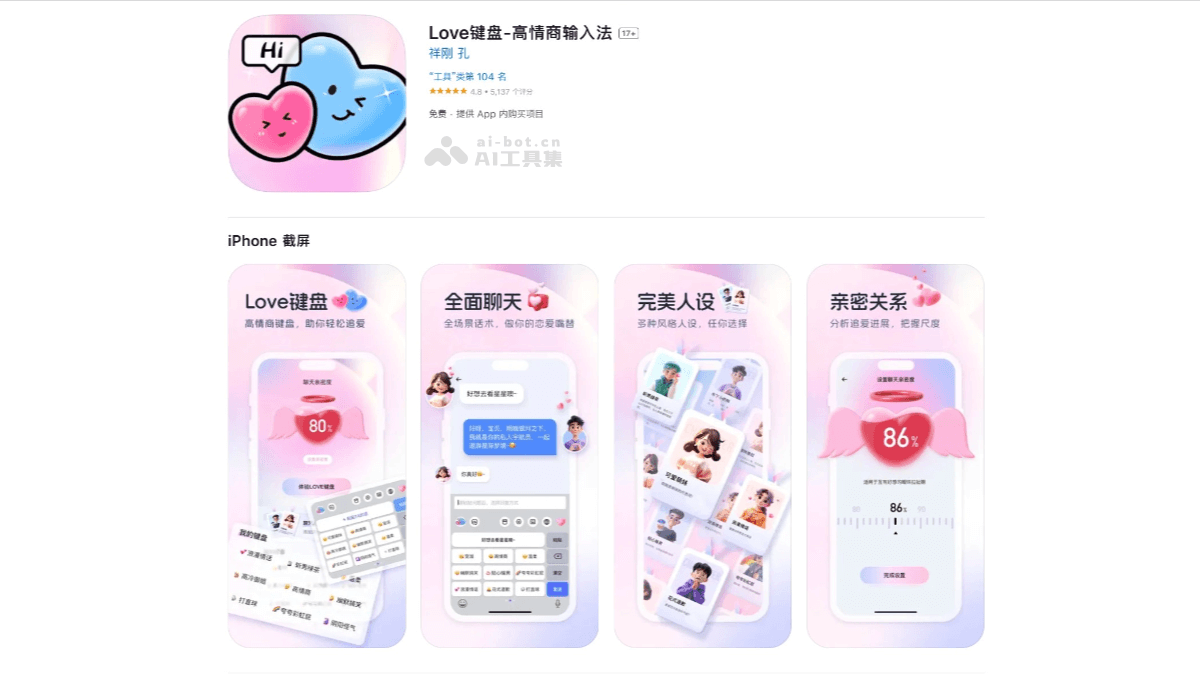
Main features of Love Keyboard
- Smart reply: Copy the other person's text, the keyboard provides answers, smart input.
- Chat persona market: Provides a variety of high emotional intelligence personas, and users can choose or customize personas on their own.
- Dating opening lines: Helps users easily open their mouths to say Hi.
- Chat intimacy setting: Grasp the appropriate chat boundaries according to intimacy.
- Personalized skins: Users can choose different keyboard themes and skins according to personal preferences.
- Drawing and coloring feature: Users can carry out simple drawing and coloring activities within the keyboard application.
How to use Love Keyboard
- Download and install: VisitApple AppStore, or search for "Love Keyboard" in the corresponding mobile app store to download and install the application.
- Enable the keyboard
- After installation is complete, open the Love Keyboard application and perform initial setup according to the prompts.
- In your phone settings, find the "Language and input method" or "Keyboard" option.
- Select "Add keyboard" or "Manage keyboards", and add Love Keyboard to the list of enabled keyboards.
- Switch to Love Keyboard as the default keyboard for the current input method.
- Basic feature settings: Open the Love Keyboard application and enter the settings interface. According to personal preferences, adjust basic settings such as keyboard layout, size, font, and color.
- Personalized settings
- Custom skins: Love Keyboard usually supports custom skin functionality, and you can upload your favorite pictures as the keyboard background image.
- Emotional phrases and emojis: Love Keyboard has built-in rich emotional phrases and emojis, and you can choose and set them according to your preferences.
- Special features
- Smart reply: Copy the other person's text, and Love Keyboard will provide corresponding reply suggestions, which can be sent with one click.
- Chat persona market: Choose or customize different chat personas to make chatting more interesting.
- Advanced features and tips
-
- Smart association and error correction: Use Love Keyboard's smart association feature to improve typing speed and accuracy. At the same time, enable the error correction feature to avoid input errors.
- Cloud sync and backup: Sync Love Keyboard's settings and data to the cloud to ensure a consistent input experience across different devices. At the same time, back up data regularly to prevent loss.
Application scenarios of Love Keyboard
- Icebreaking and opening: When chatting with someone you like for the first time, many people feel nervous or at a loss, not knowing how to start. Love Keyboard provides a rich set of romantic opening-line templates to help users start conversations easily and confidently.
- Emotional Expression: When chatting with a romantic partner, Love Keyboard can provide various warm and sweet love words, confessions, and blessings, allowing users to express their love more naturally.
- Friend Communication: During everyday small talk with friends, colleagues, and others, Love Keyboard's smart recommendation feature can recommend suitable reply sentences based on the chat content and user habits, making conversations smoother and more interesting.
- Business Communication: In business settings, Love Keyboard can also provide some business phrases and reply templates to help users communicate more professionally and appropriately with clients, partners, and others.