
What is LLM Admin
LLM Admin is an open-source and free localized LLM unified gateway, licensed under Apache-2.0. Through one set of APIs compatible with the OpenAI and Anthropic protocols, it easily orchestrates 80+ mainstream models and supports multimodal intelligent routing for text, images, and more. The platform features built-in declarative custom routing, multi-Key automatic load balancing and failover, and, combined with Prompt caching, intelligently routes requests to low-cost models, significantly reducing Token expenses. The intuitive desktop management interface makes configuration adjustments and usage monitoring clear at a glance, with data processed entirely locally and zero privacy leakage.
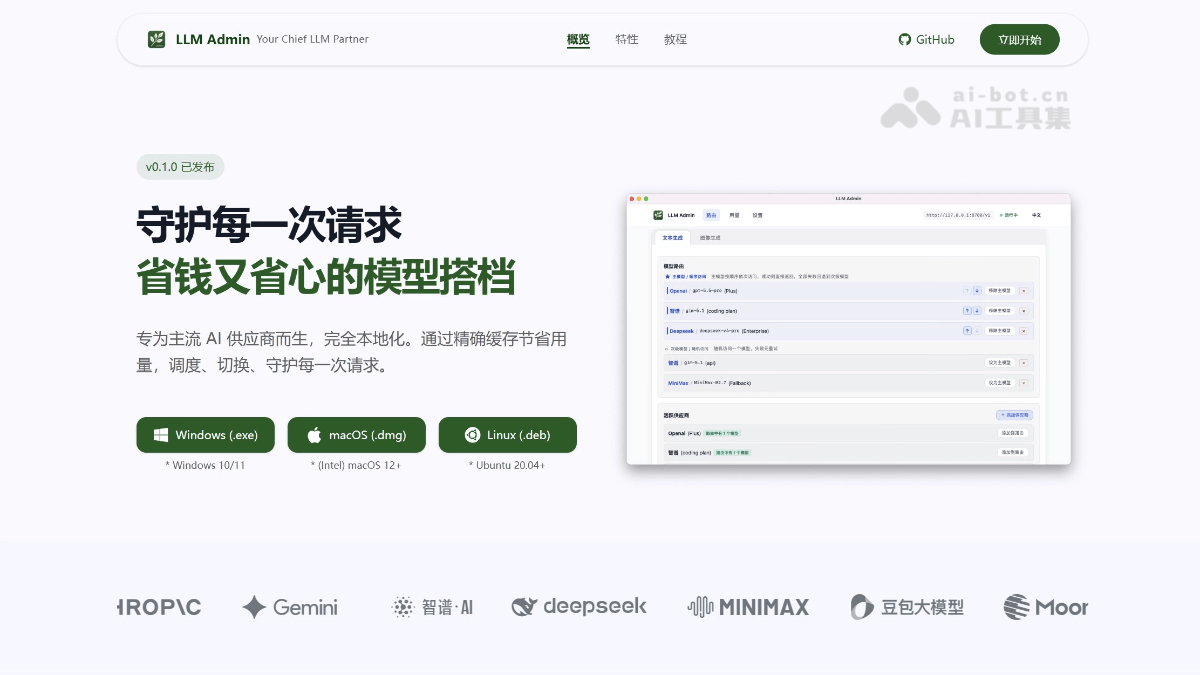
Main features of LLM Admin
-
Unified interface: One set of APIs to call 80+ mainstream models, with text generation and image generation capabilities at your fingertips.
-
Protocol compatibility: Compatible with both OpenAI
/v1/chat/completionsand Anthropic/v1/messagesprotocols, with no need to modify client code. -
Custom routing: Declarative routing rules, supporting failover, load balancing, and primary-backup strategies.
-
Intelligent routing: Automatically assigns the best model by modality such as text, image, video, and audio.
-
Multi-Key support: Multiple API Keys can be configured for the same provider, with automatic distribution and disaster recovery, avoiding single points of failure.
-
Usage statistics: Built-in dashboard monitors Token consumption and costs in real time, making every expense clearly visible.
-
Plugin system: Supports extensions such as Prompt caching and Guardrails, enhancing functionality as needed.
-
Local deployment: Data is processed entirely locally and never leaves the local environment, ensuring privacy security and compliance.
-
Open-source and free: Apache-2.0 license, freely downloadable, customizable, and available for secondary development.
How to use LLM Admin
- Visit the platform: Visit the LLM Admin official website https://llmadmin.dev/。
-
Connect providers: Add your API Key in the desktop management interface, supporting mainstream vendors such as OpenAI, Anthropic, DeepSeek, Zhipu, Doubao, and Moonshot AI.
-
Add models: Select the corresponding model from the connected providers, such as glm5.2, to complete model integration.
-
Specify routing: Configure declarative routing rules, such as primary-backup strategies and load balancing strategies, to achieve automatic failover and request distribution.
-
Start using: After routing configuration is complete, clients can call 80+ models through the unified interface, with no need to modify code or switch platforms.
Core advantages of LLM Admin
-
Save money: Prompt caching combined with load balancing strategies intelligently routes requests to low-cost models, saying goodbye to single-provider lock-in and runaway expenses.
-
Worry-free: The desktop management interface lets you modify configurations, adjust routing strategies, and view usage with what you see is what you get, saying goodbye to manually editing JSON and command-line restarts.
-
Reliable: Automatic load balancing for any upstream failure, so single-point jitter does not affect business continuity.
-
Powerful: High-performance architecture supports high concurrency and stably supports critical business scenarios.
Comparison of LLM Admin with similar competitors
| Comparison dimension | LLM Admin | LiteLLM | One API |
|---|---|---|---|
| Product Positioning | Localized LLM Unified Gateway and Management Dashboard | Open-source AI Gateway / Python SDK | Open-source LLM API Aggregation Gateway |
| Open-source License | Apache-2.0 | Open source | Open source |
| Supported Models | 80+ | 100+ | Depends on self-hosted scale |
| Protocol Compatibility | Native dual protocol: OpenAI + Anthropic | Primarily OpenAI format, multi-protocol adaptation | Mainly OpenAI format; Anthropic/Gemini rely on community patches |
| Routing Capabilities | Declarative routing + intelligent modality routing (assigned by text/image/video/audio) | Load balancing, failover, automatic fallbacks, cooldowns | Basic routing; streaming mixed scheduling requires custom development |
| Multi-Key Support | Automatic distribution and disaster recovery for multiple keys per provider | Supports multi-deployment retries and fallback mechanisms | Supports multi-key polling |
| Usage Statistics | Built-in dashboard, token-level details and cost monitoring | Spend Tracking, Budgets, Rate Limits, statistics by project/user | Costs must be recorded and calculated manually |
| Deployment Method | Local deployment, desktop application | Self-hosted Proxy / Python SDK / hosted version | Self-hosted deployment, Docker |
LLM Admin Use Cases
-
Application development with mixed multi-model use: Flexibly switch between multiple providers such as OpenAI, Anthropic, DeepSeek, and Zhipu without rewriting client code, accessing 80+ models through one interface.
-
Writing and Content Creation: Tasks such as daily polishing and expansion are routed by default to low-cost domestic or small models, automatically switching to top-tier models only at key draft stages, significantly reducing content production costs.
-
AI Agents and Automation Tools: Provides a unified backend proxy for agents, AI assistants, and OpenClaw-like automation tools, shielding interface differences across providers and ensuring stable, available service.