
What is LaterCast
LaterCast isan AI podcast generation app, a mini program that converts long-form WeChat Official Account articles into podcasts with one click. It solves the problem of users being unable to read Official Account articles in full due to being busy, allowing users to access article content by listening to podcasts during fragmented time. Users simply need to tap forward on a WeChat Official Account article they are interested in to the "LaterCast" mini program, and a podcast is generated in 3 seconds. It uses near-broadcast-quality TTS technology, with natural voice tones and reading that sounds like a conversation with a friend, making it very comfortable to listen to. AI summarizes the paragraph structure before reading, making key points clear and well-layered, avoiding "forgetting right after listening."
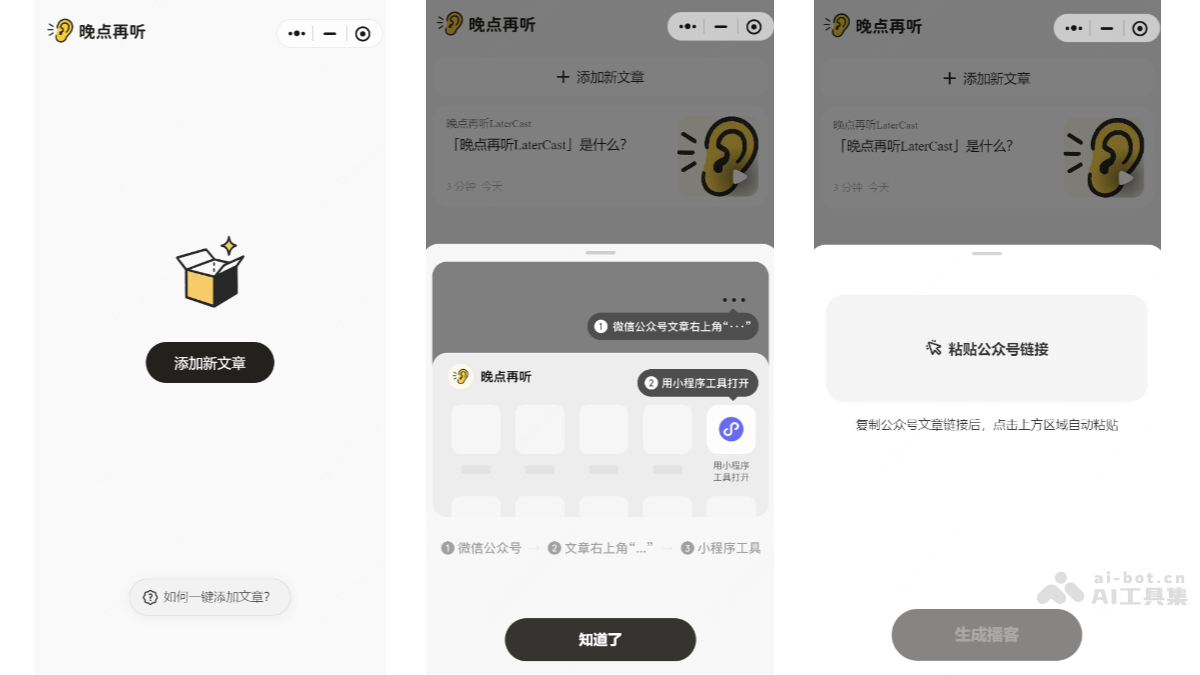
Main Features of LaterCast
- One-Click Conversion: When you see any WeChat Official Account article in WeChat, tap forward to send it to the "LaterCast" mini program, turning the article into a podcast in 3 seconds. The process is as simple as saving an article.
-
Near-Broadcast-Quality TTS: It uses advanced TTS technology, and the reading voice is natural, sounding like a conversation with a friend, avoiding the discomfort caused by robotic voices.
-
AI Extracts Key Points: Before reading, AI automatically extracts the article's paragraph structure and key points, so listeners can better grasp the core content of the article and avoid "forgetting right after listening."
-
Suitable for Multiple Scenarios: It is suitable for use in many scenarios, such as commuting, cooking, running, driving, and more. As long as users put on headphones, they can enjoy a high-quality "reading" experience during fragmented time, gaining an extra 1-2 hours of "reading" time every day.
- Complementary to Traditional Podcasts: It transforms static WeChat Official Account articles into audio podcasts, forming a complement to traditional podcast programs. Traditional podcasts are good for broadening your horizons, while LaterCast ensures users no longer miss good articles.
How to Use LaterCast
-
Find an Article in WeChat: Open WeChat, browse WeChat Official Account articles, and find a long-form article you are interested in.
-
Forward to the Mini Program: Tap the "Share" button below the article, choose "Open with Mini Program Tool," and select "LaterCast."
-
Generate a Podcast: The mini program will automatically convert the article into an audio podcast, which can be completed in 3 seconds.
-
Start Listening: Tap the play button to start listening to the article content.
Application Scenarios of LaterCast
-
During Commuting: On the subway or bus to or from work, put on headphones and listen to a long WeChat Official Account article you previously saved. It both passes the time and helps you gain knowledge.
-
Housework Time: When washing dishes, cooking, or otherwise unable to look at your phone, learn the article content by listening to audio.
-
Fitness and Exercise: While running, working out, or doing other exercise, listen to a WeChat Official Account article and make fragmented time more valuable.
-
Leisure Time: During leisure moments such as walking or resting, listen to a WeChat Official Account article to enrich your knowledge base.
-
Driving: While driving, listen to a WeChat Official Account article and use the time on the road to get information.