
What is Lanyun MCP Plaza?
Lanyun MCP Plaza is a platform launched by Lanyun Technology that integrates numerous MCP (Model Context Protocol) services. It serves as a hub that provides external data sources and tool integration for large language models, helping users quickly find and connect to the MCP services they need. The plaza brings together over a thousand popular MCP services, covering areas such as knowledge and memory, time and weather, and security auditing. Users can easily locate the services they need through keyword search or natural language descriptions of usage scenarios, and connect them to clients that support the MCP protocol via the generated SSE URL. Lanyun MCP Plaza provides cloud hosting services for developers, making it convenient for them to deploy and manage their own MCP tools.
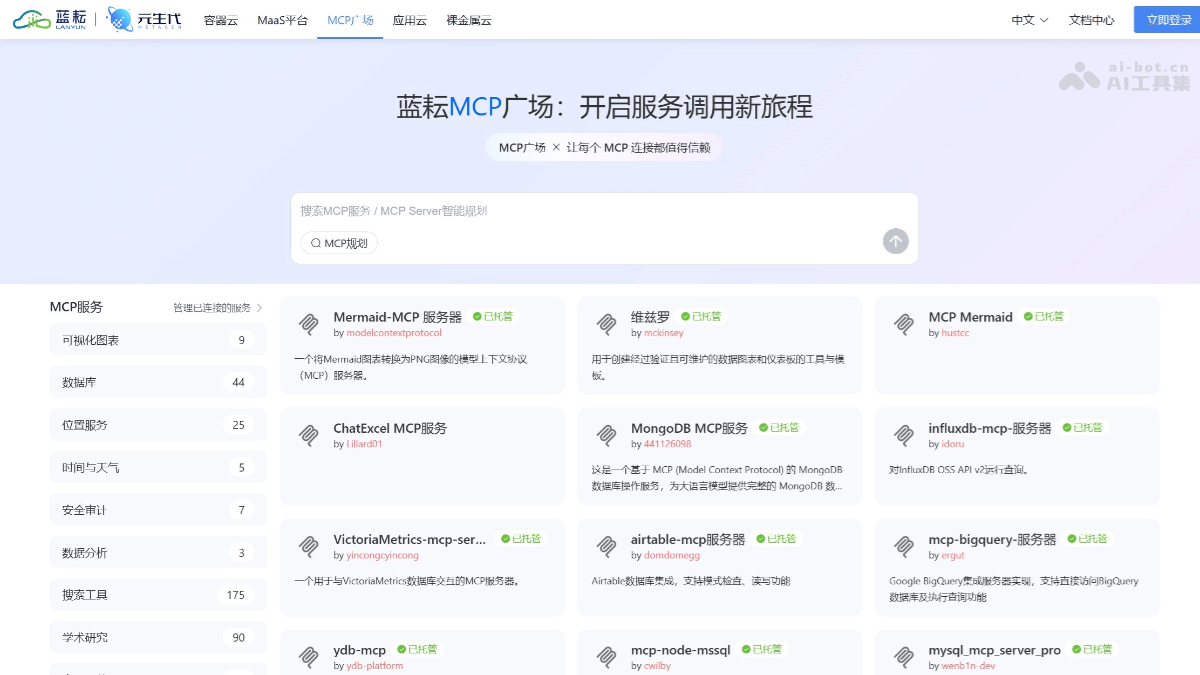
Main features of Lanyun MCP Plaza
-
Service integration and search: It brings together over a thousand popular MCP services, covering multiple categories such as knowledge and memory, time and weather, security auditing, data analysis, search tools, and academic research. Users can quickly find the services they need through keyword search or natural language descriptions of usage scenarios.
-
Cloud hosting services: It provides professional cloud hosting services for MCP tool developers. There are currently more than 240 hosted services, supporting a variety of scenarios and meeting developers' diverse needs in different fields.
-
Visualization support: It supports multiple mainstream chart specifications (such as VegaLite, AntV, and Mermaid), and can generate line charts, bar charts, flowcharts, and other graphics. It can extract structured data from multiple data sources (such as databases, Excel files, and Word documents) and convert it into interactive graphics with one click.
-
Semantic retrieval and service composition: It has powerful natural language understanding capabilities, supports natural language generation of service compositions, and provides users with a more convenient interactive experience.
-
Tool management and integration: A new MCP Server management tool has been added, supporting one-click status control for more convenient and efficient operation. The platform is seamlessly integrated with Cherry Studio to improve development efficiency.
-
Service invocation and deployment: Users can copy the SSE URL generated for the MCP service they find directly into clients that support the MCP protocol. For locally available services, users can also find the corresponding JSON configuration in the deployment documentation and add it to the client.
How to use Lanyun MCP Plaza
-
Register an account: Visit the official website of Lanyun MCP Plaza https://mcp.lanyun.net/。 Enter your mobile phone number to receive a verification code, set a password, and complete registration. After registering, new users can receive a free trial period (a 20 yuan voucher).
-
Log in to the platform: After registration is complete, use your account to log in to the Lanyun platform and enter the homepage.
- Enter the MCP Plaza: After logging in, click the "MCP Plaza" button on the homepage to enter the plaza page. Here you can browse or search for the MCP services you need, covering multiple categories such as knowledge and memory, time and weather, and security auditing.
- Select and enable MCP services
-
Search for services: In the MCP Plaza, find the services you need through keyword search or natural language descriptions of usage scenarios.
-
Enable services: Click the "Enable" button on the service card. Some services may require additional configuration of environment variables, such as API_KEY.
-
Configure environment variables: If the service requires environment variables (such as a weather service requiring an AccuWeather API Key), they need to be configured on the platform's MCP settings page or in the local environment.
-
Application Scenarios of Lanyun MCP Plaza
- Data Query and Visualization: Lanyun MCP Plaza provides a rich set of database-type MCP services, supporting the conversion of natural language into SQL query statements to enable create, read, update, and delete operations on data.
- Intelligent Customer Service and Multi-turn Dialogue: In the field of intelligent customer service, Lanyun MCP Plaza supports building multi-turn dialogue question-answering models. For example, an online education platform used the DeepSeek model on the Lanyun platform, combined with students' learning behavior data (such as question records, study duration, etc.), to build an intelligent customer service system.
- Content Creation and Knowledge Management: Lanyun MCP Plaza supports a variety of knowledge and memory-type MCP services, which can help users quickly retrieve and manage knowledge resources.
- Map and Location Services: Lanyun MCP Plaza provides MCP services integrated with map services (such as Amap). Through these services, users can obtain geographic location information, plan routes, and generate personalized travel recommendations by combining historical data.
- Time and Weather Services: The time and weather-type MCP services of Lanyun MCP Plaza can help users obtain real-time weather information and time data.