
What is LanPaint
LanPaint is a high-quality image inpainting tool used with Stable Diffusion models, achieving precise image inpainting and replacement without additional training. LanPaint optimizes inpainting results based on multi-round iterative inference, supporting seamless and accurate inpainting results. LanPaint provides a simple and easy-to-use integration method, consistent with the ComfyUI workflow, and users can use it by replacing the default sampler node. LanPaint provides a variety of parameter adjustments to suit inpainting tasks of different complexity, such as adjusting inference steps, content alignment strength, etc. LanPaint is suitable for a variety of scenarios from simple replacement to complex damage repair, and is a powerful tool for improving image generation quality.
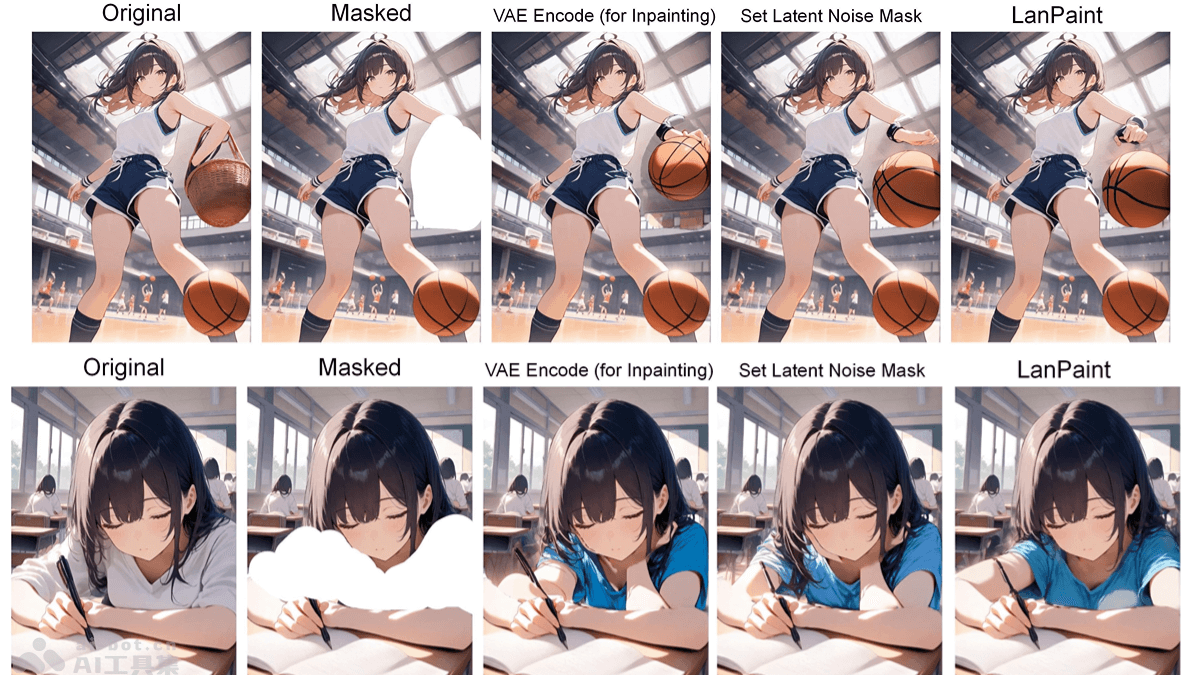
Main Features of LanPaint
- Zero-Training Image Inpainting: No additional training is required, and it seamlessly works with any Stable Diffusion model (including user-customized models) to achieve high-quality image inpainting.
- Simple Integration: Fully compatible with ComfyUI's KSampler workflow, users can easily replace the default sampler node and get started quickly.
- High-Quality Inpainting: Based on multi-round iterative inference, it optimizes the connection between the inpainted area and the original image, achieving seamless and natural inpainting results.
- Flexible Parameter Adjustment: It provides a variety of advanced parameters (such as inference steps, content alignment strength, noise mask, etc.), allowing users to make fine adjustments according to task complexity.
Technical Principles of LanPaint
- Iterative Inference: Before each denoising step, multiple rounds of iterative inference are performed (controlled by the LanPaint_NumSteps parameter), simulating the model's "thinking" process and gradually optimizing the generated content in the inpainted area.
- Content Alignment and Constraints: Based on the LanPaint_Lambda parameter, it controls the strength of content alignment between the inpainted area and the non-inpainted area, ensuring that the inpainted image transitions naturally visually and avoiding obvious splicing traces.
- Dynamic Noise Mask Adjustment: During the iterative process, the strength of the noise mask is dynamically adjusted (controlled by LanPaint_StepSize), better guiding the model to generate the content of the inpainted area and avoiding distortion caused by excessive generation.
- Advanced Parameter Optimization: Adjust parameters such as LanPaint_cfg_BIG (the CFG scale of the inpainted area) and LanPaint_Friction (friction coefficient) to optimize the inpainting effect and balance inpainting quality and generation speed.
- Binary Mask Processing: The input mask is required to be a binary mask (values 0 or 1), avoiding generation problems caused by transparency or gradients and ensuring that the boundaries of the inpainted area are clear and well-defined.
Project Address of LanPaint
- GitHub Repository:https://github.com/scraed/LanPaint
Application Scenarios of LanPaint
- Image Repair and Damage Recovery: Used to repair old photos, damaged images, or remove defects such as scratches and stains in images, restoring the integrity and clarity of the image.
- Content Replacement and Editing: Quickly replace specific elements in an image, such as changing the color of a person's clothing, replacing items in a scene, etc., to achieve creative image editing or visual effect optimization.
- Artistic Creation and Design: In artistic creation, modify or improve local details in paintings, or adjust image content according to creative needs, helping artists and designers quickly realize their ideas.
- Advertising and Commercial Image Processing: In advertising design, quickly adjust background, props, or character elements in product display images to meet different marketing needs and enhance the appeal of visual effects.
- Video frame repair and editing: Used to repair key frames in videos, achieving optimization or repair of video content, such as removing interfering elements from videos or repairing damaged video frames.