
What is Kling O1
Kling O1 (Kling Video O1 Model) is the world's first unified multimodalvideo generationmodel launched by Kling AI. Through an innovative Multimodal Vision Language (MVL) architecture, the model achieves seamless integration of video generation, editing, and understanding. The model supports multimodal inputs such as images, videos, and text, enabling all-around creative editing, solving video consistency challenges, and providing a variety of creative combinations. Users can generate precise video content through simple conversations and explore infinite creative possibilities.
The latest upgrade of the Kling O1 model adds a 720p mode and supports 3-10 second free narration, bringing more control and freedom to creation.
Main Features of Kling O1
-
All-in-One Engine: Kling O1 is the world's first unified multimodal video large model, capable of completing the entire creative workflow—video generation, editing, and modification—in one stop, with no need to switch between multiple tools.
-
All-in-One Instructions: Supports multimodal inputs, including images, videos, text, and more. Through deep semantic understanding, users can easily generate and edit video content through simple conversations.
-
All-in-One Reference: Through multi-perspective subject construction and free combination of multiple subjects, it solves video consistency challenges, ensuring that the video画面 remains precise and coherent no matter how the camera moves.
-
Powerful Combinations: Supports combined use of different skills, such as adding a subject and modifying the background at the same time, generating multiple creative variations in one go, and exploring infinite creative possibilities.
-
Control the Rhythm: Supports freely generating video durations of 3-10 seconds, allowing users to freely control the video rhythm.
-
New 720p Mode: While inheriting the original 1080p core capabilities, a new 720p mode has been added, suitable for lightweight creation and lowering device requirements.
-
Free Narrative Duration: The first and last frames support 3-10 seconds of free narration, breaking the fixed duration limit. Creators can freely define the duration of the video's beginning and end, enhancing creative flexibility.
Technical Principles of Kling O1
-
Brand-New Video Generation Model: It breaks the functional fragmentation of traditional video models and builds a new generative foundation, integrating Multimodal Transformer for multimodal understanding and Multimodal Long Context.
-
Multimodal Vision Language (MVL): Introduces MVL as an interaction medium, achieving deep fusion of textual semantics and multimodal signals through Transformer, and supporting flexible invocation and seamless integration of multiple tasks within a single input box.
-
Intelligent Reasoning Capability: Based on MVL input, the model achieves precise multimodal reference and highly flexible interactive editing, and supports long context and temporal narration. Combined with Chain-of-thought technology, the model possesses common-sense reasoning and event deduction capabilities, demonstrating intelligent performance in video generation.
Performance of Kling O1
-
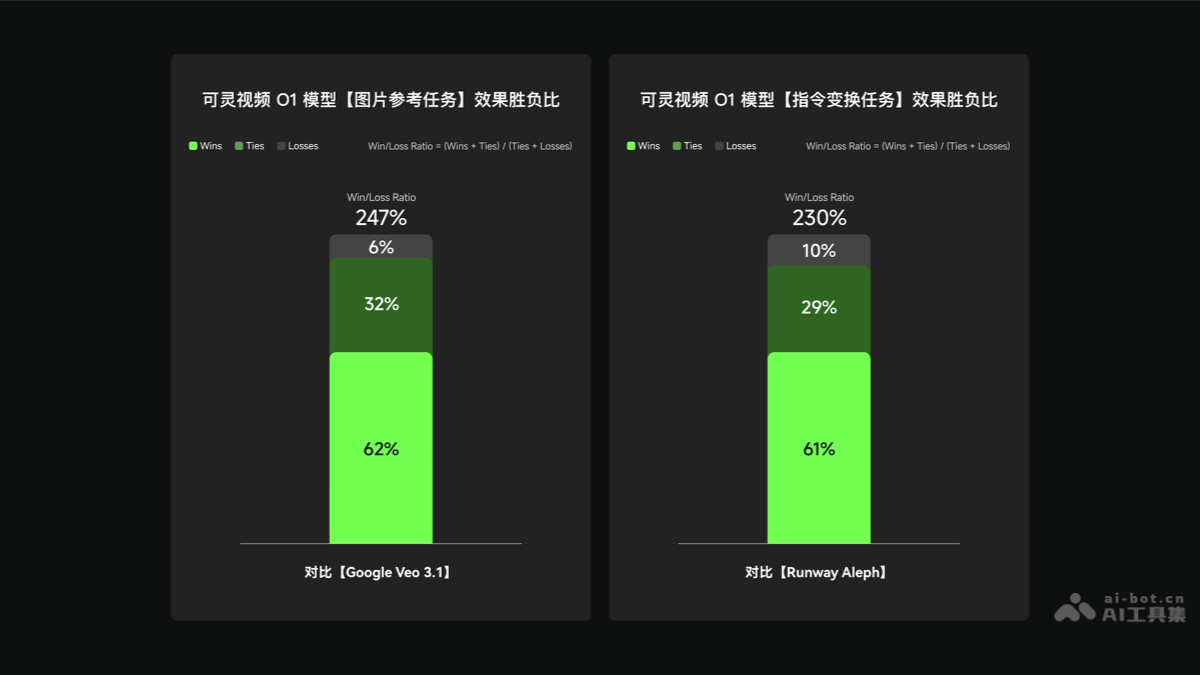
Image Reference Task:On the image reference task, the model's overall effect win-loss ratio is 247%, indicating excellent performance in overall effect and multiple subdivided dimensions.Compared with Google Veo 3.1's Ingredients to Video, the Video O1 model leads significantly in the image reference task.
-
Instruction Transformation Task:On instruction transformation tasks, the model's overall win-loss ratio is 230%, demonstrating excellent performance in overall effectiveness and multiple subdivided dimensions.Compared with Runway Alph, the model also leads significantly in performance on instruction transformation tasks.
How to use Kling O1
- Visit the platform: Visitthe Kling official websiteorthe Kling Appto complete user account registration and login.
- Select the model: Select the Video O1 model on the platform.
- Upload materials: Upload reference images, video clips, text descriptions, and other materials as needed.
- Enter instructions: Use the multimodal instruction input area to enter creative instructions.
- Generate video: The model generates video based on the provided materials and instructions. You can specify the video length, such as 3-10 seconds.
- Edit and adjust: Use the editing features provided by the model, such as adding, deleting, or modifying video content, and switching shot types/perspectives.
- Preview and export: Preview the generated video to ensure it meets requirements. Once satisfied, export the video to your local device.
Application scenarios of Kling O1
- Social media content production: Users can quickly generate short videos suitable for social media platforms, such as Douyin, Instagram, etc., for personal sharing or brand marketing.
- Online education and training: Educators can create interactive video courses and training materials to improve the appeal and effectiveness of remote learning.
- Advertising and marketing videos: Enterprises and marketing teams use the model to generate engaging advertising videos for product promotion and brand publicity.
- Film and video production: Filmmakers and video editors use the model for pre-production, such as creating storyboards, proof of concept, and animation effects.
- Corporate publicity and presentations: Enterprises produce high-quality promotional films and presentation videos for company introductions, product displays, and event reports, enhancing corporate image.