
What is Kimi Playground
Kimi Playground is a platform for developers to experience tool invocation capabilities. The platform enables AI to complete complex tasks by invoking various tools (such as weather queries, hotel bookings, data analysis, etc.), not just engaging in conversation. On the platform, developers can intuitively select and invoke preset official tools or third-party tools, adjust parameters in real time, and view invocation details. Based on the coordinated invocation of multiple tools, AI can quickly generate professional solutions, such as travel itineraries or data analysis reports. Kimi Playground helps developers better explore and utilize AI's tool invocation capabilities, improving development efficiency and application experience.
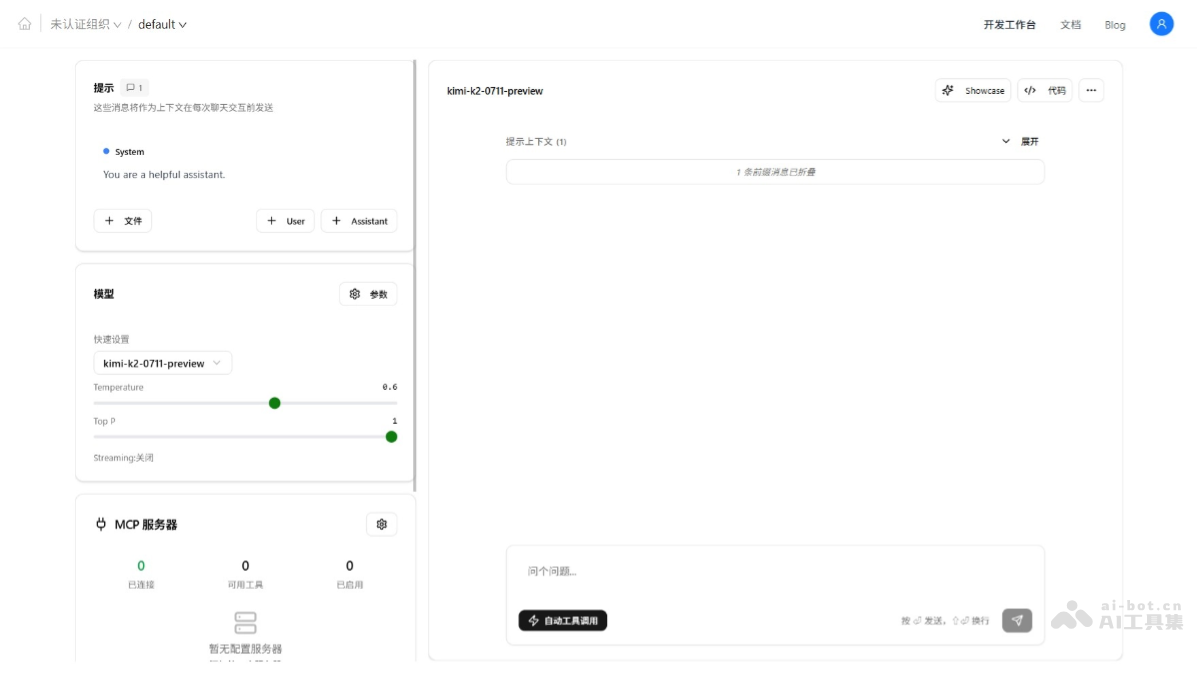
Main features of Kimi Playground
- Intuitive tool invocation interface: Provides a rich set of preset tools, supports visualizing the invocation process and displaying execution results in real time, allowing developers to clearly see every step of tool invocation.
- Convenient debugging experience: Developers can quickly select different tools (including built-in official tools and third-party MCP server tools), adjust parameters in real time, and instantly view invocation details, making debugging and optimization easy.
- Supports coordinated invocation of multiple tools: Supports invoking multiple tools simultaneously to complete complex tasks. For example, in travel itinerary planning, it can simultaneously invoke a high-speed rail query tool, hotel booking system, map tool, and food recommendation system to generate a comprehensive itinerary.
- Data processing and analysis capabilities: When handling data analysis tasks, it can invoke file reading tools to parse data, use data analysis tools for statistical processing, and output professional analysis reports, generating visual charts and interactive web pages.
- Support for third-party tool integration: Currently supports quick integration with ModelScope MCP. Developers can configure their own third-party tools, expand the tool library, and meet more personalized needs.
How to use Kimi Playground
- Visit Kimi Playground: Visit the Kimi Playground official website https://platform.moonshot.cn/playground 。
- Select tools:
- Preset official tools: The platform provides a rich set of preset tools; directly select and use these tools.
- Third-party tools (MCP Server): If you need to use third-party tools, integrate them by configuring the ModelScope MCP Server.
- Model selection: Ensure that the Kimi K2 model can be used for basic conversation.
- Enter MCP server settings: In Kimi Playground, find and click the "MCP Server Settings" option to enter the settings page.
- Add MCP service configuration: In "MCP Server Settings", click the "Configure" button to enter the MCP service configuration page.
- Sync external platform: On the configuration page, click the "Sync External Platform" button to prepare to sync ModelScope's MCP service.
- Get ModelScope API token: Visit the ModelScope homepage, log in to your account, go to the "Access Token" page, and copy the generated API token.
- Enter API token and sync: Return to the "MCP Server Settings" page in Kimi Playground, paste the copied ModelScope API token into the specified location, and click the "Start Sync" button.
- View sync results: After synchronization is complete, all configured ModelScope MCP services will be successfully synchronized to the list of available services in Kimi Playground.
- Incremental Update: If hosted services are subsequently added to or deleted from the ModelScope MCP Square, you can click the sync button in Kimi Playground's "Settings - MCP Servers - Sync Servers" to perform an incremental update.
- Using MCP Services in a Conversation: After synchronization, in the "MCP Service List" on the left side of the Kimi Playground page, select and enable the MCP services you want to use.
- Start a Conversation Test: In the Playground, enter a request or question, such as "Help me check tomorrow's weather" or "Plan a travel itinerary from Shanghai to Beijing". The model calls the corresponding tools based on the request and displays the calling process and results in real time.
- Debugging and Optimization:
- Select Tool: Quickly switch between different tools and select the tool best suited for the current task.
- Adjust Parameters: Adjust the tool's parameters in real time as needed and view the results under different parameters.
- View Call Details: Kimi Playground displays the detailed process of tool calls to help understand the execution status of each step.
- Real-Time Result Display: After the tool call is completed, the results are displayed on the interface in real time.
- Export Report: For complex tasks (such as data analysis), export the results as a report or chart.
Application Scenarios of Kimi Playground
- Travel Itinerary Planning: Call high-speed rail query, hotel booking, map navigation, and food recommendation tools to quickly generate a personalized travel itinerary covering transportation, accommodation, sightseeing, and dining.
- Data Analysis and Report Generation: Use file reading, data analysis, and visualization tools to process complex data and generate professional analysis reports including statistical processes and conclusions.
- Intelligent Customer Service and Technical Support: With the help of problem identification and knowledge base query tools, automatically provide users with accurate answers and solutions, improving customer service efficiency and customer satisfaction.
- Educational Tutoring and Learning Assistance: Based on online course query, learning material recommendation, and study plan generation tools, provide students with personalized learning support to facilitate efficient learning.
- Health and Fitness Management: Combine health data query, fitness plan generation, and dietary advice tools to help users formulate scientific health management plans and achieve fitness goals.