
What is Kimi K2 Turbo
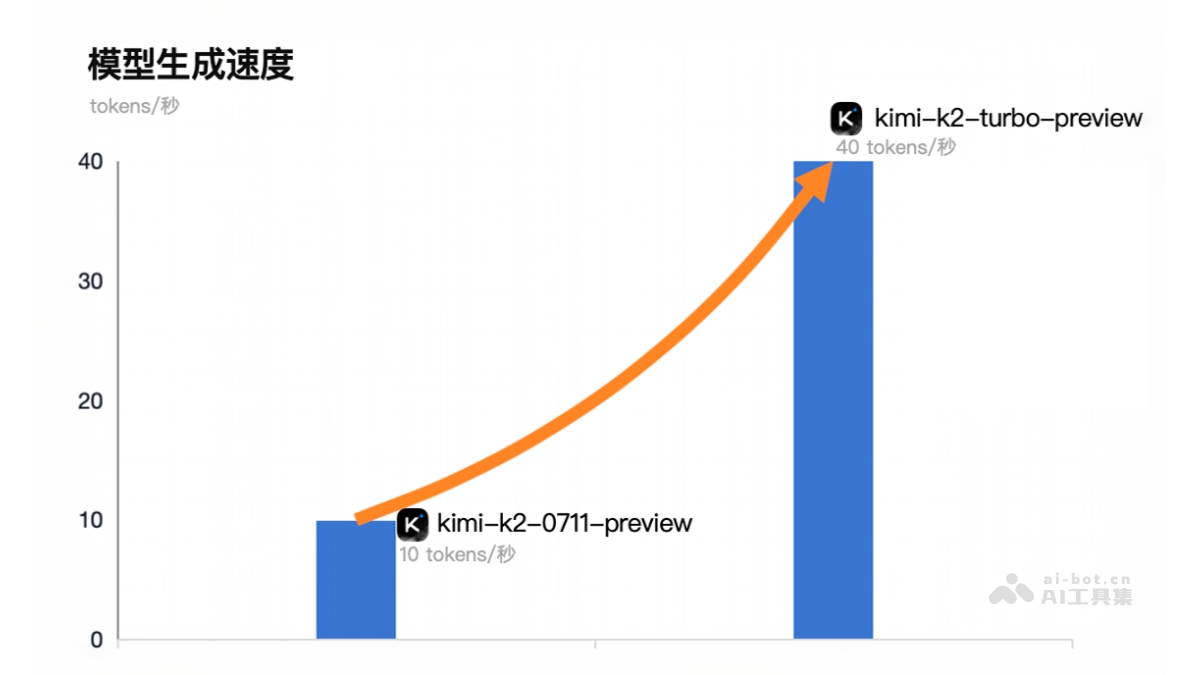
Kimi K2 Turbo (kimi-k2-turbo-preview) is a high-performance language model launched by Moonshot AIKimiIt inherits the powerful capabilities of Kimi K2 , with the model parameters kept consistent, and a significant improvement in output speed, increasing from 10 Tokens per second to 40 Tokens, enabling faster text content generation. It is suitable for scenarios requiring rapid responses, such as real-time conversations, code generation, and content creation. Users can now access and use it through the Moonshot AI Open Platform to experience efficient and intelligent language model services.
Main features of Kimi K2 Turbo
- Efficient output speed: Output speed is significantly improved, generating 40 Tokens per second, suitable for scenarios requiring rapid responses.
- Powerful language understanding capability: Can accurately understand complex natural language instructions and generate high-quality text content.
- Efficient processing capability: Suitable for high-throughput applications and can quickly process large numbers of requests.
How to use Kimi K2 Turbo
- Get API Key: Visit the Moonshot AI Open Platform, log in, and create a new API Key on the API Key management page. Select the default project (default) or another project, generate and save the API Key.
- Use with VS Code extensions (such as Cline or RooCode):
- Install extension:
- Open VS Code.
- Click the Extensions icon in the Activity Bar on the left (or use the shortcut Ctrl+Shift+X / Cmd+Shift+X).
- Enter Cline or RooCode in the search box.
- Find the corresponding extension and click Install.
- After installation is complete, restart VS Code.
- Configure extension:
- Open the extension's settings page.
- Configure API Provider as Anthropic or OpenAI Compatible.
- Enter the API Key obtained from the Moonshot AI platform.
- Set custom base URL:
- For Cline, enter https://api.moonshot.cn/anthropic。
- For RooCode, enter https://api.moonshot.cn/v1。
- Select the model as kimi-k2-turbo-preview.
- Adjust other parameters (such as temperature, context window size, etc.) according to your needs.
- Use the model:
- Enter a prompt in VS Code, and the extension will call Kimi K2 Turbo to generate content.
- View the generated text and perform subsequent operations.
- Install extension:
- Call API directly:
- Use Python sample code:
import openai

# 设置 API 密钥和基础 URL
openai.api_key = "你的API_KEY"
openai.api_base = "https://api.moonshot.cn/v1"

# 调用模型生成文本
response = openai.Completion.create(
    model="kimi-k2-turbo-preview",
    prompt="生成一段关于人工智能的介绍",
    max_tokens=100,
    temperature=0.6
)

print(response.choices[0].text.strip())-
- Use Node.js sample code:
const OpenAI = require("openai");

const openai = new OpenAI({
  apiKey: "你的API_KEY",
  baseURL: "https://api.moonshot.cn/v1",
});

async function generateText() {
  const response = await openai.chat.completions.create({
    model: "kimi-k2-turbo-preview",
    messages: [{ role: "user", content: "生成一段关于人工智能的介绍" }],
    max_tokens: 100,
    temperature: 0.6,
  });

  console.log(response.choices[0].message.content);
}

generateText();- Adjust parameters:
-
Temperature: Controls the randomness of generated text. It is recommended to set it to 0.6.
-
Maximum output Tokens: Set the length of generated text according to your needs.
-
Context window size: Set to 128000 or adjust according to actual needs.
-
Kimi K2 Turbo project address
- Project official website:https://platform.moonshot.cn/docs/guide/agent-support#获取-api-key
Application scenarios of Kimi K2 Turbo
- Real-time dialogue systems: Quickly generate replies and improve user experience, suitable for online customer service, intelligent assistants, and other scenarios requiring immediate responses.
- Code Generation and Development Assistance: Developers and programmers can quickly generate code snippets and logic, significantly improving development efficiency.
- Content Creation: The media and advertising industries can quickly generate high-quality copy, news, stories, etc., saving creation time.
- Education and Learning: Online education platforms can quickly generate teaching materials, practice questions, and answer explanations, improving educational efficiency.
- Data Analysis and Report Generation: Data analysts can quickly generate data analysis reports and market research reports, improving work efficiency.