
What is Quick Find kFind
Quick Find kFind is an anonymous AI search product launched by Hangzhou Bange Universe Technology (KMind). Users can enjoy anonymous search services without registration or login. It supports WeChat Mini Program, has a simple interface, provides instant search results, and supports the follow-up question feature for deeper questioning. Quick Find kFind also supports users browsing the information feed, setting content recommendation preferences, and has newly added support for videos.
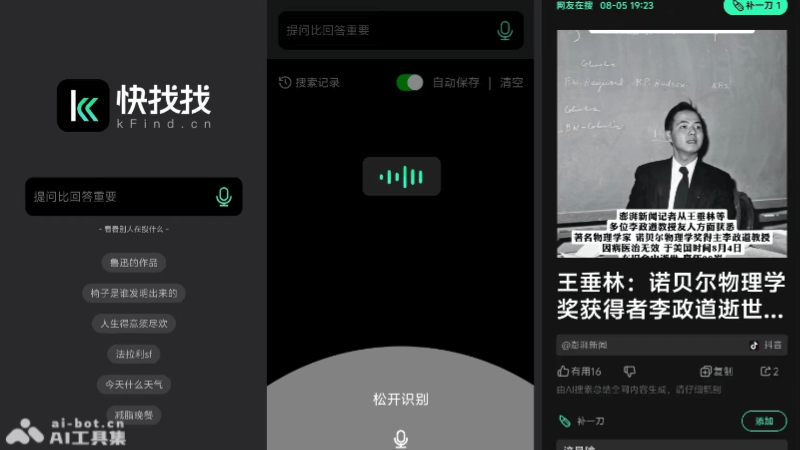
Features of Quick Find kFind
-
Anonymous search: Users can search without registering or logging in, protecting privacy.
-
Instant results: Quickly provides search answers with short response times.
-
Follow-up question feature: Allows users to ask further questions about search results to obtain more detailed explanations.
-
Information feed browsing: Through a left-swipe operation, users can browse other users' search results just like scrolling through short videos.
-
Content recommendation settings: Users can set preferences, and the system will recommend related content.
How to use Quick Find kFind
-
WeChat Mini Program: Search in WeChat for the"Quick Find kFind"Mini Program, no registration or login required
-
Search: On the main interface of the Mini Program, you will see an input box. Directly enter the question or keywords you want to query.
-
Get search results: After entering a question, Quick Find kFind will quickly provide search results.
-
Use the follow-up question feature: If you have questions about the search results or need more information, you can use the follow-up question feature to continue asking, and the system will provide more detailed answers.
-
Browse the information feed: Through a left-swipe operation, you can browse other users' search results, similar to the browsing experience of short video platforms.
-
Set content preferences: In the "three bars" in the upper left corner of the homepage, you can set content recommendation preferences. When browsing the information feed, the system will recommend content that matches your interests.
Who Quick Find kFind is suitable for
-
Students: Students who need to find materials and answer academic questions during learning.
-
Educators: Teachers who need to prepare teaching content or find educational resources.
-
Professionals: Professionals who need to obtain the latest information or data within their professional fields.
-
Researchers: Researchers conducting academic research or market research who need support from a large amount of information.
-
Content creators: Content creators who need inspiration or material support, such as bloggers, writers, video producers, etc.