
What is Architecture Senior
Architecture Senior is a resource library and AI drawing creation platform built specifically for architects and related professionals. It offers a series of powerful AI tools, such as AI drawing creation, AI image-to-3D model, AI image-to-video advanced version, AI removal tool, AI weather and season conversion tool, AI art style conversion, AI interior style conversion, etc., which can help users quickly generate and optimize design works and improve work efficiency. Architecture Senior provides abundant free resources, including SU model library, case texts, CAD drawings, PS materials, etc., and plugin downloads for a variety of design software, such as AutoCAD, Illustrator, SketchUP, Photoshop, Enscape, Lumion, Vray, Rhino, etc.
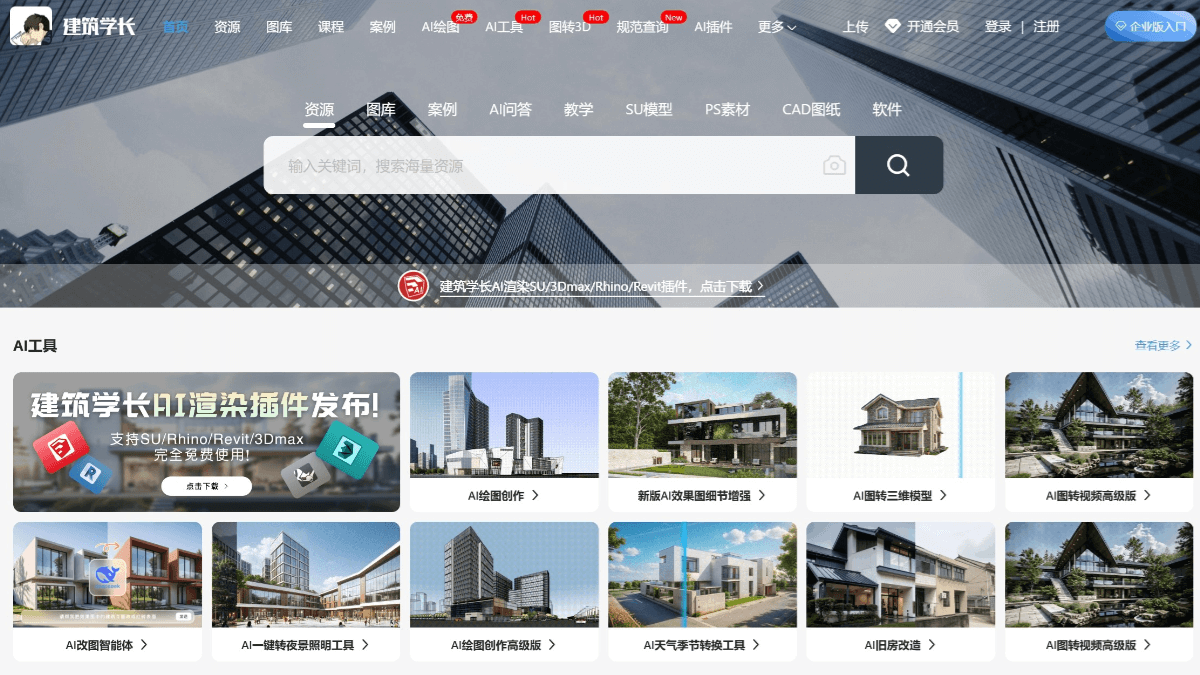
Main Features of Architecture Senior
-
One-Click Rendering Generation: Users can quickly generate architectural, interior, landscape, and planning renderings based on AI technology by taking on-site photos or uploading local sketches, model screenshots, and hand-drawn line drawings, and it supports one-click generation of old house renovation and interior decoration plans.
-
Multiple AI Drawing Tools: It provides a variety of tools such as AI interior decoration, AI old house renovation, AI partial redrawing, AI background replacement, AI art style conversion, AI style imitation, AI line drawing coloring, etc., to meet different design needs.
-
Massive Free Resources: It has more than 64,398 design resources, covering design cases, CAD drawings, SU models, PS materials, etc., all available for free download.
-
Case Texts and Supporting Materials: It provides case texts, SU models, CAD drawing supporting materials, layout PPTs, and models for various software, etc., to meet the diverse design needs of designers.
-
AI Q&A Assistant: It can check codes, check design methods, analyze architectural cases, etc., becoming a 24-hour exclusive architecture AI assistant.
-
Intelligent Modification Tools: Using AI technology, it can quickly modify CAD drawings and SU models, accurate and efficient, saving a lot of time.
-
Other Practical Tools: It provides practical intelligent tools such as AI intelligent cutout, AI removal tool, AI intelligent upscaling, etc., to improve design efficiency.
-
Professional Tutorials: It provides abundant illustrated tutorials and video tutorials to help designers learn and master more skills.
-
Jianliao Community: It has created an exclusive communication community where designers can share works, complain about the industry, seek help, and also discuss anything related to architecture.
-
Project Management: It helps users manage architectural projects, track progress and tasks.
-
Team Collaboration: It supports multi-person collaboration, and team members can share files and exchange opinions.
-
Architecture News: It updates architecture industry news in real time, provides analysis and interpretation of classic architectural cases, and helps users learn excellent design.
How to Use Architecture Senior
- Log in to the Platform: Visit Architecture Senior'sofficial website, register or log in to your account.
-
Install the Plugin: Download and install the AI rendering SU plugin on the official website.
- AI Drawing Creation
-
Upload Base Image: Upload design sketches, on-site photos, or model screenshots.
-
Set Parameters: Select the design type and style, enter the description words, and set other parameters.
-
Generate a rendering: Click generate, and AI quickly generates a rendering.
-
- AI Tool Applications
-
Select a tool: Choose tools such as AI interior renovation, old house renovation, and image-to-3D model according to your needs.
-
Upload materials: Upload the corresponding images or models.
-
AI processing: AI processes and generates results based on the input information.
-
- AI Image Editing Agent
-
Upload a rendering: Upload the rendering that needs to be modified.
-
Enter instructions: Enter specific modification instructions.
-
AI modification: AI modifies the rendering according to the instructions.
-
-
Browse the resource library: Find the resources you need in the official website resource library.
-
Download resources: Select and download free SU models, CAD drawings, PS materials, etc.
Architecture Senior's Application Scenarios
-
Quickly generate concept images: Designers can upload sketches or on-site photos and use the AI drawing function to quickly generate architectural concept images and explore different design schemes.
-
Interior style conversion: Upload photos of unfinished interiors and use the AI interior style conversion tool to quickly generate interior design schemes in different styles.
-
Urban landscape simulation: Upload urban planning sketches or on-site photos and use the AI drawing function to quickly generate urban landscape simulation images and explore different planning schemes.
-
Student learning: Students can learn professional knowledge such as architectural design, interior design, and landscape design through Architecture Senior's resource library and tutorials to improve their skills.