
What is Jev Chat Assistant
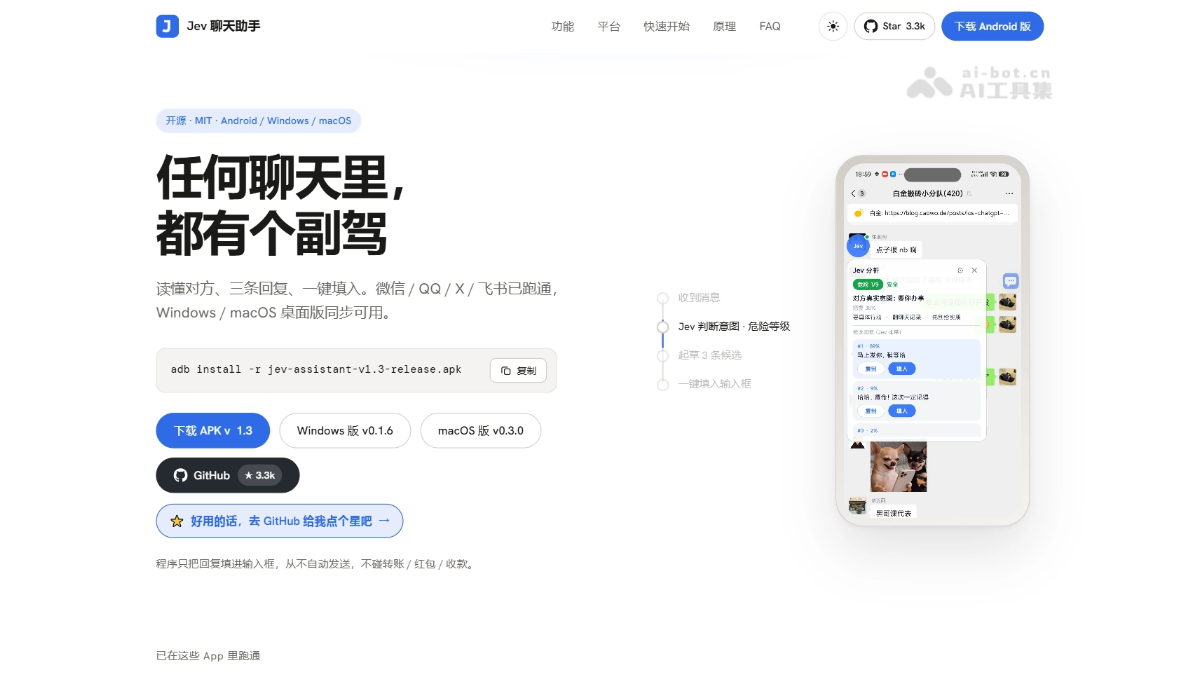
Jev Chat Assistant is an open-source, non-intrusive AI conversation assistant that provides real-time reply assistance during chats on WeChat, QQ, X, Feishu, and more. Jev Chat Assistant reads on-screen conversations through accessibility services or offline OCR, first using a judgment model to analyze the other party's intent and risk level, then generates and ranks 3 candidate replies, filling them into the input box with one click, only filling without sending. Jev Chat Assistant supports Android, Windows, and macOS, with keys stored only on the local device for privacy and security.
Main features of Jev Chat Assistant
-
Intent judgment: Analyzes the other party's true intent, danger level (1–9), and best response action in about 1 second, with a confidence level.
-
Candidate reply generation: The generation model (DeepSeek by default) drafts 3 conversational replies to choose from.
-
Smart ranking: Reorders candidate replies by the "most appropriate" standard and gives each one's proportion and recommendation reason.
-
One-click fill: Click to fill the reply into the chat input box without auto-sending; the send right always stays with the user.
-
Screen capture: Reads conversation content through accessibility services, and automatically falls back to screenshot OCR when it cannot be read.
-
Offline OCR: Uses local recognition with ML Kit / RapidOCR; images are not uploaded and no internet connection is required.
-
Knowledge base association: Maintains notes and contact profiles locally, automatically bringing in relevant background information during analysis.
-
Contact management: Records relationships, aliases, and notes, and supports associating the same contact across apps.
-
Custom interfaces: Judgment, reply, and vision interfaces are configured independently, compatible with OpenRouter, DeepSeek, Tongyi, and more.
-
Multi-platform support: Android (v1.3), Windows (v0.1.6), and macOS (v0.3.0) share the same core.
-
Conversation whitelist: Keyword filtering can be set to enable automatic analysis only for specific conversations.

Follow on WeChat and reply "open source" to joinAI open-source project communication group
How to use Jev Chat Assistant
Android (using v1.3 as an example):
- Download and install: From the Jev Chat Assistant official website https://chatjevs.com/ or GitHub, download the APK and install it directly (Android 11+), or use
adb install -r jev-assistant-v1.3-release.apk。 - Configure keys: Open Settings → API, fill in the OpenRouter API Key. Leave the other APIs blank and they will be inherited automatically, or you can configure DeepSeek, Tongyi, etc. separately.
- Connectivity Test: Click the "Connectivity Test" button to confirm that all three API routes (judgment/reply/vision) connect properly.
- Set Relationship Description: In the "Relationship Description" field, enter your relationship with the other person (e.g., "the other person is my partner") to help Jev judge more accurately.
- Enable Auto-Analysis: Turn on the "Automatically analyze when the other person sends a message" switch. You can also set a conversation whitelist to limit the scope.
- Grant Permissions: Enable the accessibility service and floating window permission. On Xiaomi/HyperOS you also need to enable autostart + no battery restrictions.
- Start Using: Open any chat (WeChat/QQ/X, etc.). After the other person sends a message, the floating window will automatically pop up with the analysis result.
- Select and Fill In: Choose one of the 3 candidate replies and click "Fill In". The reply will be placed in the input box, and you can modify it yourself after checking.
- Send Manually: After confirming the content, click the send button in the chat app yourself—the program will never send automatically.
Windows / macOS:
-
Download and Install: Download the corresponding version from the GitHub releases page (Windows v0.1.6 / macOS v0.3.0), unzip and run it (if unsigned, choose "Run Anyway" / right-click to open).
-
Configure API: Likewise, fill in the OpenRouter key or the key for another compatible API.
-
Open WeChat: Launch WeChat for Windows and keep the window visible; the program will automatically take screenshots to recognize the conversation content.
-
View Suggestions: After local model analysis, it provides intent judgment and candidate replies; just select one and fill it in.
Core Advantages of the Jev Chat Assistant
-
Judge First, Then Reply: First analyze the other person's intent and risk level, then decide how to reply, making it fit real conversation scenarios better.
-
Non-Invasive Design: Does not modify chat app installation packages, does not hook, and does not read databases. It obtains content only by reading the screen, making it safer and more compliant to use.
-
The User Controls Sending: Only fills replies into the input box and never sends automatically. It also does not touch transfers, red packets, or payments, avoiding the risk of accidental operations.
-
Works with Any App: Dual-channel collection via accessibility + OCR. WeChat, QQ, X, Feishu, etc. all work. A new app only needs a few dozen lines of adaptation code.
-
Offline OCR Fallback: Uses ML Kit / RapidOCR for local recognition. Images are not uploaded, and it works even offline or in sensitive scenarios.
-
Contact Knowledge Base: Maintains relationships, aliases, and historical context locally, so replies better understand the actual relationship between you and the other person.
-
Fully open interfaces: Judgment/reply/vision are configured independently across three channels, with one-click switching between OpenRouter, DeepSeek, and Tongyi, so you are not locked in by a single vendor.
Project address of the Jev chat assistant
- Project address:https://chatjevs.com/
- GitHub repository:https://github.com/jev-chat
Comparison of the Jev chat assistant with similar competing products
| Comparison dimension | Jev chat assistant | iFlytek Input Method (AI keyboard) |
|---|---|---|
| Product positioning | An independent conversation copilot app, with a floating window attached next to the chat | AI capabilities built into the input method, assisting incidentally while typing |
| Intent judgment | First judges intent + danger level 1–9 + action suggestions, then writes the reply | Scenario recognition based on the Spark large model, focusing on generation rather than risk judgment |
| How conversations are read | Accessibility screen reading + offline OCR, able to read the complete messages sent by the other person | Cannot read conversation context, mainly relies on associations from the keywords you type |
| Applicable chat apps | WeChat, QQ, X, Feishu, and any app | All apps (as an input method), but with weak context understanding capability |
| Reply generation | The generation model drafts 3 options and ranks them by suitability with percentages | One-key AI writing assistance/smart replies, scenario assistants such as high-EQ communication |
| Send control | Only fills the input box, never sends automatically | Generated content goes directly onto the screen, and the user sends it |
| Knowledge base/contacts | Local knowledge base + contact profiles, linked across apps | Personalized skill groups and custom quotes, but no semantic contact memory |
| Model selection | Fully open interfaces (choose your own such as OpenRouter/DeepSeek/Tongyi) | Bound to the iFlytek Spark large model, not replaceable |
Application scenarios of the Jev chat assistant
-
Workplace communication: When receiving messages from leaders or clients, first judge the other person's true intent, then give an appropriate reply, avoiding misunderstandings.
-
Intimate relationship maintenance: When chatting with a partner or family members, understand the context through relationship descriptions and contact profiles, and generate replies that fit each other's habits, reducing "straight-guy-style" perfunctory responses.
-
Social obligations: When facing sudden requests from colleagues or friends you are not close to, first display danger level 1–9 and response suggestions, helping you see the tricks clearly before deciding how to reply.
-
Group chat handling: When you are @ mentioned or asked a question in a WeChat group or QQ group, quickly generate a fitting group chat reply to avoid an awkward silence or saying the wrong thing.