
What is JadeAI
JadeAI is an open-source AI-powered resume generatordeveloped by twwch, positioned as a resume solution that is "truly easy to use, completely free, and self-hostable." Built on Next.js and open-sourced under the Apache 2.0 license, with data fully controlled by the user. Its core highlight is deep integration of AI capabilities, supporting one-click resume generation, intelligent PDF/image parsing, JD matching analysis and ATS scoring, cover letter generation, writing quality checks, and multilingual translation. The editor features an intuitive drag-and-drop design and direct canvas editing interaction, with 50+ built-in professional templates and support for real-time theme customization. Users can use their own OpenAI/Anthropic API Key to ensure privacy and security. The project supports one-click Docker deployment and also offers an online version, suitable for job seekers to quickly create resumes, or for developers to self-host and customize, and it is easy to get started with.
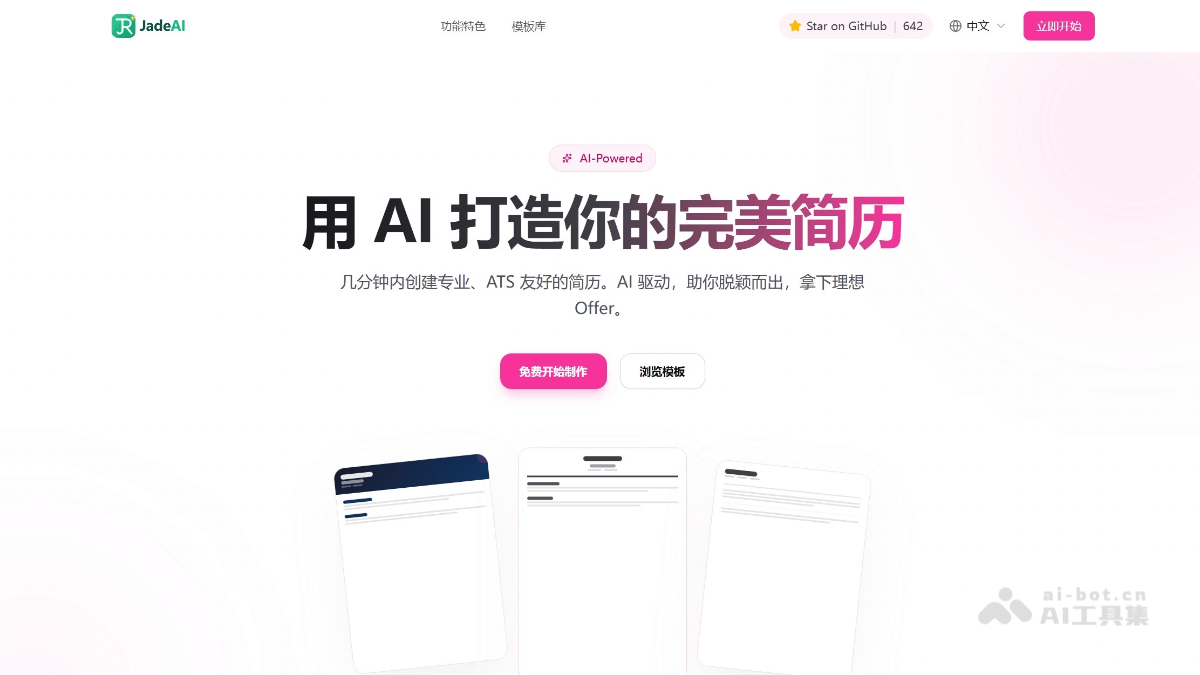
Main features of JadeAI
- 50 professional templates: Covering classic, modern, minimalist, creative, ATS-friendly, Nordic, Swiss, Japanese, and many other styles, suitable for different industries and job-seeking scenarios.
- Drag-and-drop editor: A WYSIWYG editing experience, supporting drag-and-drop sorting, inline editing, theme customization (colors/fonts/spacing/margins), and undo/redo up to 50 steps.
- One-click AI resume generation: Enter the target position, years of experience, and core skills, and AI automatically generates a complete structured resume.
- Image/PDF resume parsing: Upload a PDF or photo of an existing resume, and AI automatically recognizes and extracts all content into the editor.
- AI conversation optimization: An AI chat assistant is integrated into the editor, allowing you to optimize resume content through natural language conversation, with support for multiple sessions and history.
- Grammar and writing check: One-click detection of weak verbs, vague descriptions, and grammatical errors, providing quality scores and revision suggestions, with support for one-click batch fixes.
- JD matching analysis: Compare the match between a resume and a job description, providing keyword coverage, ATS score, and improvement suggestions.
- AI professional headshot generation: Upload an ordinary photo, and AI automatically generates a professional-style ID photo, with different sizes and backgrounds available.
- QR code module: Add QR codes for links such as a personal website, GitHub, LinkedIn, etc., to a resume so HR can scan and go directly.
- Cover letter generation: Automatically generate a cover letter based on a resume and JD, with optional formal/friendly/confident tones.
- Multilingual translation: Supports translation between 10 languages, preserving the original professional terminology.
- Multi-format export: Supports six formats: PDF, smart one-page PDF, DOCX, HTML, TXT, and JSON.
- Link sharing: Generate a share link to send to HR, with support for password protection and view count statistics.
- Data security: AI keys are stored locally in the browser, and the server does not store any API Key; supports SQLite local storage or PostgreSQL.
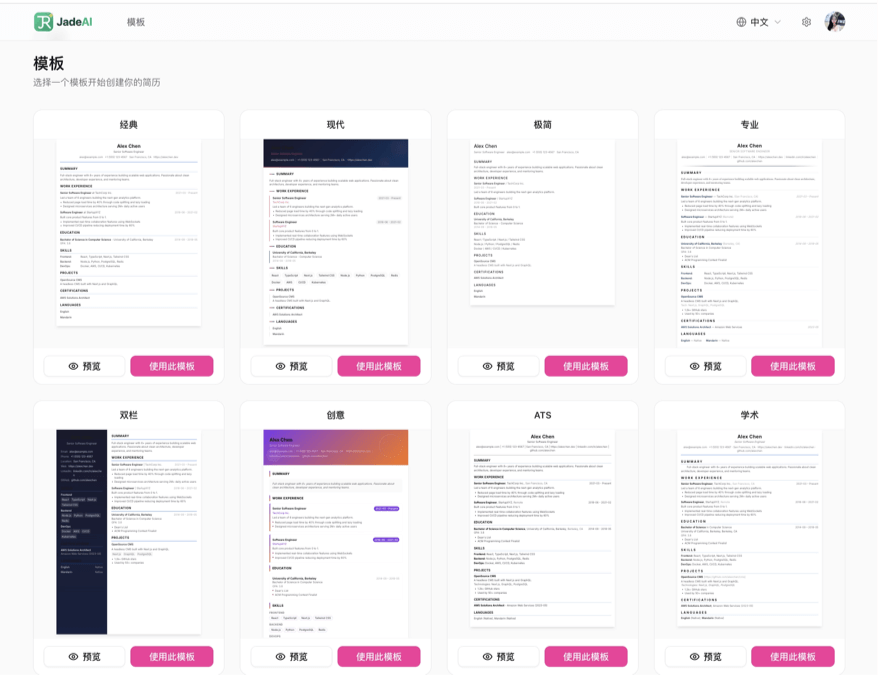
How to use JadeAI
- Online use: Visit JadeAI's official website github.com/twwch/JadeAI , and you can start using it without registration.
- Self-hosted deployment: Deploy with a single Docker command (
docker run -d -p 3000:3000 -e AUTH_SECRET=<密钥> -v jadeai-data:/app/data twwch/jadeai:latest), or clone the source code locally for development. - Configure AI: After opening the app, in Settings > AI configure your own API Key, Base URL, and model (supports OpenAI, Anthropic, and custom endpoints).
- Create a Resume: Click New on the dashboard, choose a template to start editing; you can also use AI one-click generation, or upload an existing resume to parse and import.
- Edit Content: In the drag-and-drop editor, fill in personal information, education background, work experience, project experience, and more. Click any field to edit directly, drag to adjust the order of modules, and preview the effect in real time on the right.
- AI Smart Optimization:
- Conversational Optimization: Open the AI chat panel and use natural language to let AI help you polish your resume content. AI can directly modify the resume.
- Grammar Check: Click the grammar check button, and AI will detect issues one by one and provide revision suggestions, with one-click batch fixes.
- JD Matching: Paste the target job JD, and AI will analyze the match level and provide targeted improvement suggestions.
- Generate Professional Photo: Upload an ordinary photo, choose the size and background style, and AI will generate a professional ID photo that you can download and use directly.
- Add QR Code: Add a QR code module to the resume to automatically generate QR codes for links such as personal websites, GitHub, and LinkedIn, so that paper resumes can also link to online content.
- Customize Resume Style:
- Choose a Template: Switch freely among 50 templates, covering multiple styles such as classic, modern, minimalist, and creative.
- Adjust the Theme: Customize colors, fonts, spacing, and margins, with real-time preview.
- Export Resume: After editing is complete, click the export button and choose PDF, DOCX, HTML, or other formats to download; you can also generate an online sharing link to send directly to HR.
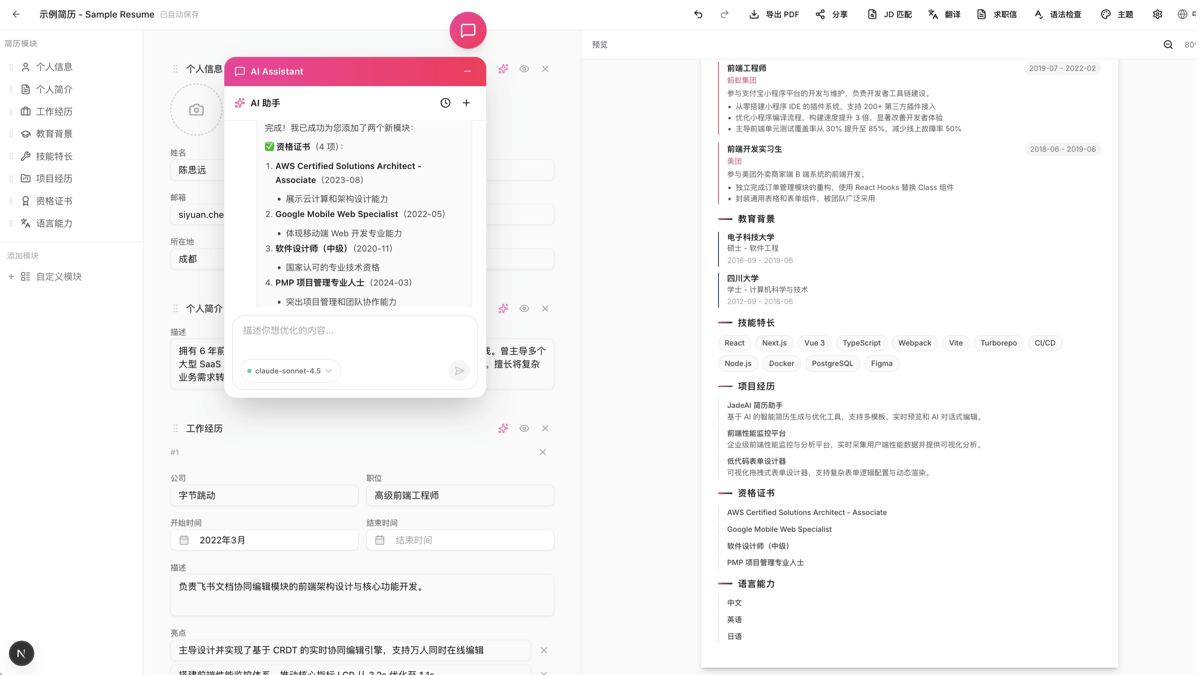
JadeAI Use Cases
-
Job Application Resume Creation: New graduates and working professionals can quickly generate professional resumes, with ATS-friendly templates to improve the pass rate.
-
Resume Optimization and Upgrade: After an existing resume is uploaded and parsed, AI analyzes the JD match level and provides improvement suggestions.
-
Multilingual Job Applications: Translate resumes into English and 10+ other languages with one click, preserving the accuracy of technical terms.
-
Batch Cover Letter Generation: Based on the resume and job description, quickly generate customized cover letters, supporting tones such as formal, friendly, and confident.
-
Resume Hosting and Sharing: Generate encrypted links to share resumes, track view counts, and make applications and feedback collection easier.
-
Enterprise HR Tools: Teams can unify resume format standards and batch process candidate resume parsing and evaluation.