
What is IntroCard
IntroCard is an online AI personal business card generator based on Zhipu AI technology, supporting users in generating personalized digital business cards with simple operations. Users only need to enter a personal introduction, upload an avatar and a QR code, and it can automatically generate a beautifully designed social card, used in business meetings or social activities to quickly and professionally introduce oneself. The tool is simple and easy to use, requiring no complex design skills, and even tech novices can easily get started, generating with one click and downloading and saving to their device.
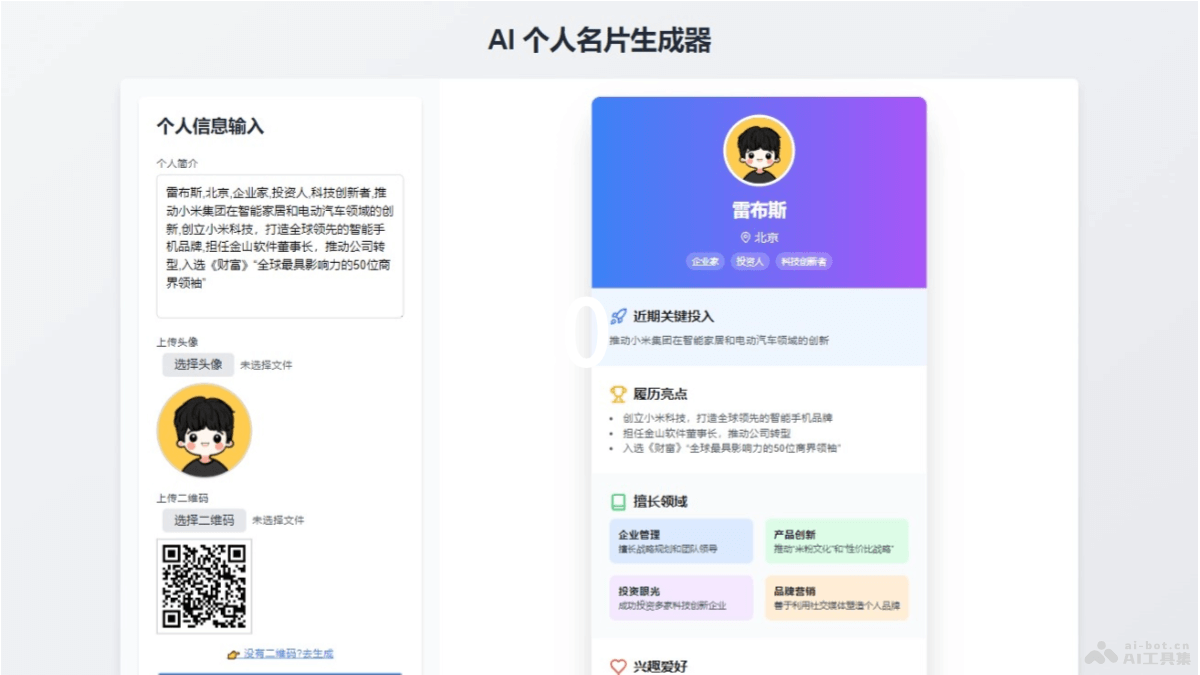
Main features of IntroCard
- Personalized business card generation: Users can create digital business cards with a personal introduction, avatar, and QR code.
- One-click generation: After entering the necessary information, users can generate a business card with one click, making the operation simple and quick.
- Beautiful design: The generated business card has a professional and attractive visual design, enhancing personal brand image.
- Information display: The business card displays the user's basic information, such as profession, skills, contact information, etc., making it easy for others to quickly understand.
- QR code generation: If the user does not have a QR code, IntroCard provides an online QR code generation feature, making it convenient for others to scan and contact.
How to use IntroCard
- Visit the website: Visit IntroCard'sofficial website 。
- Enter personal information: Enter a personal introduction in the provided text box. Include information such as profession, expertise, educational background, etc.
- Upload an avatar: Choose an avatar to represent the personal image. Click the button to upload an avatar and select an image from the device to upload.
- Upload or generate a QR code: If you already have a personal or company QR code, upload it directly. If not, use the tool provided by the website to generate a QR code online.
- Adjust and preview: After uploading the avatar and QR code, preview the generated business card. If needed, return to the previous step to modify the information.
- Generate the business card: After confirming there are no errors, click the "Generate Business Card" button. IntroCard generates a beautifully designed digital business card based on the provided information and images.
- Download the business card: After the business card is generated, click the download button to save the business card to the device. The business card is provided in image formats (such as PNG or JPEG).
IntroCard's product pricing
- IntroCard currently provides a free service.
IntroCard's application scenarios
- Business meetings: At business meetings or trade shows, use digital business cards to quickly share contact information and display a professional image.
- Professional networking: On professional social platforms such as LinkedIn and Xing, a beautifully designed personal business card can enhance personal branding and attract more career opportunities.
- Personal brand promotion: Content creators, freelancers, or entrepreneurs use IntroCard to create personalized business cards and increase personal brand recognition.
- Educational settings: Teachers, scholars, or students use digital business cards at academic conferences or educational activities to facilitate communication and build connections.
- Social activities: At parties, weddings, or other social activities, digital business cards are a novel way to introduce oneself.