
What is Spark Writer Master
Spark Writer Master is anAI novel writing toolfor writers launched by iFlytek. Based on the AI capabilities of the iFlytek Spark cognitive large model, combined with a concise and intuitive operation interface, users only need to simply input their writing requirements, and Spark Writer Master can quickly create novels or online literary works with rich content and diverse styles. Whether it is suspense, romance, fantasy, time travel, or any other genre, Spark Writer Master can meet creators' various writing needs with its unique intelligence and creativity.

Main features of Spark Writer Master
- Multiple genre generation: Supports generating full-length novels, short stories, short dramas, etc., flexibly adapting to different literary forms and providing writers with more comprehensive writing support.
- Diverse setting construction: From character settings to worldview architecture, Spark Writer Master can flexibly construct various background settings, injecting richer dimensions and depth into works.
- Creative inspiration matching: Whether you are facing a lack of inspiration or a mental block, Spark Writer Master can instantly provide you with sparks of inspiration, stimulating more creative possibilities.
- Chapter content generation: Based on your creative needs, Spark Writer Master can efficiently generate coherent and vivid chapter content, helping you quickly expand the storyline.
- Independent fragment depiction: For specific scenes or emotional details, Spark Writer Master can provide precise and vivid descriptions, enhancing the expressiveness and appeal of the text.
- Processing, polishing, and continuation: Not only can it generate original content, but Spark Writer Master can also deeply process and polish existing text, improving the overall quality and coherence of the text.
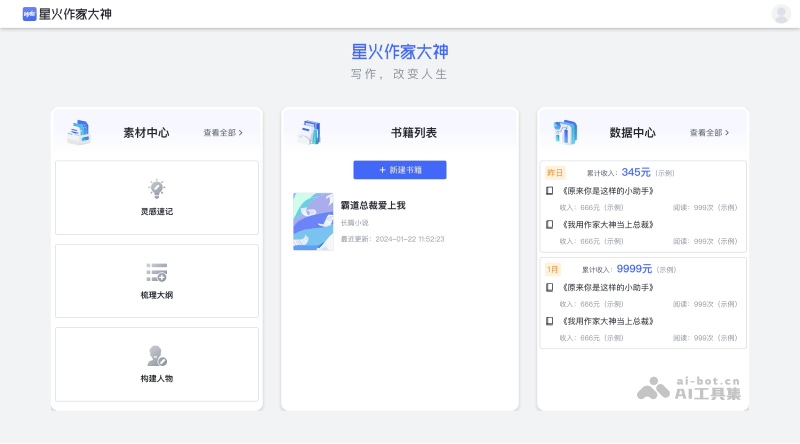
How to use Spark Writer Master
- Visit the official website of Spark Writer Master (https://zj.iflynote.com/), click Free to Use to log in/register
- After successful login, you will be redirected to the backend creation interface. Click "New Book", select the genre and enter the work title
- After creating the book, enter the writing interface, select the AI function you want to use and enter the relevant description, then click Generate Now