
What is iFlyCode
iFlyCode is anAI programming assistantlaunched by iFLYTEK. Based on the iFlytek Spark large model, it provides functions such as code generation, code continuation, code explanation, and unit testing. It simplifies programming work, improves development efficiency, and supports multiple programming languages. iFlyCode is suitable for individuals and teams, provides an enterprise edition and plugin support, and is applicable to industries such as education and finance, helping to improve work efficiency and code quality.

Main Features of iFlyCode
- Code Generation: iFlyCode can automatically generate code based on information such as comments and function names, reducing repetitive work.
- Code Continuation: Provides code completion functionality, intelligently completing code by analyzing information such as context and method names.
- Code Explanation: iFlyCode can explain classes, functions, and their roles one by one, helping users better understand code.
- Code Error Correction: Can accurately locate spelling, syntax, and logic errors, and provide correction suggestions.
- Unit Testing: iFlyCode supports quickly generating test cases and supports multiple mainstream unit testing frameworks.
- Intelligent Q&A: Provides professional knowledge acquisition and professional answers, helping to solve code-related problems.
- Real-time Documentation: Provides real-time documentation support, helping developers quickly find API documentation and related materials.
- Integrated Version Control: Seamlessly integrates with mainstream version control systems (such as Git), making it convenient for developers to track code changes and collaborate.
How to Use iFlyCode
- Install a JetBrains Series IDE: First, make sure the development environment is a JetBrains series IDE, such as IntelliJ IDEA.
- Install the iFlyCode Plugin: The iFlyCode plugin can be installed in two ways.
- Install directly from the plugin marketplace: Open the IDE and use the shortcut
Ctrl + Alt + Sor click "File" -> "Settings" -> "Plugins", search for iFlyCode, and install it. - Install the plugin from a local installation package: Also open the IDE and use the shortcut
Ctrl + Alt + S, click the settings icon in the upper right corner, and select "Install Plugin from Disk" to install.
- Install directly from the plugin marketplace: Open the IDE and use the shortcut
- Visit the iFlyCode Official Website: Visit the iFlyCode official website iflycode.xfyun.cn and register or log in to an account.
- Account Login: In the IDE, click the plugin to log in, and use an iFLYTEK Open Platform account to log in. If you do not have an account, please register first. After successful login, start using iFlyCode.
- Usage Guide:
- Shortcuts and Settings: In daily use, iFlyCode supports immersive code generation/completion. You can automatically generate code suggestions through keys such as Enter and Space, use
Tabto accept suggestions,Escto reject suggestions, or simply continue programming and ignore the suggestions. You can also select functions such as code explanation/error correction/unit testing through the right-click menu or above the dialog box, or directly ask iFlyCode technical questions. - Code Generation: Generate code in the editor based on comments and function names. After writing comments, pressing Enter triggers code suggestions, use
TabKey shortcut to accept suggestion,EscReject suggestion or directly continue programming ignoring the suggestion. - Code completion: In the editor, code completion is triggered by method name, context, and other information. In code with existing context, code suggestions are automatically triggered by pressing Enter or Space.
- Code explanation: After selecting code, right-click and select "iFlyCode: Code explanation" to use the code explanation feature.
- Code error correction: After selecting code, right-click and select "iFlyCode: Code error correction" to use the code error correction feature.
- Unit testing: After selecting code, right-click and select "iFlyCode: Unit testing" to use the unit testing feature.
- Shortcuts and Settings: In daily use, iFlyCode supports immersive code generation/completion. You can automatically generate code suggestions through keys such as Enter and Space, use
- Custom settings: iFlyCode supports custom settings, allowing you to customize iFlyCode trigger and interaction methods according to your usage habits.
- SQL generation/optimization: iFlyCode supports configuring MySQL data sources to perform SQL generation and SQL optimization based on database structure.
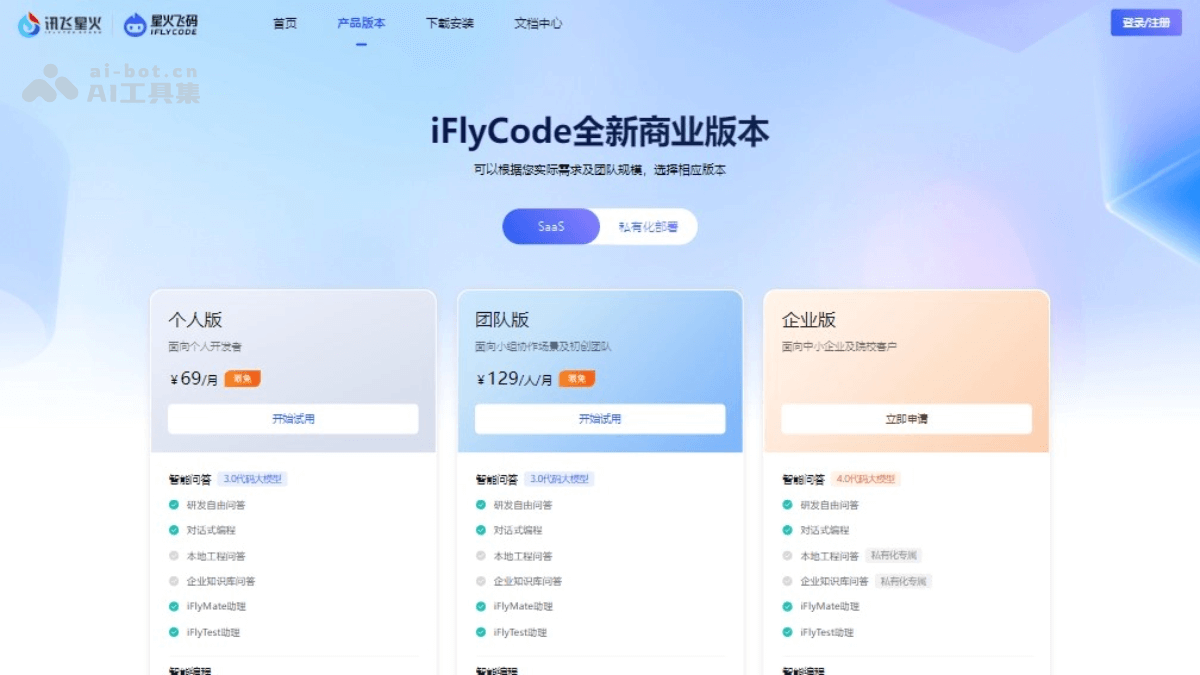
Spark Fly Code product pricing
- Personal Edition: For individual developers, priced from 69 RMB per month.
- Team Edition: For group collaboration scenarios and startup teams, priced from 129 RMB per person per month.
- The above editions include features:
- Intelligent Q&A: Unlimited intelligent Q&A, intelligent Q&A knowledge enhancement, intelligent Q&A based on agent architecture, dialogue-generated code.
- Intelligent programming: Code generation, code completion, code inspection, code explanation, function comments, inline comments, unit testing, batch unit testing.
- Intelligent development: Code debugging, SQL generation/optimization, code pre-review, code review, code search.
- Enterprise management: Organization management, entitlement management, member management, statistical reports, knowledge base, localized deployment.
- iFlyCode provides localized deployment and private dedicated services: Visit the official iFlyCode website or contact iFlytek to obtain the latest pricing information and detailed service content.
Application scenarios of Spark Fly Code
- Software development: iFlyCode provides full-process assistance for the software development industry from design to coding and testing, helping development teams improve efficiency and code quality.
- Financial industry: The financial industry needs to process large amounts of data and complex algorithms. iFlyCode can assist developers in writing and testing trading algorithms, risk assessment models, etc.
- Advanced manufacturing: Quickly write precise control code for production equipment, improving efficiency and product quality. It is compatible with various advanced manufacturing equipment development languages, helping enterprises achieve intelligence.
- Education: iFlyCode can be used as a teaching tool to help students learn programming, and in academic research to assist researchers in rapidly implementing algorithm prototypes.
- Enterprise digital management: In many industries such as hospitals, universities, enterprises, and governments, iFlytek Spark and iFlyCode can be used to quickly and cost-effectively build digital management requirements.
- Individual developers: For individual developers, the code generation, completion, explanation, unit testing, and other features provided by iFlyCode can improve coding efficiency.