
What Is IC-Light
IC-Light is an AI image relighting tool developed by Zhang Lvmin, the author of ControlNet. It can manipulate light sources and reconstruct lighting and shadows in images, achieving perfect integration with different backgrounds. Users only need to upload an image, select the light source direction, and enter a prompt, and IC-Light will automatically cut out the subject and generate a new image integrated with the new light source and background. This tool supports image relighting under text conditions and background conditions, and is suitable for various scenarios, including everyday photo editing and e-commerce product poster creation. It is currently open source, and the related models and code can be obtained through GitHub.
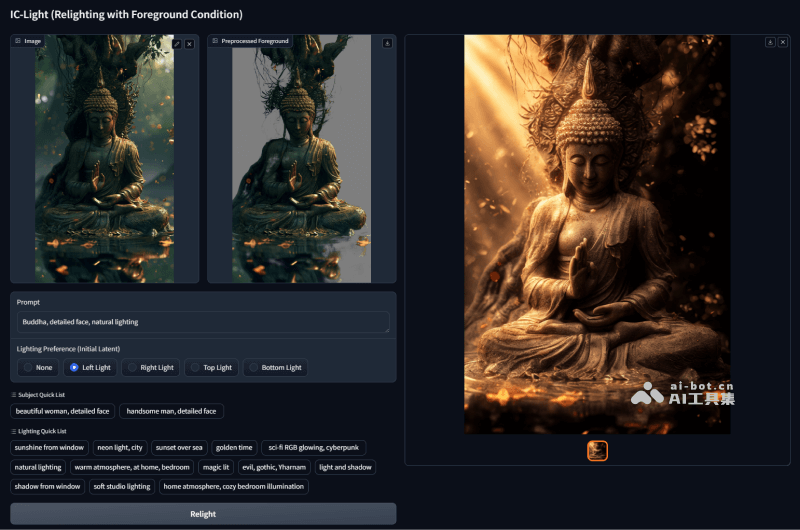
Main Features of IC-Light
- Image Relighting: IC-Light can change the light source effect of an image, making the image blend more naturally visually with a new background or environment.
- Text-Conditioned Relighting: Users can input descriptive text prompts, such as "light from the left" or "moonlight," to guide IC-Light in generating images with specific lighting effects.
- Background-Conditioned Model: IC-Light can also apply lighting variations in different styles to foreground objects based on the prompt information of a background image, without the need for complex text descriptions.
- Light Source Direction Selection: Users can specify the direction of the light source, such as illumination from the left, right, or top, to create more realistic lighting effects.
- Automatic Cutout: IC-Light has an automatic cutout function that can separate the subject from the background in an uploaded image, and then adjust the lighting effect.
- Stylized Integration: IC-Light supports integrating images with backgrounds of different styles, such as cyberpunk style and science fiction style, increasing the creative space for image editing.
- Consistency Assurance: Through consistency in the latent space, IC-Light ensures that under different light source combinations, the lighting effects output by the model have a high degree of consistency.
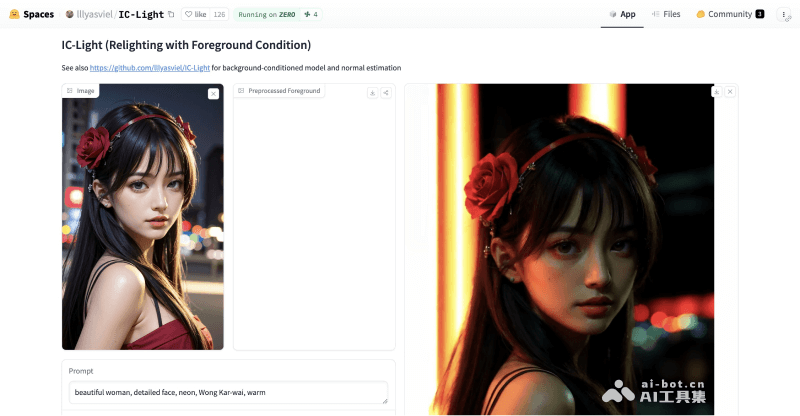
IC-Light Project Entrances
- GitHub source code repository:https://github.com/lllyasviel/IC-Light
- Hugging Face Demo:https://huggingface.co/spaces/lllyasviel/IC-Light
- Third-party ComfyUI implementation:https://github.com/kijai/ComfyUI-IC-Light
How to Use IC-Light
- Run Gradio: Download the GitHub source code and run it locally, or visit the online Gradio Demo on Hugging Face.
- Upload an Image: Upload an image you want to edit. This image will serve as the foreground subject, and IC-Light will adjust the lighting effect based on it.
- Select the Light Source Position: Choose the direction of the light source according to the lighting effect you want to achieve. IC-Light allows users to specify whether the light source shines from the left, right, top, or any other direction.
- Enter a Prompt: For the text-conditioned relighting model, you need to enter descriptive prompts, such as "warm sunlight" or "dim lighting." These prompts will guide IC-Light in generating the corresponding lighting effect.
- Select a Background (Optional): If needed, you can select a background image, and IC-Light will integrate the foreground image with the selected background to create new lighting and background effects.
- Adjust Parameters: As needed, you may need to adjust some additional parameters, such as the size, blurriness, or color of the light source, to obtain the best visual effect.
- Generate a New Image: After completing the above steps, IC-Light will automatically process the image and generate a new image that includes the lighting effect you specified.
Application Scenarios of IC-Light
- Personal Photo Editing: Users can upload personal photos and change the lighting effect through IC-Light, making the photos look more artistic or suitable for different background environments.
- Professional Photography Post-Processing: Photographers can use IC-Light to adjust the lighting of captured photos to achieve more ideal lighting effects and enhance the professional quality of their work.
- E-commerce Product Display: E-commerce platforms can use IC-Light to blend product images with various backgrounds, creating more attractive product display effects.
- Advertising and Poster Design: Designers can use IC-Light to quickly achieve lighting and shadow effects in advertisements or posters, improving design efficiency and creative expression.
- Simulating Real-World Environmental Lighting: In the fields of 3D modeling and rendering, IC-Light can be used to simulate real-world lighting conditions and enhance the realism of models.