
What is I2VGen-XL
I2VGen-XL is an open-source image-to-video generation model launched by Alibaba DAMO Academy. Through an innovative cascaded diffusion method, it decouples text-video data from video structure, while using static images as a key form of guidance, ensuring the alignment of input data and synthesizing static images into high-quality dynamic videos. This method effectively addresses the challenges of semantic accuracy, clarity, and spatiotemporal continuity in the AI video synthesis process.
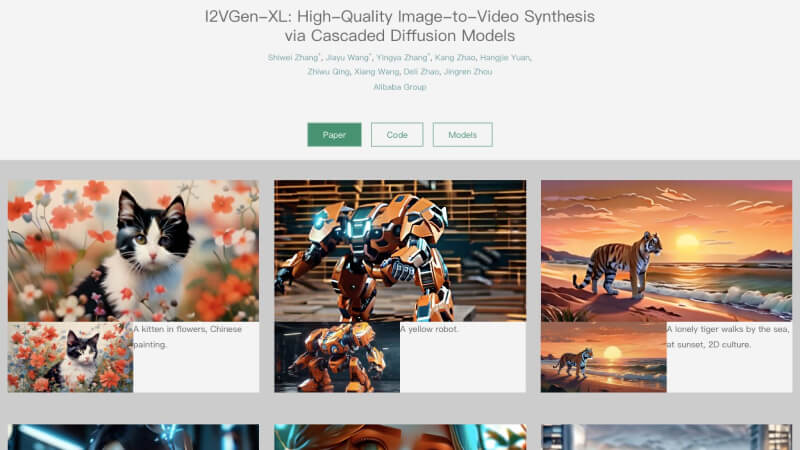
Features of I2VGen-XL
- Static Image to Video: Users only need to provide a static image and the corresponding text description, and the model can generate a dynamic video highly consistent with the content and semantics of the input image.
- Generate Widescreen HD Video: I2VGen-XL can generate HD video with a resolution of 1280*720 and a 16:9 widescreen ratio, providing users with a high-quality visual experience.
- Temporal Coherence: The video generated by the model is coherent in temporal sequence, ensuring the fluency of the video content and the comfort of viewing.
- Good Texture and Rich Details: I2VGen-XL pays attention to the preservation of details and the presentation of texture during video synthesis, making the generated video highly realistic and artistic.
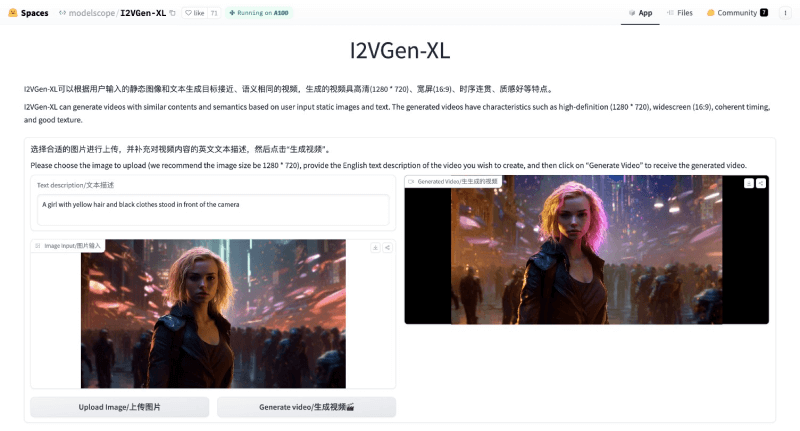
How to Use I2VGen-XL
The project homepage of I2VGen-XL is:https://i2vgen-xl.github.io/, the GitHub code repository is:https://github.com/ali-vilab/i2vgen-xl, the research paper address is:https://arxiv.org/abs/2311.04145, and ordinary users can experience it online through the Demos on Hugging Face or the ModelScope community:
- Visit the I2VGen-XL Demo homepage (Hugging Face version:https://huggingface.co/spaces/modelscope/I2VGen-XL; ModelScope version:https://www.modelscope.cn/studios/damo/I2VGen-XL-Demo/summary)
- Choose an appropriate image to upload (an image ratio of 1:1 is recommended), then click "Generate Video"
- After the initially generated video is completed, proceed to the next step of adding an English text description of the video content
- Click "Generate High-Resolution Video" and wait for about 2 minutes, and the video will be generated