
What is Huantu AI
Huantu AI is a brand-new free AI image processing tool. Based on AI technology, it provides users with a variety of functions including text-to-image, image and video face swap, outfit change, custom personalized avatars, and style photos. Users only need simple operations to easily generate creative images, without the need for a complex technical background. Huantu AI has ease of use and powerful functions, suitable for many scenarios such as personal entertainment, social media content creation, and e-commerce product display, simplifying the editing and creation process of images and videos, and providing users with a rich and personalized visual experience.
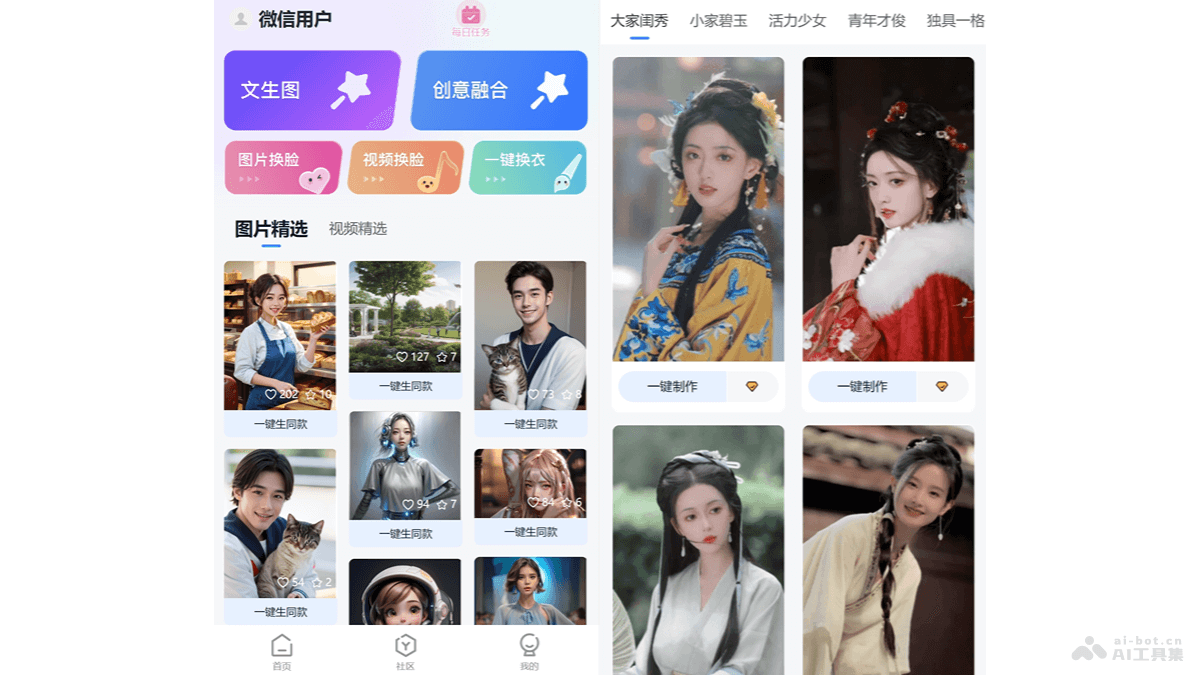
Main functions of Huantu AI
- Text-to-image: Users enter a text description, and Huantu AI automatically generates the corresponding image based on the description, including landscapes, people, or objects, etc.
- Image face swap: Users can choose different backgrounds, lighting, and filters to replace their own face with other people in the image, creating virtual portraits.
- Video face swap: Replace the user's face with the face of a person in a video, enabling interaction between the user and the person in the video.
- Creative fusion: Users combine their own text creations, artistic graphics, and illustrations to create graphic works with unique visual effects.
- One-click outfit change: Users can easily change a person's clothing. Fashionable clothes and ancient costumes can all be changed with one click.
How to use Huantu AI
- Visit the Huantu AI mini program: Search for the "Huantu AI" mini program in WeChat and click to enter.
- Choose a function: According to the operation you want to perform, select the corresponding function module, such as text-to-image, image face swap, video face swap, creative fusion, or one-click outfit change, etc.
- Text-to-image operation steps: Enter a detailed text description, and Huantu AI generates the corresponding image based on the description. The description includes details such as scene, people, objects, actions, and style.
- Image face swap operation steps:
- Select the "Image face swap" function.
- Select a specific image or background.
- Upload a face image.
- Click "Next" to start generating the image after face swap.
- Video face swap operation steps:
- Select the "Video face swap" function.
- Select the video and the person's face.
- Upload a face image.
- The system processes and generates a video, replacing the face with the face of the person in the video.
- Creative fusion operation steps:
- Select the "Creative fusion" function.
- Upload an image or select a background effect in the software.
- Adjust the rendering mode and style intensity as needed.
- Click "Generate now" to complete style transfer and image fusion.
- One-click outfit change operation steps:
- Select the "One-click outfit change" function.
- Upload a photo as the model.
- Upload an image of the clothes you want to try on.
- Select the clothing style and color, and the system generates the image after outfit change.
- Use templates:
- Select a template and click "Make the same style".
- Upload the corresponding images or text according to the template requirements.
- Adjust details to meet personalized needs.
- Save and Share:
- After editing is complete, save the generated image or video to your device.
- Or share your creative work directly on social media.
Application Scenarios of HuanTu AI
- Social Media Content Creation: Users can quickly generate personalized images and videos to use on social media platforms, increasing the appeal and interactivity of their content.
- E-commerce Product Display: E-commerce sellers can use HuanTu AI's outfit-changing feature to show how clothing or other products look on different models without actual photo shoots.
- Advertising and Marketing: Advertising designers can use HuanTu AI to quickly generate attractive ad images, improving the creativity and effectiveness of advertisements.
- Personalized Gifts: Users can create personalized images and videos to give to family and friends as gifts, such as customized avatars, style photos, and more.
- Education and Training: Educators can use HuanTu AI to generate teaching materials, such as restored images of historical figures, enhancing students' learning experience.