
What is HTML Anything
HTML Anything is an HTML editor for the Agent era open-sourced by the nexu-io team. It comes with 75 Skill templates covering 9 delivery formats such as magazines, presentations, posters, and Xiaohongshu cards. It can automatically detect 18 local Code Agent CLIs and reuse already logged-in sessions, converting any content into professional-grade HTML with zero API Key that can be published to WeChat, X, Zhihu, and other platforms with one click.
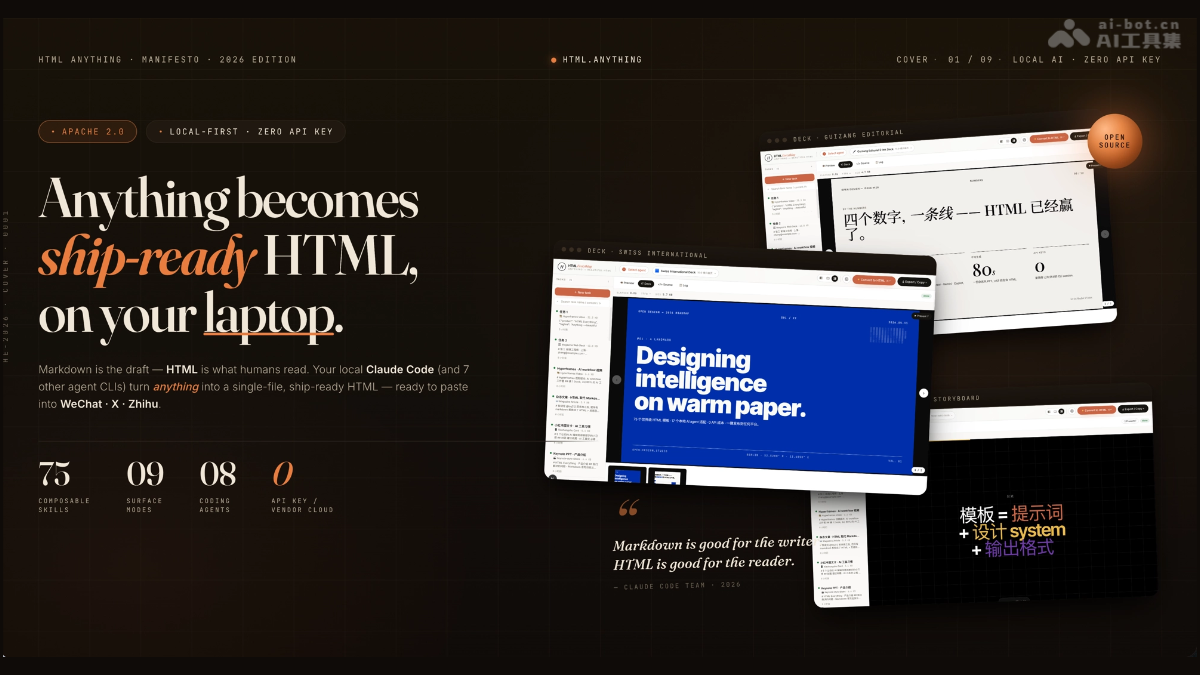
Main features of HTML Anything
- 75 Skill templates covering 9 delivery formats: Built-in 75 composable Skill templates, covering 9 professional delivery formats such as magazine articles, Keynote presentations, resumes, posters, Xiaohongshu cards, tweet cards, Web prototypes, data reports, and Hyperframes videos.
- Automatic detection of 18 local Code Agents: Automatically scans the local PATH to detect 18 Code Agent CLIs (Claude Code, Cursor, Codex, Gemini, etc.), directly reusing already logged-in sessions without the need to configure an API Key.
- Support for uploading 11 mainstream file formats: Supports uploading 11 mainstream file formats, including Markdown, TXT, CSV, Excel, JSON, SQL, YAML, HTML, PNG, JPG, etc., as content input sources.
- SSE streaming real-time rendering: Uses the SSE (Server-Sent Events) protocol to push HTML code generated by the local Agent to the browser in real time, enabling a streaming experience of previewing while generating.
- iframe sandbox secure preview: User-generated HTML runs in an independent iframe sandbox, completely isolated from the main process, ensuring a safe and reliable preview environment.
- One-click multi-platform export and publishing: Provides multiple one-click export methods such as WeChat Official Account CSS inline paste, X/Weibo/Xiaohongshu 2× DPI PNG, Zhihu LaTeX processing, and single-file HTML download.

Follow on WeChat and reply “Open Source” to join theAI Open Source Project Exchange Group
Technical principles of HTML Anything
- Local-first and Agent reuse architecture: By scanning the system PATH, it automatically detects installed Code Agent CLI tools and reuses the user's existing login sessions and subscription permissions, achieving zero marginal cost invocation without the need to additionally configure an API Key or connect to cloud services.
- SSE streaming transmission protocol: The frontend uses Server-Sent Events to establish a persistent one-way connection, streaming the HTML code generated by the Agent to the browser, enabling real-time incremental rendering and instant preview feedback.
- Design constraint system: Each Skill template has built-in strict typographic specifications, including CJK-first font stacks, an 8px baseline grid, and design constraints such as contrast ratio ≥4.5, ensuring that the output achieves professional publication-grade visual quality.
- Sandbox isolation security mechanism: The generated HTML runs in an independent iframe sandbox, isolated from the main application process, preventing malicious script execution and safeguarding local data and system security.
How to use HTML Anything
- Environment preparation: Ensure that Node.js and pnpm are installed locally, and install at least one Code Agent CLI (such as Claude Code) in advance with login authentication completed.
- Clone the project
- Run the
git clone https://github.com/nexu-io/html-anythingcommand to download the project source code locally. - Install dependencies: After entering the project directory
cd html-anything, runpnpm installComplete the installation of all dependency packages. - Start the service: Run
pnpm devto start the local development server, then accesshttp://localhost:3000in your browser to enter the editor interface. - Select Agent: In the dropdown menu at the top of the interface, select the local Code Agent that the system has automatically detected (such as Claude Code).
- Create task: Click New task, upload a file or enter content, and select the corresponding Skill template type.
- Generate preview: The Agent automatically processes the input content and streams HTML generation. View the layout effect in real time in the sandbox preview area on the right.
- Export and publish: Click Export/Copy, then choose WeChat, X, Xiaohongshu, Zhihu, or download HTML/PNG to complete publishing.
Core advantages of HTML Anything
- Zero marginal cost operation: Directly reuse locally logged-in Agent CLI sessions, with no need to purchase additional API Keys or cloud services.
- Professional publication-grade quality: All 75 templates come with complete design system constraints, ensuring every output work achieves professional publication-grade visual quality.
- One-click cross-platform publishing: One-click adaptation for mainstream Chinese platforms such as WeChat, X, Xiaohongshu, and Zhihu, completely eliminating the labor of repeated cross-platform formatting.
- Local privacy and security assurance: All data is processed locally first, content is not uploaded to the cloud, and the sandbox preview mechanism fully ensures privacy and security.
Project address of HTML Anything
- GitHub repository:https://github.com/nexu-io/html-anything
Comparison of HTML Anything with similar competing products
| Comparison dimension | html-anything | Marp | reveal.js |
|---|---|---|---|
| Product positioning | Agent-driven local multi-form HTML editor | Open-source Markdown-to-HTML slide engine | Open-source HTML presentation framework |
| AI integration | Automatically recognizes 18 local Code Agents, reusing sessions at zero API cost | No native AI capability; Markdown must be written manually | No native AI capability; HTML/Markdown must be written manually |
| Input format | Supports upload of 11 file formats, with the Agent automatically generating HTML | Only supports Markdown file input | Native support for HTML, with Markdown supported through plugins |
| Output form | 9 delivery forms including magazines, presentations, posters, cards, resumes, and videos | Only generates HTML slides | Only generates HTML slides |
| Design system | 75 templates with CJK-first font stacks and strict typography constraints | Customize styles through CSS themes | Provides multiple built-in themes; details need to be adjusted manually |
| Platform publishing | One-click export to natively adapted formats for WeChat, X, Xiaohongshu, Zhihu, etc. | Export as HTML, PDF, or PPTX | Export as HTML or deploy as a static webpage |
| Usage threshold | Zero-code operation; after uploading a file, the Agent automatically completes formatting | Requires mastery of Markdown syntax and theme configuration | Requires mastery of HTML/CSS or Markdown plugin configuration |
Application scenarios of HTML Anything
- Self-Media Content Formatting: Self-media operators can convert Markdown drafts into beautifully formatted content optimized for WeChat Official Accounts, Xiaohongshu, and Twitter with one click.
- Business Presentation Creation: Professionals can quickly generate professional-grade business presentations using style templates such as Swiss International Style and Guizang Editorial.
- Data Report Visualization: Data analysts can convert CSV or Excel data into interactive HTML data reports with professional charts and formatting.
- Video Storyboard Scripts: Video creators can use the Hyperframes template to generate video storyboard scripts that can be directly used for rendering in Remotion or HeyGen.