
What is HivisionIDPhotos
HivisionIDPhoto is a lightweight AI-based ID photo creation tool that intelligently recognizes and cuts out images, quickly generating ID photos that meet various specifications. It supports custom background colors and sizes, and beauty enhancement and smart formal wear replacement features will be launched in the future. Users can deploy it via Docker to easily set up a local service. Source code and an online experience are available on GitHub.
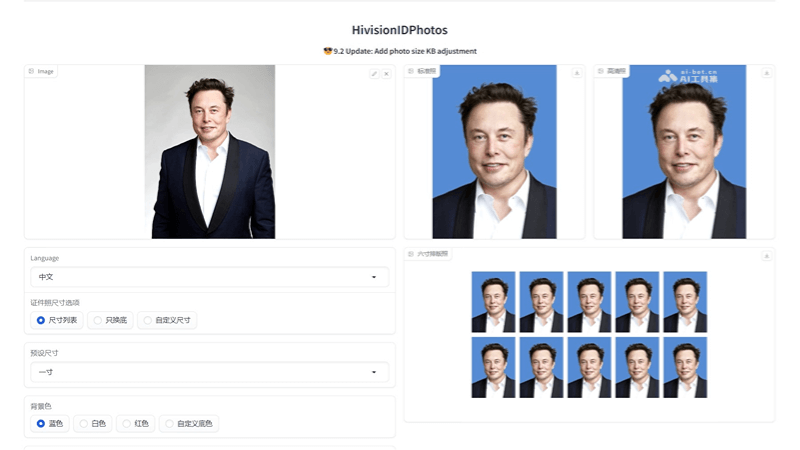
Main Features of HivisionIDPhotos
- Lightweight Image Cutout: Based on AI technology, it accurately recognizes portraits in photos and separates them from the background, generating ID photos with transparent backgrounds.
- Multi-Size ID Photo Generation: Supports generating ID photos in multiple standard sizes, such as 1-inch, 2-inch, and 6-inch layout photos, meeting the needs of different usage scenarios.
- Smart Formal Wear Replacement(Coming Soon): Future versions will allow users to upload ordinary photos, and AI will automatically change them into formal wear, simplifying the ID photo shooting process.
- Beauty Enhancement(Coming Soon): Beauty processing will be provided, allowing users' ID photos to meet standards while also showing their best state.
- Supports Docker Deployment: Convenient for users to quickly set up and run the ID photo generation service locally or on a server.
- API Service: Provides API interfaces, supporting developers in integrating and automating the ID photo generation process.
HivisionIDPhotos Project Address
- GitHub Repository:https://github.com/Zeyi-Lin/HivisionIDPhotos
- Online Demo Experience Address:https://swanhub.co/ZeYiLin/HivisionIDPhotos/demo
How to Use HivisionIDPhotos
- Install Environment:Ensure that Python 3.7 or a higher version is installed on the computer.Use Anaconda or Miniconda to manage the Python environment.
- Get the Code:Clone the HivisionIDPhoto code repository to local via GitHub
- Install Dependencies:Install the required Python dependency packages
- Download Pre-trained Models:Download the pre-trained model files from GitHub or other provided links, and place them in the project's root directory.
- Run Gradio Demo:Run
python app.pycommand to start the local Web service, which will provide an interactive Web page.Visit the displayed local URL, usuallyhttp://127.0.0.1:7860, and start using the Web interface to create ID photos. - Deploy API Service:If you need to call the ID photo generation service via API, you can run:
python deploy_api.pyThis will start an API server, and you can generate ID photos by sending HTTP requests. - Use API:Use the provided Python script or write your own script to send requests to the API server. The command will take
test.jpgas input, generate a standard-size ID photo and save it asidphoto.png。 - Docker Deployment:If you prefer to use Docker, you can run the following command in the project root directory to build and run the Docker container.
Application Scenarios of HivisionIDPhotos
- Personal Use:Individuals can create ID photos that meet various official requirements at home, such as passports, visas, ID cards, driver's licenses, etc.
- Enterprise Human Resources:Corporate human resources departments can use the tool to quickly create and update work credentials for new or existing employees.
- Educational institutions:Schools and universities can use it to create student IDs, teacher IDs, and other campus cards.
- Online service providers:Websites and applications can integrate the HivisionIDPhoto API to provide online ID photo generation services.
- Photo studios:Photographers can use this tool to improve work efficiency, quickly processing and providing specification-compliant ID photos to clients.