
What is Grok Imagine Image 2.0
Grok Imagine Image 2.0 is a brand-new generation released by SpaceXAIimage generationand editing model, launched in the form of "Quality Mode" on the grok web version and iOS and Android apps. It does not just do "regenerate another one"; it treats editing as a core capability, supporting Magic Wand local modifications, segmented selection color adjustment, one-click background removal, fusion of up to 5 reference images, and smart outpainting across 9 aspect ratios. The model has designer-level text layout and multi-element composition capabilities, and can stably maintain subject consistency across multiple rounds of editing.
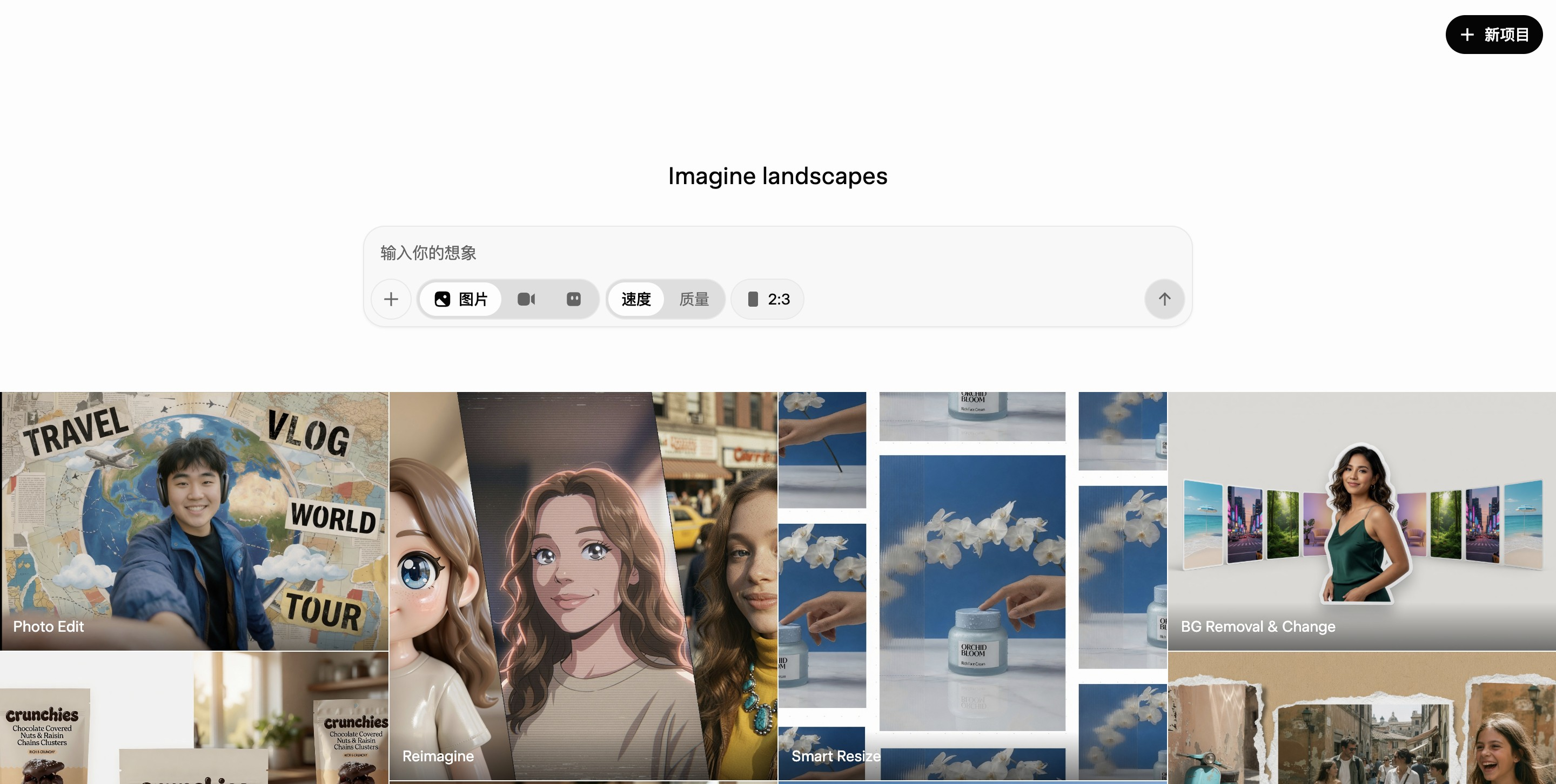
Main features of Grok Imagine Image 2.0
-
Magic Wand local modification: point to any area in the image for precise changes while the rest remains unchanged, with no need to regenerate the whole image.
-
Segmentation selection: automatically identify and select local elements in the image, allowing individual adjustment of colors or replacement of materials or assets.
-
Background Removal: strip the background with one click and export the subject with a transparent background, making it convenient for cross-software recomposition and design reuse.
-
Multi-ref Editing: input up to 5 reference images at a time, and the model automatically fuses their subjects, styles, and elements.
-
Smart Resize: supports 9 aspect ratios from 1:2 to 2:1; when switching ratios, it automatically fills in new image content instead of simply cropping.
-
Text rendering capability: can plan fonts, layouts, and hierarchy, with small text clear and sharp, and can directly produce posters, banners, and other designs with text.
-
Multi-round consistency: stably preserves character identity and style settings across multiple rounds of generation and editing, suitable for serialized and series-based visual creation.
-
Templates: built-in workflow templates for product photography, professional portraits, e-commerce images, game concept art, marketing posters, and more, lowering the barrier to entry.
How to use Grok Imagine Image 2.0
-
Access the entry point: visit the Grok official website, or download the Grok App on iOS / Android and log in with an X account.
-
Switch to quality mode: select "Quality Mode" in the generation interface to enable the Imagine Image 2.0 model.
-
Enter a prompt: describe the desired image in text, and you can specify the style, composition, lighting, and text content.
-
Upload reference images (optional): upload up to 5 images as references for subject, style, or assets, and the model automatically fuses them.
-
Choose an aspect ratio: choose from 9 ratios (1:2 to 2:1). After generation, you can also switch at any time, and the model automatically fills in the image.
-
Local retouching: use Magic Wand to click the area you want to change, or use Segmentation to box-select a local area and adjust colors and assets.
-
Export and reuse: when you need transparent-background assets, use the background removal feature to export PNG; you can also use Templates to quickly produce e-commerce images, posters, and more.
Core advantages of Grok Imagine Image 2.0
-
An editing-first product philosophy: Treating "precise editing after generation" as a first-class capability, covering the need for repeated revisions in real workflows, rather than one-off gacha-style generation.
-
Leapfrog improvement in leaderboard results: Both text-to-image and image editing rank second globally on Arena; in the editing leaderboard, an Elo of 1439 is only 24 points behind first place; the previous generation ranked only 8th and 5th.
-
Complete local editing toolchain: The trio of magic wand, segmentation, and background removal covers the complete chain from point-and-click modification to asset export, approaching the experience of professional photo-editing software.
-
Industry-leading multi-image reference: The ability to fuse 5 reference images in a single pass exceeds most competitors (commonly 1-3 images), suitable for complex compositing scenarios.
-
Layout as design: Text rendering is not just about "writing the words correctly," but possesses layout planning capability, allowing direct delivery of finished products at the level of marketing materials.
-
Full-platform coverage: Launched simultaneously on web and iOS and Android apps, with a complete mobile experience.
-
Ecosystem integration: As part of the Grok Imagine product line, it can connect with video generation capabilities to form a complete creation chain from image and text to video.
Grok Imagine Image 2.0 Comparison with Similar Competitors
| Comparison Dimension | Grok Imagine Image 2.0 | GPT-Image-2 | Nano Banana 2 |
|---|---|---|---|
| Developer | xAI (under Musk, listed on Arena under the name SpaceXAI) | OpenAI | Google DeepMind |
| Official Name | Grok Imagine Image 2.0(Quality Mode) | ChatGPT Images 2.0, model ID gpt-image-2
|
Gemini 3.1 Flash Image, model ID gemini-3.1-flash-image
|
| Arena Text-to-Image Leaderboard | 2nd (Elo 1320, low tier) | 1st (Elo 1380, medium tier) | Not currently in the top ranks; shortly after release was surpassed by GPT-Image-2 by a margin of 241 points |
| Arena Image Editing Leaderboard | 2nd (Elo 1439) | 1st (Elo 1463) | Not currently in the top ranks |
| Leaderboard Data Caveats | Marked Preliminary, only about 2,700-5,900 votes, wide confidence interval, first-day impression rather than a final verdict | 69,000-184,000 votes, ranking is solid | — |
| Maximum Resolution | 1K-2K | Standard 2K, API Beta supports 4K (4096×4096) | 4K |
| Aspect Ratios | 9 types (1:2 to 2:1), intelligently completes the image when switching | 3:1 to 1:3, wide range | 14 types, the most among the three |
| Generation Speed | About 5-8 seconds | About 5-10 seconds, slower in Thinking mode | 3-5 seconds, the fastest among the three |
| Reference Image Fusion | Up to 5 images per pass, automatically fused | Supports image-to-image and editing | Supports multi-image compositing; Pro version supports up to 14 image inputs |
| Text Rendering | Supports layout design, but relatively the weakest among the three | Strongest, accuracy about 99%, supports multilingual layout including Chinese, Japanese, Korean, etc. | Good, accuracy about 87%-96%, occasional errors in complex layouts |
| Local Editing Capability | Magic wand selection + segmented选区 + background removal, the most complete editing toolchain | Supports local modifications, ranked first in editing | Excels at conversational iterative editing, with strong subject consistency |
| Reasoning/Knowledge capabilities | Not emphasized | The first image model with native integrated reasoning, plans the layout before generation | Search-grounded real-time world knowledge, stronger factuality |
| Watermark mechanism | Visible watermarks on some interfaces | C2PA metadata + invisible watermark | SynthID invisible watermark + C2PA, mandatory and edit-resistant |
| Cost per image | Standard tier $0.02, quality tier $0.05-0.07, the lowest of the three | $0.006 (low) - $0.211 (high), medium about $0.05 | $0.045 (512px) - $0.151 (4K); Batch API at half price |
Application scenarios of Grok Imagine Image 2.0
-
E-commerce product image creation: Use built-in product photography templates to generate professional product images, and with multi-image fusion (up to 5 reference images) integrate products into different scenarios, quickly producing main images and detail page assets.
-
Marketing posters and advertising materials: Designer-level text layout and multi-element composition capabilities can directly generate complete posters and banners with titles and slogans, without the need to add text in post-production.
-
Multi-platform social media images: 9 aspect ratios can be switched with one click and the image is automatically completed, allowing one image to quickly adapt to different platform sizes such as WeChat official account covers, Xiaohongshu vertical images, and short video covers.
-
Brand visuals and secondary processing of assets: The background removal feature exports transparent-background subjects with one click, making it convenient for designers to import AI-generated elements into PS, Figma, and other software for cross-tool composition.
-
Retouching and rework-oriented design workflows: The local editing toolchain of magic wand selection + segmented选区 is suitable for high-frequency rework scenarios where 'the client wants to change part of it and keep the rest unchanged,' avoiding regenerating the entire image.
-
Professional image photos and business portraits: Professional image photo templates can quickly generate workplace avatars, LinkedIn photos, and team portraits, saving offline shooting costs.