
Today I'm sharing something suited for frontend animation.
Usually when you ask AI to do some frontend animation, either it simply can't understand what you're saying, or what it produces is a total mess.
This GitHub project called Gsap-skills is exactly what solves this problem, letting AI know how to correctly generate page animations.

01. Project Introduction
Gsap-skills It is a GSAP coding skill set officially maintained by GreenSock, aimed at AI Agents such as Codex and Claude Code. After installation, the Agent will read the rules, examples, and common error explanations provided by GreenSock when writing animation code.
Project address:https://github.com/greensock/gsap-skills
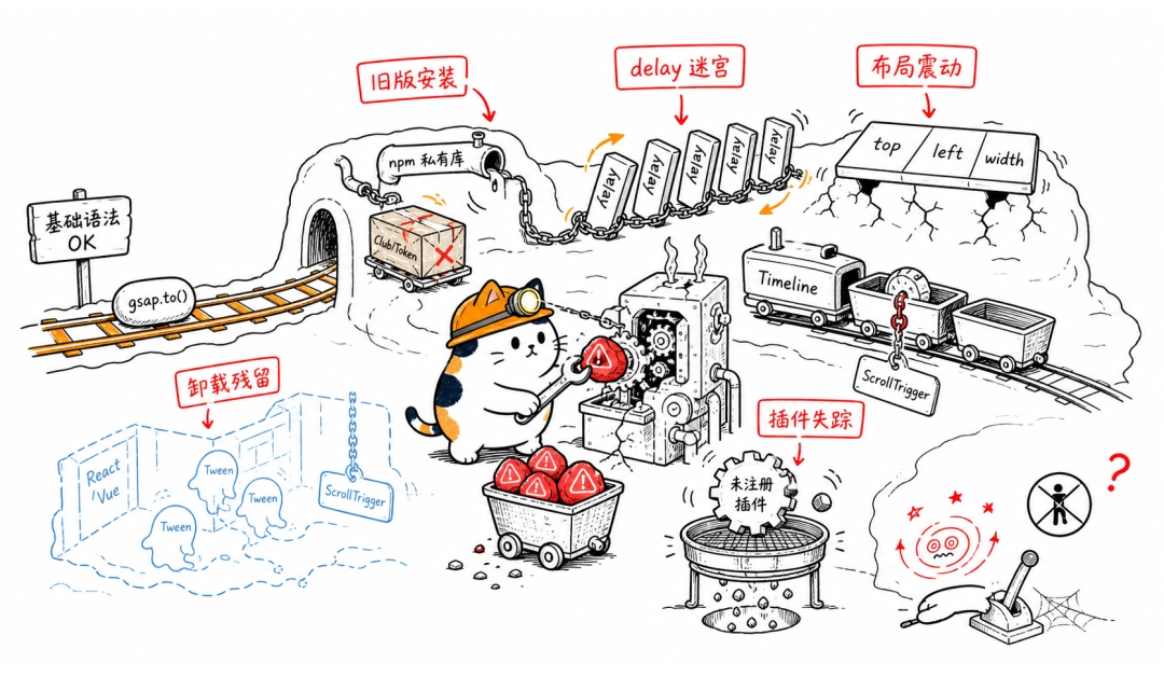
AI models usually know the basic syntax of GSAP, but when encountering complex animations they tend to produce several types of problems:
- Using outdated installation methods such as the old Club GSAP, private npm registry, and authentication Token.
- Stitching animations together with multiple delays, without using Timeline.
- Using properties such as top, left, and width to create displacement animations, causing frequent layout calculations.
- Leaving Tweens or ScrollTriggers behind after components such as React and Vue are unmounted.
- Attaching ScrollTrigger to child Tweens inside a Timeline.
- Forgetting to register plugins, so the development environment works fine, but production builds remove them via tree shaking.
- Ignoring prefers-reduced-motion, providing no reduced animation for users sensitive to motion sickness.
Gsap-skills breaks animation capabilities into 8 parts:
1. gsap-core: Handling basic animations
2. gsap-timeline: Arranging animation sequences
3. gsap-scrolltrigger: Making animations follow scrolling
4. gsap-plugins: Calling advanced plugins
5. gsap-utils: Handling animation values
6. gsap-react: Solving React integration issues
7. gsap-performance: Reducing animation stuttering
8. gsap-frameworks: Adapting to Vue, Nuxt, and Svelte
Gsap-skills Write these rules into the agent context so that the model proactively adopts the officially recommended approach when generating code.
Gsap-skills Suitable for writing these kinds of code:
- React, Vue, or Nuxt page animations
- ScrollTrigger scroll narratives and pinned sections
- SVG path, MorphSVG, and DrawSVG animations
- Flip layout transitions and Draggable drag interactions
- SplitText and ScrambleText text animations
- Complex Timelines that need pause, reverse playback, seeking, and dynamic control
02. Project Hands-On
case 1 gsap-core: Orbital Launch Pad
Prompt:
Call `gsap-core` skill, and in the current workspace create a complete frontend project named `gsap-core-launchpad` .
Use Vite, native HTML, CSS, and JavaScript for the tech stack. Install gsap via npm, do not use a CDN.
Create an "Orbital Launch Pad" animation page, so that the effects in the browser can directly demonstrate gsap.to(), gsap.from(), gsap.fromTo(), stagger, transform, autoAlpha, ease, and gsap.matchMedia().
The page needs to include:
1. A dark spaceflight console interface, with a probe, circular orbit, and 12 orbital tick marks in the center.
2. When the page opens, the title, status data, and action buttons enter one after another from below.
3. The 12 orbital tick marks light up one after another using stagger.
4. After clicking "Launch Probe", the probe accelerates and flies out horizontally, while simultaneously scaling, rotating, and fading out.
5. After clicking "Reset", it returns to the initial state and can be played repeatedly.
6. Provide three speed buttons: "Smooth", "Standard", and "Fast".
7. Desktop and mobile use different displacement distances via gsap.matchMedia().
8. When the system has prefers-reduced-motion enabled, cancel large movements and keep only a brief fade-in.
9. Displacement animations use x, y, scale, and rotation, not top, left, width, or height.
10. Fade-out uses autoAlpha to prevent transparent elements from continuing to block clicks.
It needs complete navigation, a page title, an animation stage, a control area, and a capabilities description area. The page needs to be responsive and adapted for mobile phones.
Directly create package.json, index.html, src/main.js, src/style.css, and README.md. Do not return only code snippets.
After completion, execute:
npm install
npm run build
After a successful build, start the development server, return a local address that can be opened in the browser, and explain the startup command.
You can understand the case content as soon as you open it, and see the GSAP effects as soon as you click.
Overall, this Case can already be used directly for article companion demonstrations. The visual completeness, GSAP implementation, and interaction loop all pass, with no blocking issues found for use.
case 2 gsap-timeline: Opening sequence
Prompt:
Call the `gsap-timeline` skill to create a complete frontend project named `gsap-timeline-show` in the current workspace.
The tech stack uses Vite, native HTML, CSS, and JavaScript, with gsap installed via npm.
Create an "Electronic Music Performance Opening" page that visually demonstrates GSAP Timeline, position parameters, labels, nested timelines, and playback controls through a complete animation.
The animation process includes:
1. The two curtains on the left and right open to both sides.
2. The stage grid and record turntable appear.
3. 8 volume columns pop up one after another.
4. The performance title is split into two lines and enters from below.
5. The date, venue, and subtitle then appear.
6. The turntable starts rotating, and the volume columns continue bouncing.
7. It finally rests on the complete performance poster scene.
Implementation requirements:
1. Use gsap.timeline({ defaults: … }) to uniformly set duration and ease.
2. Use position parameters such as "<", ">", and "+=0.2" to control parallel and staggered relationships.
3. Add labels such as open, pulse, title, and hold.
4. Do not use multiple delays to stitch animations together.
5. Add "Play", "Pause", "Reverse", "Replay", and "Jump to Title" buttons.
6. Add a draggable progress bar that allows manual control of the Timeline progress.
7. The page displays the current playback time and total duration.
8. Nested Timelines can be used to manage the title animation or the volume column animation.
9. When the system has prefers-reduced-motion enabled, directly display the final state.
10. Animations use only transform, opacity, and autoAlpha.
Directly create the complete project files. The page needs a clear stage effect and must not display only code or a parameter panel.
After completion, run npm install and npm run build. Once the build succeeds, start the development server and return the browser address.
The four animation stages can be seen intuitively, and it can play, pause, reverse, jump, and scrub through progress.
The visual recognition is high, and the stage, record player, volume bars, and fluorescent colors form a unified electronic performance style.
case 3 gsap-scrolltrigger: deep sea exploration scrolling
Prompt:
Call the `gsap-scrolltrigger` skill to create a complete front-end project named `gsap-scrolltrigger-ocean` in the current workspace.
The tech stack uses Vite, native HTML, CSS, and JavaScript. Install gsap via npm, import ScrollTrigger from gsap/ScrollTrigger, and explicitly call gsap.registerPlugin(ScrollTrigger).
Create a "Deep Sea Exploration Mission" scroll narrative page. The page contains at least 4 chapters:
1. The submarine leaves the sea surface.
2. Dive to the twilight zone.
3. Discover deep-sea creatures.
4. Reach the deep-sea hydrothermal vents.
The scrolling effects need to meet the following:
1. The page has sufficient scroll distance.
2. Pin the main screen after entering the story area.
3. The submarine, depth number, bubbles, background layers, and chapter text change with scrolling.
4. The depth gradually increases from 0 meters to 6000 meters.
5. Use autoAlpha, scale, and y when switching chapters.
6. Display scroll progress and the current chapter on the right side.
7. Use scrub: 1 so the animation progress follows scrolling.
8. Use pin: true and start: "top top".
9. snap can be used so that after scrolling stops it moves close to a chapter position.
10. Only attach ScrollTrigger to the top-level Timeline, not to internal child Tweens.
11. Do not configure toggleActions at the same time when using scrub.
12. Do not listen to window.scroll.
13. When the system has prefers-reduced-motion enabled, cancel pinning and scroll linkage, and change the 4 chapters into ordinary vertical content.
The page's deep-sea environment can be made using CSS graphics, bubbles, light beams, and layered backgrounds; it cannot just be text moving up and down.
Create the complete project files and run npm install and npm run build. After the build succeeds, start the development server and return the local access address.
The desktop scrolling narrative is very complete; the 6000-meter depth, chapter copy, submarine, ocean background, and right-side progress change in sync, and the scrolling relationship is clear.
The depth number, submarine scale, seawater brightness, and seabed terrain jointly carry the narrative, without piling on irrelevant effects.
case 4 gsap-plugins: record library layout transformation
Prompt:
Call the `gsap-plugins` skill to create a complete front-end project named `gsap-flip-records` in the current workspace.
The tech stack uses Vite, native HTML, CSS, and JavaScript. Install gsap via the public npm package, and do not use a private npm registry, Club GSAP, or authentication Token.
Use the Flip plugin to create a "Record Collection Library" page.
The page contains 8 record cards with different visual styles, and each card has a cover, album name, artist, and duration. The cover needs a complete pattern and cannot use a blank placeholder box.
Provide three actions:
1. Switch to a three-column grid.
2. Switch to a single-column playlist.
3. Randomly shuffle the record order.
Implementation requirements:
1. Import Flip from gsap/Flip.
2. Call gsap.registerPlugin(Flip).
3. Before each switch, use Flip.getState() to save the card state.
4. Modify the container layout or DOM order.
5. Use Flip.from() to complete the position and size transition.
6. Keep the text and cover continuous while cards are moving.
7. The current layout button needs a clear selected state.
8. On mobile, the grid automatically becomes a single column or two columns.
9. When the system has prefers-reduced-motion enabled, complete the layout switch immediately.
10. Do not manually calculate the left, top, or width animation for each card.
The page needs to feel like an operable music product, not a crude test page for the Flip API.
Create the project files directly, run npm install and npm run build. After a successful build, start the development server and return the access address.
The grid switching list, random sorting, and record selection all intuitively demonstrate the purpose of FLIP, and the visual polish is also very high.
case 5 gsap-utils: Signal Mixer
Prompt:
Call `gsap-utils` skill, create a complete frontend project named `gsap-utils-tuner` in the current workspace.
Use Vite, native HTML, CSS, and JavaScript for the tech stack, and install gsap via npm.
Create a "Signal Mixer" interactive page that intuitively demonstrates the numerical processing capabilities of gsap.utils.
In the center of the page is a horizontal signal track with 9 tick marks. Users can drag the slider, click the track, or click "Random Signal".
The interaction process needs to use:
1. gsap.utils.clamp(), limit the input range to 0 to 1000.
2. gsap.utils.snap(), make the value snap to multiples of 125.
3. gsap.utils.normalize(), convert the result to 0 to 1.
4. gsap.utils.mapRange(), map the progress to the marker's horizontal position and rotation angle.
5. gsap.utils.interpolate(), change the marker color and background color according to the progress.
6. gsap.utils.wrap(), make "previous channel" and "next channel" loop at the boundaries.
7. gsap.utils.random(), generate random and already snapped channel values.
8. gsap.utils.toArray(), get all track tick marks.
The page needs to display in real time:
- Raw input value
- Value after clamp
- Value after snap
- normalize result
- Pixel position obtained from mapRange
- Current channel name
When the value changes, the track marker needs to move smoothly, and the tick marks light up in sync. Recalculate the track range after the window size changes.
When the system has prefers-reduced-motion enabled, update the position directly without playing easing.
Create the complete project and run npm install, npm run build. After a successful build, start the development server and return the browser address.
It can be opened directly and is interactive, and the value changes and animation feedback also correspond.
Dragging, clicking the track, random signal, and channel switching can all normally drive the animation. The visual direction is very consistent, the mixer metaphor and numerical processing theme fit well, and there is no common templated card feel.
case 6 gsap-react: unmountable notification center
Prompt:
Call the `gsap-react` skill to create a complete React frontend project named `gsap-react-notifications` in the current workspace.
Use Vite, React, CSS, gsap, and @gsap/react for the tech stack. Install dependencies via npm; do not use a CDN.
Build a "real-time notification center" page. The page displays two independent NotificationPanel components at the same time, to visually verify animation scoping and unmount cleanup.
Each component contains:
1. A status indicator light.
2. Three notification cards.
3. A "receive new message" button.
4. A "clear messages" button.
5. The current component's mount status.
The parent component provides the following operations:
1. Unmount the left component individually.
2. Unmount the right component individually.
3. Remount the components.
4. Replay the entrance animations of both components at the same time.
GSAP implementation requirements:
1. Import useGSAP from @gsap/react.
2. Call gsap.registerPlugin(useGSAP) outside the component.
3. Each NotificationPanel uses its own independent root ref.
4. useGSAP must be configured with a scope, so selectors inside the component can only match the current component.
5. Notification cards enter sequentially using stagger.
6. The status indicator light uses scale and autoAlpha animations.
7. Animation callbacks created after clicks must use contextSafe.
8. Using document.querySelector() to manipulate elements inside the component is not allowed.
9. After the component is unmounted, useGSAP automatically reverts the animations.
10. Display a brief mount and cleanup log on the page, so the unmount results can be seen directly.
11. When the system has prefers-reduced-motion enabled, only update the state and do not play large animations.
The page needs a complete product interface and responsive layout. The animations of the two components must not affect each other.
Write directly to the project files, run npm install and npm run build. After a successful build, start the development server and return the local address.
The core capabilities are demonstrated very completely, with actionable frontend feedback for scope isolation, event animations, and component unmount cleanup.
case 7 gsap-performance: high-frequency control surface
Prompt:
Call the `gsap-performance` skill to create a complete frontend project named `gsap-performance-field` in the current workspace.
Use Vite, native HTML, CSS, and JavaScript for the tech stack, and install gsap via npm.
Build a "high-frequency signal control surface" page. The main area is a grid containing 64 signal nodes, with a circular scanning module in the center.
Interaction effects:
1. When the pointer moves within the control surface, the scanning module follows smoothly.
2. The scanning module rotates slightly according to its horizontal position.
3. The page displays x, y, and rotation angle in real time.
4. After clicking "batch pulse", the 64 nodes light up sequentially from the center outward.
5. After clicking "return to center", the scanning module smoothly returns to the center.
Performance requirements:
1. Create reusable Tweens for x, y, and rotation using gsap.quickTo() respectively.
2. In pointermove, only call the function returned by quickTo; do not keep creating gsap.to().
3. Use x, y, and rotation for movement, not top and left.
4. Use a single Tween and stagger for node pulses; do not set a delay individually for each node.
5. Only set will-change on the continuously moving scanning module.
6. Read pointer boundary information in pointerenter or ResizeObserver to avoid repeatedly reading layout every frame.
7. Do not alternate between reading layout and writing styles within the same loop.
8. Pause non-essential animations when the page is hidden or left.
9. When the system has prefers-reduced-motion enabled, disable pointer following and keep only the static state.
10. Support touch taps on mobile and provide an operable recenter button.
The page needs to visually show the smooth effects brought by quickTo and batch stagger, while also providing a concise performance explanation area.
Create the complete project, run npm install and npm run build. After a successful build, start the development server and return the access address.
The implementation is solid, and the presentation also looks quite good. When the mouse pointer moves over the control panel, the scanning module follows very smoothly and in real time.
case 8 gsap-frameworks: Vue dynamic poster wall
Prompt:
Call the `gsap-frameworks` skill to create a complete Vue 3 front-end project named `gsap-vue-gallery` in the current workspace.
Use Vite, Vue 3 Composition API, CSS, and gsap for the tech stack. Install gsap via npm; do not use a CDN.
Create a "dynamic poster wall" page. The parent component renders two MotionGallery child components at the same time, to demonstrate the Vue lifecycle, animation scope, and unmount cleanup.
Each MotionGallery contains:
1. Four poster cards.
2. A playing status indicator.
3. A "Rearrange" button.
4. A "Play Entrance" button.
5. The current mounted state.
The parent component provides:
1. Unmount the left poster wall.
2. Unmount the right poster wall.
3. Remount the corresponding component.
4. Display the component mount and cleanup log at the bottom of the page.
Implementation requirements:
1. Create the GSAP animation in onMounted().
2. Each component uses an independent root ref.
3. Use gsap.context() and pass the root ref as the selector scope.
4. The poster cards enter one after another using stagger.
5. When a poster is clicked, the current card scales up, and the other cards have their autoAlpha lowered.
6. Tweens created after an event is triggered need to be added to the Context, or killed individually on unmount.
7. Call ctx.revert() in onUnmounted().
8. Within a component, it is forbidden to use global selectors to manipulate another component.
9. After repeated unmounting and mounting, animations must not stack, and the console must not show errors about accessing deleted nodes.
10. When the system has prefers-reduced-motion enabled, show the final layout directly.
11. The page needs a clear empty state; after a component is unmounted, it must not leave a blank, broken area.
Create App.vue, MotionGallery.vue, main.js, style files, package.json, and README.md.
After completion, run npm install and npm run build. Once the build succeeds, start the development server and return a local address that can be opened directly.
Vue lifecycle, GSAP scoping, and unmount cleanup are turned into a hands-on frontend demo, with a very high level of completion. The visual completion is good. The two sets of posters have a clear contrast between warm and cool tones.
03. Dig Deeper
AI programming is moving from patching a few lines of code to directly delivering a runnable page.
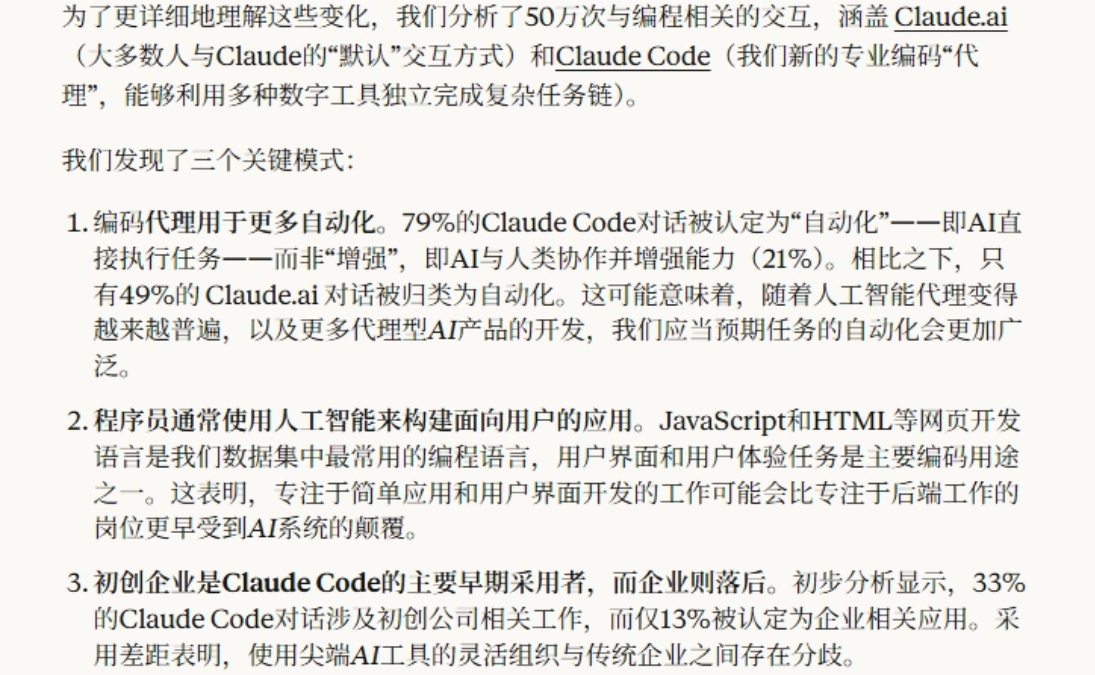
Anthropic analyzed 500,000 programming-related interactions. In Claude Code, 79% of conversations fall under the mode of AI directly executing tasks; JavaScript and HTML are the most common languages, and UI/UX component development also ranks among the main uses.
Gsap-skills Organize GreenSock's engineering experience into rules that Agents can directly read. The 8 tested Cases already show the difference: Timelines no longer rely on a string of delays crudely stitched together, scroll animations know which layer ScrollTrigger should be placed on, and React and Vue components also proactively clean up Tweens when unmounted.
Gsap-skills Suitable for making product demos, launch pages, and portfolios; it can unify animation writing and reduce quality fluctuations between different pages.
AI-generated pages will become faster and faster, and the engineering rules that can smoothly bring generated code into real projects will also become more and more valuable. GSAP Skills fills in exactly this animation segment.
Original link:GitHub raked in 11K Stars, making AI-made page animations more dazzling