
What is GPT Pilot
GPT Pilot is anAI programming toolthat helps build applications from scratch by imitating the workflow of human developers. It can write code, debug programs, discuss issues with users, and request code reviews, making it a true AI developer partner. GPT Pilot supports multiple ways to run, including a VS Code extension, command-line tool, and Docker container, allowing developers to improve development efficiency in a familiar environment.
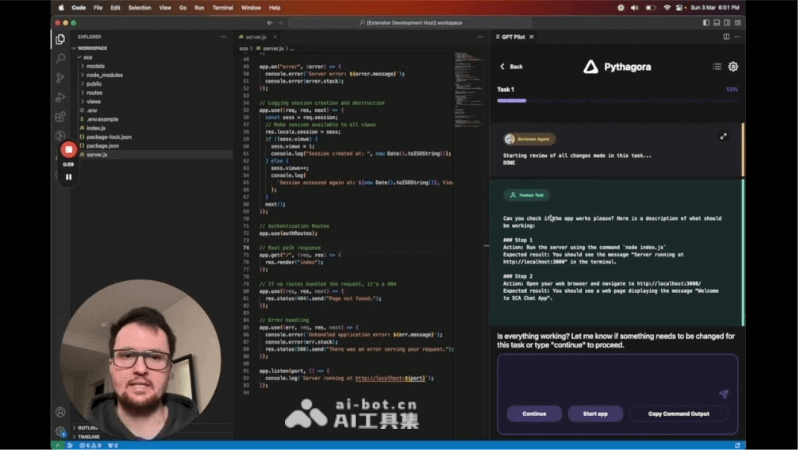
Main features of GPT Pilot
- Full-featured code generation: Can write most application code, reducing the developer's burden and increasing development speed.
- Interactive Q&A: Converse with developers, provide feedback on code issues, conduct code reviews, and help solve complex problems.
- Highly integrated development environment: Through the VS Code extension, it provides a seamless development experience and allows direct collaboration with AI in the IDE.
- Step-by-step development: Instead of generating the entire application code all at once, it builds it step by step, imitating a real development process.
- Task assignment: Breaks down development tasks, assigned by the Tech Lead agent, ensuring each task has clear instructions.
- Developer participation: During the code writing process, developers can review and debug, participating in every step of application creation.
- Code testing: Uses a test-driven development (TDD) approach to write test cases for code, ensuring new changes do not break existing code.
- Multi-platform support: Supports multiple usage methods such as the VS Code extension, command-line interface, and Docker container, improving compatibility and ease of use.
GPT Pilot project address
- GitHub repository:https://github.com/Pythagora-io/gpt-pilot
How to use GPT Pilot
- Install the environment: Ensure that Python 3.9 or a higher version is installed on the system, as well as (if needed) a PostgreSQL database.
- Get GPT Pilot:Via VS Code: Install the GPT Pilot extension in Visual Studio Code.Via the command-line interface (CLI): Clone the GPT Pilot GitHub repository to the local environment.Via Docker: Use a Docker container to run GPT Pilot.
- Set up the working environment:For the CLI, follow the instructions in the repository to set up a virtual environment, install dependencies, and configure the
config.jsonfile.For Docker, configure the environment variables according to thedocker-compose.ymlfile, and start the container. - Start GPT Pilot:In VS Code, start GPT Pilot through the extension.In the CLI, start it by running the
python main.pycommand.In Docker, start the service with thedocker compose upcommand, and run it in the web terminalpython main.py。 - Create and develop a project:Enter the application name and description, and GPT Pilot will guide you through initializing the project.Follow GPT Pilot's prompts to carry out task assignment, code writing, and debugging.
- Interaction and collaboration:Interact with GPT Pilot, answer questions, provide feedback, and review and modify the generated code.
- Testing and review:Use GPT Pilot's testing capabilities to ensure code quality and conduct necessary test-driven development.
GPT Pilot's application scenarios
- Rapid prototyping: GPT Pilot can help developers quickly generate application prototypes, accelerating proof of concept and early development stages.
- Daily coding tasks: In daily development work, GPT Pilot can assist in writing code, provide autocompletion and code suggestions, and improve coding efficiency.
- Solving complex problems: When facing complex programming problems, GPT Pilot can help developers find solutions through interactive question answering.
- Code review and refactoring: GPT Pilot can participate in the code review process, provide feedback, and help improve code quality and maintainability.