
What is gnhf
gnhf (full name good night, have fun) is an open-source AI Agent autonomous orchestrator. Its core idea is to let developers set a goal for the AI before going to sleep and have it continuously iterate while you rest. Each time it makes only a small change; if successful, it automatically git commit; if it fails, it git reset --hard rolls back. When you wake up, your repository branch is full of clean commit records and complete logs. It natively supports mainstream AI coding assistants such as Claude Code, Codex, and GitHub Copilot CLI, and features cross-iteration memory sharing, resumable runs, multi-task worktree parallelism, and real-time token monitoring. It can be installed with one command via npm, runs cross-platform, and is open-sourced on GitHub under the MIT license.
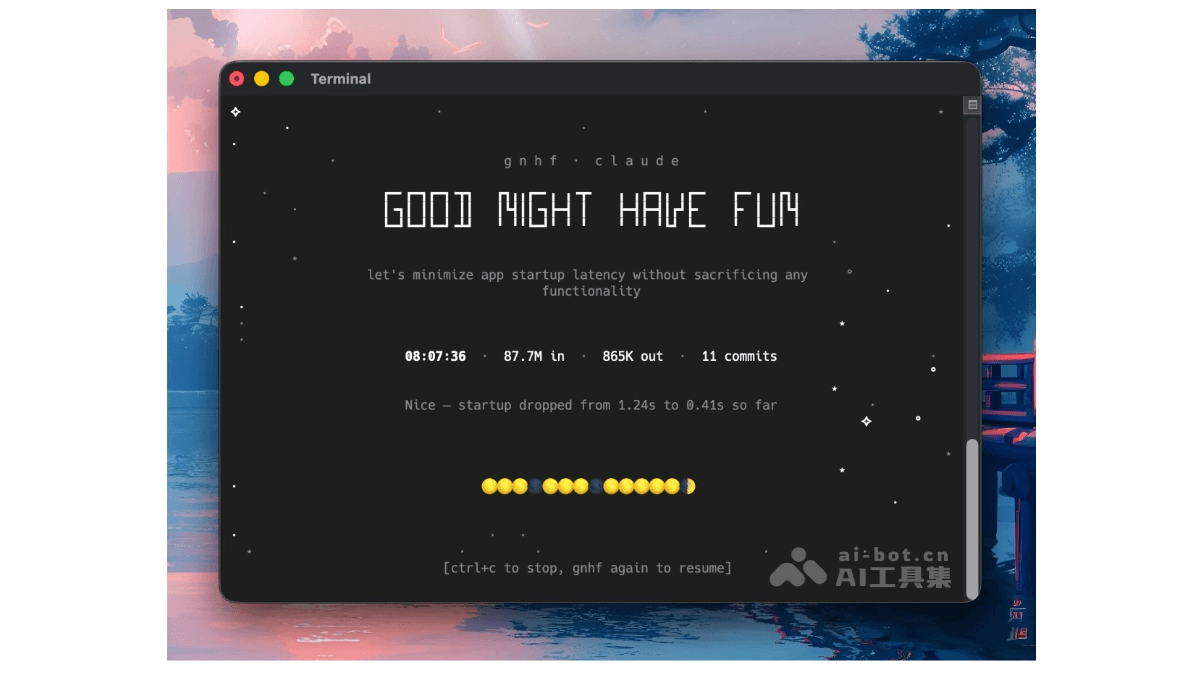
Main features of gnhf
-
Autonomous overnight iteration: Just set a development goal for the AI before going to sleep, and the Agent will automatically loop while you rest, making only one small change each time, so you can review the complete results when you wake up.
-
Git discipline-driven: Each successful iteration automatically generates an independent
git commit, and failed iterations are immediatelygit reset --hardrolled back, ensuring the branch history is clean and traceable. -
Intelligent fault tolerance and retry: Failures reported by the Agent enter the next iteration round. Hard errors use exponential backoff, permanent errors (such as insufficient API balance) stop immediately and output the log path, and it automatically stops after 3 consecutive failures.
-
Cross-iteration memory sharing: The Agent passes context and experience between multiple iteration rounds through the
notes.mdfile, enabling continuous accumulation rather than starting from scratch. -
Worktree parallelism: Multiple gnhf tasks can be started simultaneously in the same repository, each with its own independent working directory and branch without interfering with each other, making it suitable for advancing multiple technical debts in parallel.
-
Resumable runs: Re-running the command on an existing
gnhf/branch automatically restores the previous task progress without starting over. -
Real-time status monitoring: During interactive runs, the terminal title bar displays the current status, cumulative token consumption, and commit count in real time, making it easy to keep track of progress at any time.
-
Sleep prevention mechanism: Automatically prevents system sleep during operation, using
caffeinateon macOS,systemd-inhibiton Linux, and a native PowerShell solution on Windows. -
Native multi-Agent support: Out-of-the-box support for six mainstream AI coding assistants: Claude Code, Codex, GitHub Copilot CLI, Rovo Dev, OpenCode, and Pi, with customizable paths and parameters through configuration.
-
Flexible runtime control: Supports
--max-iterationsto limit the number of iterations,--max-tokensto limit the total number of tokens, and--stop-whento set natural language stop conditions. -
Zero-intrusion integration: All operations are performed only on the automatically created
gnhf/branch, leaving the main branch completely unaffected; worktree mode does not even pollute the original repository workspace.
How to use gnhf
-
Installation and deployment: Install globally via
npm install -g gnhf, or clone the source code from the GitHub repository and runnpm install && npm run build && npm linkfor a local build. -
Basic startup: Run
gnhf "你的开发目标"in the root directory of the target repository, for examplegnhf "reduce complexity of the codebase without changing functionality", the tool will automatically create agnhf/branch and start iterating. -
Limit iteration scale: Use
--max-iterations 10to set the maximum number of iterations,--max-tokens 5000000to set the token consumption limit, avoiding runaway resource usage. -
Set natural language stop conditions: Use
--stop-when "所有测试通过"to let the Agent automatically end the task when specific conditions are met. -
Resume from checkpoint: Re-run the
gnhf/command on an existinggnhfbranch, choose to continue the historical task to resume previous progress without starting from scratch -
Multi-task parallel execution: Use
gnhf --worktree "任务A" &andgnhf --worktree "任务B" &to start multiple Agents simultaneously in the same repository, each with its own independent working directory and branch. -
Custom Agent configuration: Edit
~/.gnhf/config.ymlto set the default Agent (such asclaude、codex、copilot, etc.), anti-sleep toggle, custom binary path, and additional CLI parameters. -
View run logs: All run metadata is saved in the
.gnhf/runs/directory, including the complete input and output of each iteration, for easy auditing and troubleshooting. -
Safe abort: Press
Ctrl+Cduring a run to stop, or wait until the configured limit is reached to end automatically; after 3 consecutive failures it will also abort automatically and prompt the log path.
gnhf's official website address
- Github repository:https://github.com/kunchenguid/gnhf
gnhf's key information and usage requirements
-
Full project name: gnhf, namely good night, have fun, created and open-sourced by developer kunchenguid
-
Tech stack: TypeScript / Node.js, relying on Git as the version control foundation
-
Platform support: the three major mainstream operating systems macOS, Linux, and Windows
-
Community metrics: about two weeks after launch it gained 550+ GitHub Stars, with 73 active PRs contributed by the community
-
Core philosophy: Set a development goal for AI before going to sleep and let it keep iterating while you rest; make only one small change each time, and if successful automatically
git commit, if failed thengit reset --hardroll back -
Natively supported Agents: Claude Code, Codex, GitHub Copilot CLI, Rovo Dev, OpenCode, Pi, a total of six mainstream AI coding assistants
-
Branch isolation mechanism: All operations are performed on the automatically created
gnhf/<slug>branch, leaving the main branch completely unaffected, with support for independent worktree working directories -
Configuration directory: Runtime configuration is located in
~/.gnhf/config.yml, run logs and metadata are saved in the repository's.gnhf/runs/directory
-
Environment requirements: The system must have Node.js and npm pre-installed, and the target project must be a Git repository (gnhf relies on Git for commit and rollback operations)
-
Agent prerequisites: You need to first install and configure at least one supported AI coding assistant locally (such as Claude Code, Codex, etc.), and ensure its CLI command is available in the system PATH
-
API resource preparation: Using cloud Agents (such as Claude Code, Codex) requires ensuring the API account has sufficient balance, otherwise it will be identified as a permanent error and aborted immediately
-
Permission requirements: The working directory must be writable by the current user, so as to create
gnhf/branches,.gnhf/log directories andnotes.mdmemory files -
Sleep prevention dependencies: macOS requires system support for the
caffeinatecommand, Linux requiressystemd-inhibit, Windows depends on PowerShell; when the corresponding tool is unavailable, the sleep prevention feature will silently fail -
Configuration initialization: Before first use, it is recommended to edit
~/.gnhf/config.ymlto specify the default Agent and preferred parameters, avoiding manually specifying them on the command line every time -
Runtime monitoring: It is recommended to set resource limits via the terminal title bar or the
--max-tokens/--max-iterationsparameter, to prevent uncontrolled token consumption at night -
Safe exit: During runtime, you can press
Ctrl+Cat any time to interrupt, or rely on the mechanism that automatically aborts after 3 consecutive failures; after an abnormal exit, you can use the log path.gnhf/runs/to troubleshoot the cause
gnhf's core advantages
-
Automatic overnight iteration, freeing up developers' time: Set up tasks before bed, and the AI keeps working while you rest; when you wake up, you can review the results, turning "fragmented time" and "sleep hours" into effective development output.
-
Git discipline built in natively: Every successful change is automatically
git commit, and failures immediatelygit reset --hardrollback, ensuring a clean, auditable, and always revertible branch history without manual review. -
Zero-intrusion isolation: All operations are confined to the automatically created
gnhf/branch, leaving the main branch completely unaffected;--worktreemode even creates an independent working directory for each task, achieving physical-level isolation. -
Free switching between multiple Agents: Natively supports six mainstream tools: Claude Code, Codex, GitHub Copilot CLI, Rovo Dev, OpenCode, and Pi; it is not tied to a single vendor and can be seamlessly switched or custom-extended via configuration.
-
Production-grade fault tolerance and cost control: Automatically aborts after 3 consecutive failures, immediately exits on permanent errors (such as insufficient API balance), and works with
--max-tokensand--max-iterationshard limits to prevent uncontrolled resource usage at night. -
Resume from breakpoints without losing progress: Re-running on an existing
gnhf/branch restores historical tasks, with no need to start from scratch; suitable for sustained work on long-cycle complex goals. -
Memory accumulation across iterations: Through
notes.mdcontext and lessons from failures are passed between multiple iterations, so the Agent gets "smarter" the more it runs, instead of figuring things out from zero each time. -
Parallel multiple tasks in the same repository:
--worktreesupports advancing multiple technical debts in the same project at the same time (such as one adding tests and one doing refactoring), without interfering with each other, multiplying throughput. -
Natural-language-level run control:
--stop-whenAllows stop conditions to be set in plain language (such as "all tests pass"), enabling precise control of task boundaries without writing complex scripts. -
Cross-platform out of the box: Supports macOS, Linux, and Windows, automatically adapts to each platform's sleep-prevention mechanism, with a single
npm install -g gnhfcommand to complete deployment.
gnhf use cases
-
Filling test coverage gaps: Automatically supplements unit tests and integration tests for legacy modules or new features, using nighttime hours to raise coverage from 60% to 90% without taking up daytime coding time.
-
Incremental implementation of new features: Splits large requirements into small goals (such as "implement user authentication middleware"), letting the Agent iterate step by step at night, committing on each success and automatically rolling back on failure, for acceptance and merging the next day.
-
Parallel work on multiple modules: Starts multiple worktree tasks simultaneously in the same project, for example one Agent adding tests, one Agent refactoring, and one Agent upgrading dependencies, progressing in parallel without interfering with one another.
-
Daily maintenance of open source projects: Automatically handles simple refactoring, documentation completion, and dependency version upgrades marked as "good first issue", so maintainers can directly review the PR the next day.
-
API layer refactoring and migration: Automatically completes low-risk but time-consuming mechanical changes at night, such as interface parameter adjustments, deprecated method replacement, and response format unification, reducing interference with daytime business development.
-
Code style and Lint governance: Batch-fixes ESLint/Prettier warnings, unifies naming conventions, and removes unused variables, keeping the codebase clean over the long term without taking up core development effort.