

Today I'm posting something suitable for illustrations.
When it comes to self-media, writing articles is only the foundation; illustration skills are also becoming increasingly important. Modern people already find it hard to seriously read through a long article, but instead they'll take a second look at interesting illustrations.
Here I'd like to recommend a super interesting illustration project: ian-xiaohei-illustrations, which I usually call Xiahei Skill.

Follow on WeChat and reply "open source" to join theAI Open Source Project Exchange Group
01. Project Introduction
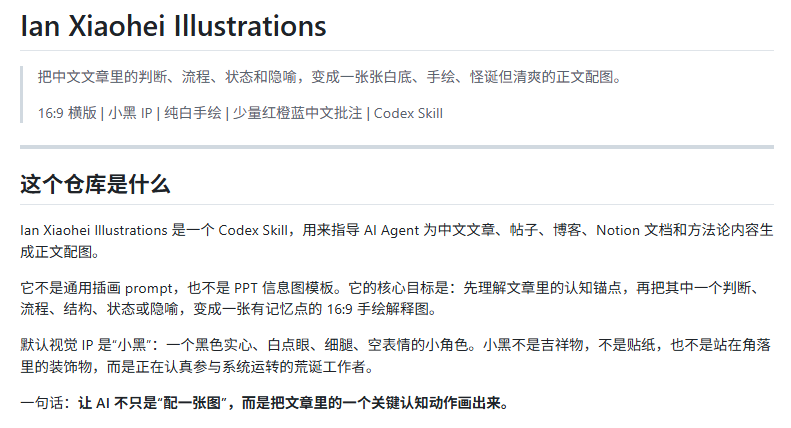
helloianneo/ian-xiaohei-illustrations is a Codex Skill open-sourced by Ian. Its image generation logic is to turn the judgments, processes, states, and metaphors in an article into white-background, hand-drawn, bizarre yet clean body-text illustrations.
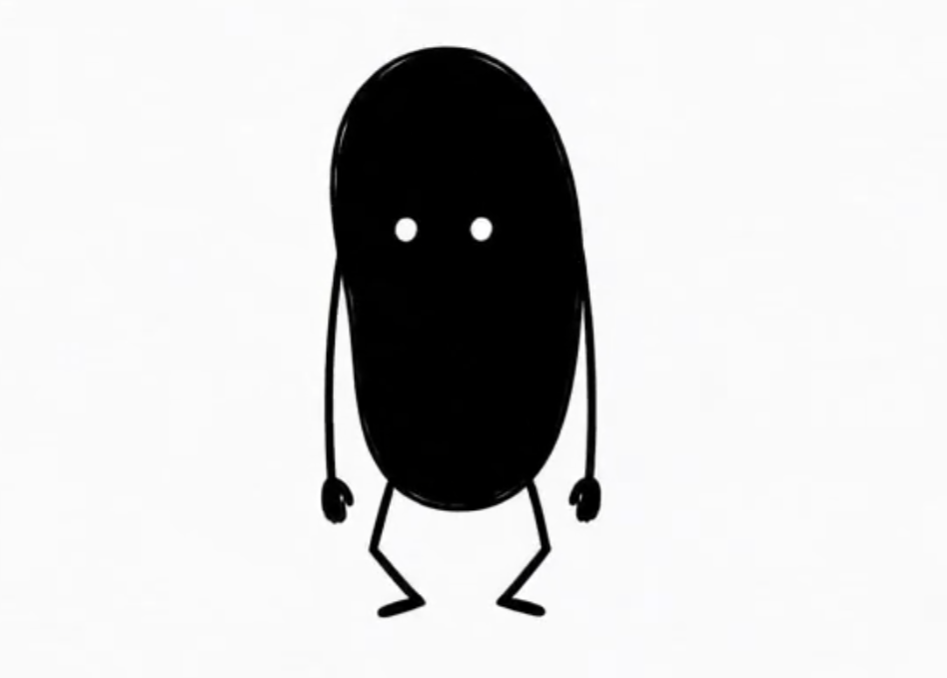
Xiahei looks like this: solid black, white dot eyes, thin legs, blank expression.
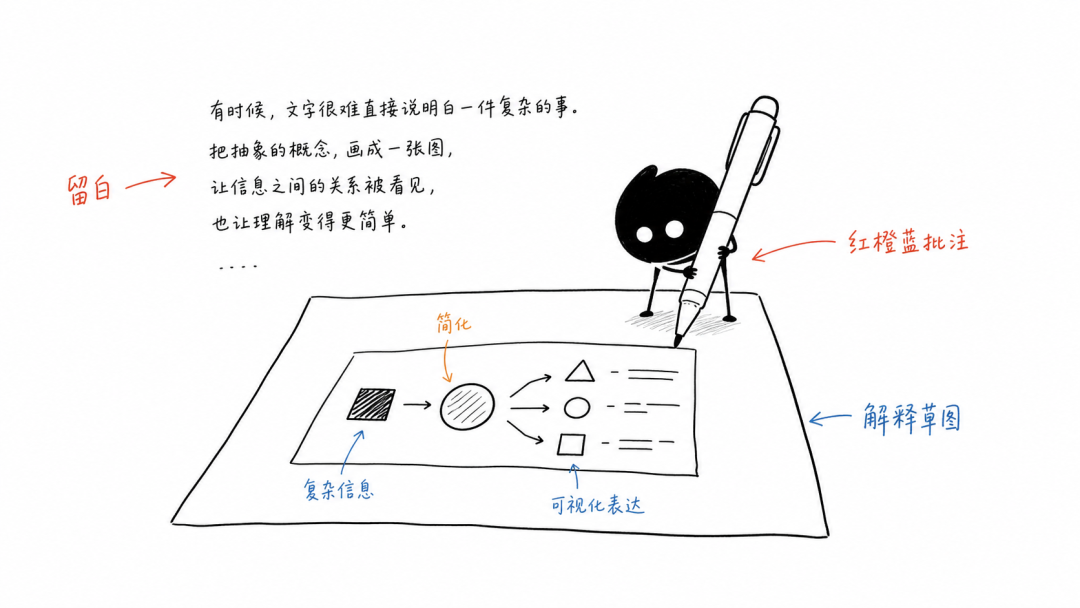
The images produced by Xiahei Skill are generally 16:9 white-background hand-drawn, with a few red, orange, and blue Chinese annotations, lots of negative space, looking like explanatory sketches a product designer casually drew on white paper.
Project address:https://github.com/helloianneo/ian-xiaohei-illustrations
02. Project Hands-On Test
case 1 Illustration planning
Xiahei Skill has several ways to use it. The first is illustration planning. Let's test it with one of our previous articles.
Prompt:
Use Xiahei Skill, but don't generate images yet. Please analyze which parts of the article below are worth illustrating, and output a shot list of about 5 images. For each image, clearly write: after which paragraph it goes, the theme, the core meaning, the structure type, what Xiahei is doing, and suggested Chinese annotation words.
Article:
Today I'm posting something suitable for academics.
Nowadays there are more and more AI academic tools. Writing speed has gone up, but after carefully checking once, flaws are everywhere.
What's even worse is that AI can write an argument very firmly, but the original literature cited may not actually support that argument.
Recently I saw an academic research project on GitHub specifically solving this kind of problem, and it already has 30K Stars.
Image
01
Project Introduction
Academic Research Skills (ARS) is an open-source academic research Skill package for Claude Code . It breaks apart stages such as topic selection, literature search, paper writing, peer review, revision, and formatting, letting AI participate in stages while key judgments are still left to us.
This project covers the complete academic workflow from topic research, literature search, paper writing, peer review, and revision to final formatting and process summary.
Image
This project mainly includes four groups of Skills:
Deep Research: for deep research, literature review, systematic review, and fact-checking.
Image
Academic Paper: assists with paper writing, abstract generation, format conversion, citation format checking,LaTeX / PDF output.
Image
Academic Paper Reviewer: simulates peer review, reviews papers from multiple angles, and gives quality scores and revision suggestions.
Image
Academic Pipeline: strings together the process from research to manuscript, advances by stages, and adds academic integrity checks in between.
Image
It's also especially simple to use.
If we are already using Claude Code, we can install the plugin directly with two lines of commands.
/plugin marketplace add Imbad0202/academic-research-skills
/plugin install academic-research-skills
Image
02
Project hands-on test
The four skill groups in the project complement each other, and over a dozen skills will appear alternately throughout the process of completing our paper. For example, let the project guide us in writing a paper:
Prompt: Guide me in writing a paper about the impact of declining birth rates.
The plan mode skill in the Academic Paper skill group will use a guided method to help us plan a paper.
Image
Through questions, it obtains the paper's current progress and which structure we want to use.
Image
After we finish answering about the progress and choose the paper structure, based on the current paper progress, it will recommend that we first conduct deep-research.
Image
Of course, during deep-research, it will also determine some directional questions about the paper through follow-up questions.
<Click the image and swipe up or down to view all content>
As can be seen, this has switched to the full mode process of the Academic Paper skill group.
The process directly enters Phase 1: it produced a research question brief and methodological blueprint for us.
It will also carefully confirm some directional questions before conducting the literature search. The process is really meticulous.
<Click the image and swipe up or down to view all content>
I think the literature search results divided into four directions are already comprehensive enough, but I did not expect that it could also list some limitations.
<Click the image and swipe up or down to view all content>
After Phase 3: Analysis and Synthesis is completed, we are given two options:
Enter Phase 4: directly write the complete research report.
Or take this research foundation back to the Plan mode of academic-paper and enter chapter-by-chapter guided planning.
The second option is to return to our original goal: accumulate literature first, then do paper planning.
Image
We now have initial literature collection, and the progress is no longer a blank slate. Moreover, through the process just now, the core thesis of our paper has also been distilled.
<Click the image and swipe up or down to view all content>
With the core argument, it will help us plan chapter by chapter. ARS will not directly write the entire text for us, but instead conduct a series of questions and answers through skills, trying as much as possible to incorporate our views.
After one round of inquiry, if there are no revisions, it will enter full mode and let the AI write the complete first draft of the paper.
<Click the image and swipe up or down to view all content>
The essence of this project is the academic integrity gate and citation audit.
If we simply ask, "Help me review the entire paper." ARS will specifically insert checkpoints into the paper process to check for fabricated citations, data errors, claims not supported by literature, methodological packaging, AI hallucination results, and other such issues.
Specifically, this is done by directly invoking the Academic Paper Reviewer skill group.
<Click the image and swipe up or down to view all content>
As can be seen, ARS will score our paper from many dimensions at a high level, and will also concretely tell us which paragraphs or sentences need revision.
<Click the image and swipe up or down to view all content>
You can see the final result: the structure is very complete, and the content is substantial as well. As a course-level paper, it is already presentable.
03
Dig a little deeper
Compared with writing a complete paper, I care more about the approach behind ARS: breaking academic research into an AI workflow that can be repeatedly executed, leaves a process trail, and can be checked.
Schools can use ARS for paper writing tutoring and also for academic integrity checks. Research teams can use ARS for literature reviews and project pre-research. Journals and educational institutions can use it for initial screening review. R&D, consulting, and investment research teams in enterprises can also use similar processes to check the evidence chain in reports.
In particular, features such as "citation auditing" and "claim support checking" are very likely to become core monetization points for future AI academic tools.
Many AI tools are still stuck at the level of "helping you write more like a paper," but the real trouble has not been solved: Does every conclusion have literature support? Have citations been distorted? Was the data moved over from a different context?
AI does not have to rush to finish professional work all at once. A better approach is to embed itself in professional processes, help people ask follow-up questions, verify, and review, and fill in the steps that are most easily overlooked.
It took only a few minutes to select five illustration points:
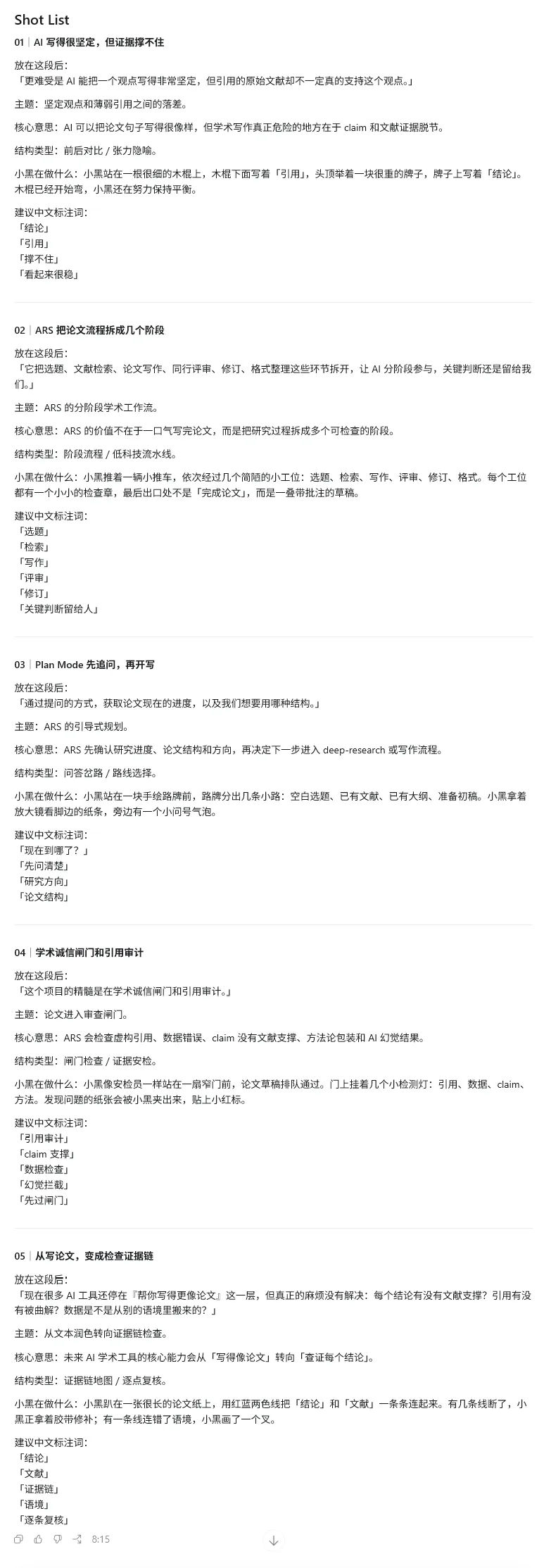
These 5 points are generally well chosen, capturing several places in the article where readers' minds will pause. This set of images is not spread evenly across functional modules; it selects the places in the article where judgment truly needs to be established..
Case 2 body illustrations
The second way to use it is to directly generate body illustrations: give it an article, and it will directly prepare the illustrations for you.
Prompt: Use the Xiaohei Skill to generate 4 Xiaohei grotesque body illustrations for the article below. Requirements: 16:9 horizontal format, pure white background, black hand-drawn line art, a small amount of red-orange-blue Chinese handwritten annotations.
Article:
Today I will post something suitable for front-end work.
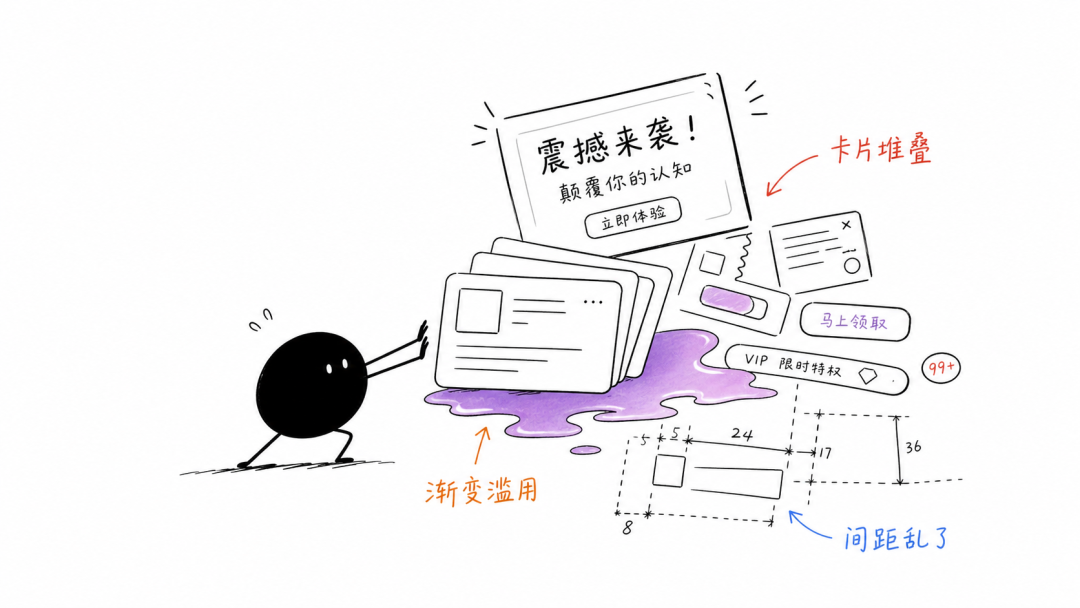
To be honest, some current AI Agent front-end aesthetics are extremely poor: layouts are overly centered, cards are stacked, gradients are overused, whitespace and hierarchy are unnatural, motion lacks rhythm, and fonts and spacing lack a premium feel. The webpages produced look very cheap, and a representative example is Codex.
A few days ago, I finally discovered on GitHub a project called Taste Skill that can solve the problem of poor aesthetics in AI Agent, and the project repository currently has about 40,000+ Stars.
Image
01
Project introduction
Taste Skill is a front-end design skill library for AI Agent, with the goal of helping AI break away from templated, homogenized, and aesthetically lacking front-end work.
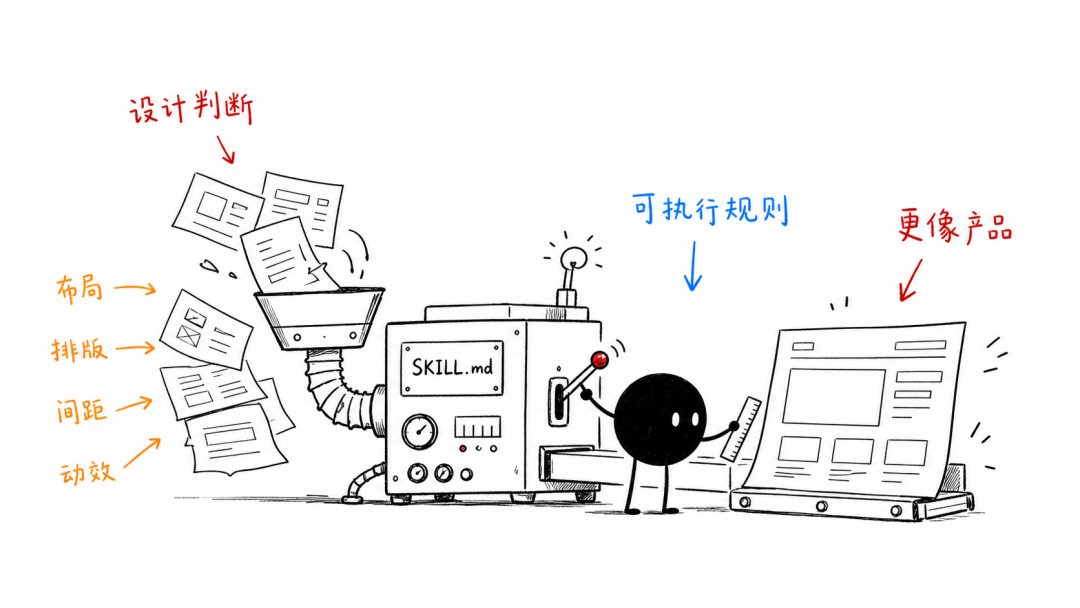
It transforms things that originally required design experience and judgment, such as layout, typography, motion, spacing, visual density, and design language, into SKILL.md instructions that AI Agent can read and execute, thereby improving design judgment when AI generates interfaces.
Taste Skill currently includes a variety of skill modules for different purposes, with each module solving a specific problem:
design-taste-frontend
The default Skill infers the design language according to requirements and controls the output through several key dimensions, such as layout variation, motion intensity, and information density.
gpt-taste
A strict version suitable for GPT/Codex, with higher requirements for layout variation,GSAP motion, and anti-templating.
image-to-code
Suitable for scenarios where you first need to make webpage reference images and then have AI reproduce them as front-end code.
redesign-existing-projects
Used to transform existing projects. First review the existing UI, then fix issues such as layout, spacing, hierarchy, and visual style.
high-end-visual-design
A slightly high-end, restrained, and refined visual style, emphasizing soft contrast, whitespace, typographic quality, and natural motion.
minimalist-ui
A modern minimalist product interface in the vein of Notion and Linear, suitable for SaaS, tool-based products, developer products, and content-oriented back offices.
industrial-brutalist-ui
An industrial style with a rough feel, Swiss typography, strong contrast, and experimental layouts, suitable for a more distinctive and sharper visual expression.
full-output-enforcement
Used to constrain AI so it does not only provide half-finished work, placeholders, or omitted code; suitable for handling the problem of incomplete Agent output.
Image generation related skills
Including imagegen-frontend-web, imagegen-frontend-mobile, and brandkit, used to generate reference images such as website visual drafts, mobile interface flows, and brand visual boards, which are then handed to Codex, Cursor, or Claude Code for implementation.
Installing Taste Skill is very simple; it can be installed directly via the CLI:
npx skills add https://github.com/Leonxlnx/taste-skill
If you only want to install one skill, you can also specify the skill name:
npx skills add https://github.com/Leonxlnx/taste-skill –skill “design-taste-frontend”
The project also supports a more lightweight way of use: directly copy any SKILL.md into the project, or paste it into a ChatGPT / Codex conversation to use.
02
Project hands-on testing
Codex hands-on test 1
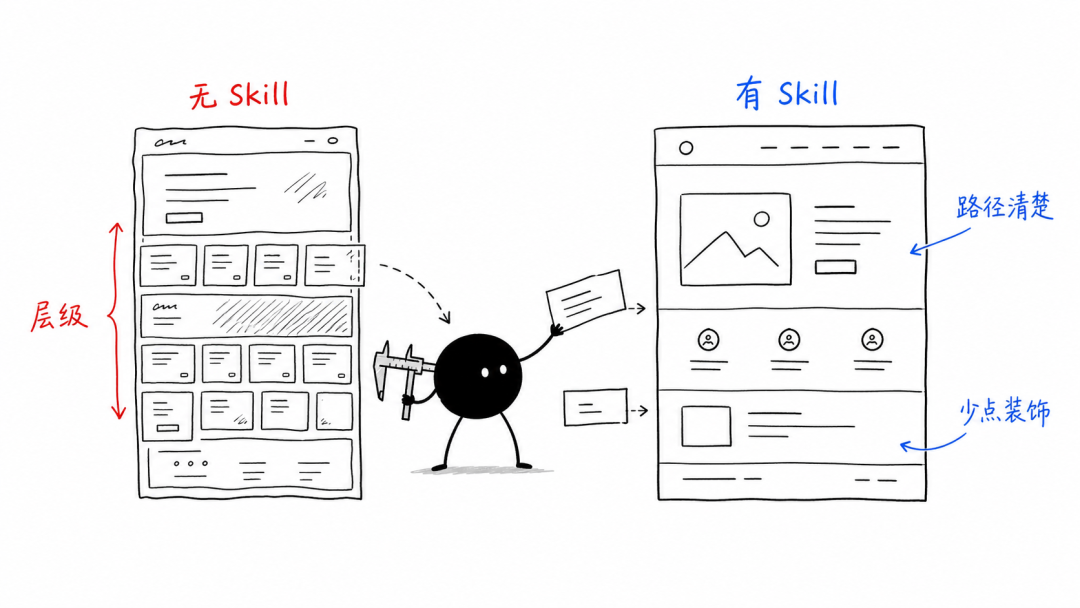
Let's generate a webpage in two cases, without Skill and with Skill, and compare the results.
Without Skill:
Prompt:
Help me implement from scratch the hero section of an AI Agent product website, without using any skill.
Product name: LoopPilot
Product positioning: an AI Agent workspace that helps teams automatically plan, execute, and review tasks.
Target users: independent developers, small teams, AI product managers.
Page feel: not a generic SaaS template feel, no large blue-purple gradients, no piling up cards. I hope for a high-end, restrained, clear information hierarchy, while carrying a bit of futurism and utility feel.
Please complete the following:
1. Design a complete hero section
– Include the product name, main headline, subheadline, primary CTA, secondary CTA
– Show 3 core capabilities: automatic task breakdown, continuous execution, review and optimization
– There needs to be a product interface preview area, but it should not look like a generic dashboard template
– The hero section needs a clear visual memory point
2. Design style requirements
– Use a non-template layout, avoid stacking all content in the center
– Clear typographic hierarchy; the headline should have impact but not be rough
– Keep colors within 3-5 main colors
– Motion is allowed, but it should serve information expression, not show off technique
– The page needs to adapt to mobile and desktop
3. Code requirements
– Please directly output complete runnable code
– Do not use placeholders, do not omit any key code
– Do not only give design suggestions; actually implement the page
– If components are used, please ensure all components are written out completely
– If styles are needed, please write out the complete CSS / Tailwind class
4. Acceptance criteria
– At first glance, the page must not look like a SaaS template generated by AI by default
– The visual hierarchy is clear and the CTA is obvious
– It must also hold up when screenshotted at 9:16 on mobile
– All text must not overflow or overlap
– The final result should look like a real product's hero section that is ready to launch
Please briefly explain your design direction first, then directly provide the complete implementation.
▲ Swipe up and down to view the full text
Desktop effect:
Image
Mobile effect:
<Tap the image and swipe up and down to view all content>
The version without the Skill did not fall into the typical SaaS hero section formula of "centered title + three cards + blue-purple gradient".
But the product feel is weaker; the workspace on the right looks like a decorative image, and users are drawn in by the large headline and graphics, yet in the end cannot figure out how the product helps teams work or how it forms a closed loop.
The mobile version is still viewable, but the title line breaks are a bit rigid.
Using the Taste Skill:
Prompt:
Please use design-taste-frontend and full-output-enforcement from Taste Skill to help me build an AI Agent product website hero section from scratch.
Product name: LoopPilot
Product positioning: an AI Agent workspace that helps teams automatically plan, execute, and review tasks.
Target users: independent developers, small teams, AI product managers.
Page vibe: no generic SaaS template feel, no large-area blue-purple gradients, no piling up cards. I want a sophisticated, restrained, and clear information hierarchy, with a touch of futurism and a tool-like feel.
Please complete the following:
1. Design a complete hero section
– Includes product name, main headline, subheadline, primary CTA, secondary CTA
– Showcase 3 core capabilities: automatic task breakdown, continuous execution, review and optimization
– There needs to be a product interface preview area, but it should not look like a generic dashboard template
– The hero section must have a clear visual memory point
2. Design style requirements
– Use a non-templated layout, and avoid stacking all content in the center
– Clear font hierarchy; the headline should be impactful but not crude
– Keep colors within 3-5 main colors
– Motion effects are allowed, but they should serve information delivery, not show off
– The page needs to adapt to both mobile and desktop
3. Code requirements
– Please directly output complete runnable code
– Do not use placeholders, and do not omit any key code
– Do not just give design suggestions; actually implement the page
– If components are used, please ensure all components are fully written out
– If styles are needed, please fully write out the CSS / Tailwind classes
4. Acceptance criteria
– At first glance, the page must not look like a default AI-generated SaaS template
– The visual hierarchy is clear, and the CTA is obvious
– It must also hold up in a 9:16 mobile screenshot
– None of the text may overflow or overlap
– The final result should look like a real product's hero section that is ready to launch
Please briefly explain your design direction first, then directly provide the complete implementation.
▲ Swipe up and down to view the full text
Desktop effect:
Image
Mobile effect:
<Tap the image and swipe up and down to view all content>
Taste Skill added a top navigation, which makes it look very comfortable. Which website doesn't have a navigation bar at the top these days?
The product preview on the right is no longer just an abstract graphic; users can understand the product's path through step-by-step text.
The mobile experience is also more mature, with capability points turned into independent information blocks, and the reading order feels quite natural.
Codex hands-on test 2
Of course, existing projects can also use Taste Skill to refactor their frontend once.
Prompt:
Please use redesign-existing-projects, minimalist-ui, high-end-visual-design, and full-output-enforcement in Taste Skill to help me refactor the homepage of an existing project's official website.
Project location:
D:\360MoveData\Users\win\Desktop\公众号\wechat-topic-dashboard-ugly-homepage
Background:
This is the official website homepage of a "WeChat Official Account Topic Management Platform." The product is named Content Desk. It is aimed at content teams on WeChat Official Accounts, Xiaohongshu, WeChat Channels, Zhihu, and other platforms, helping them manage topics, assign owners, track status, and view AI recommendations and content performance.
Current problems:
The current page has both functionality and information, but the visuals are very templated:
– Excessive blue-purple-pink gradients
– Exaggerated large headlines
– The page is overly centered
– Severe card stacking
– Repeated CTAs
– Product screenshots look like decoration, not like a real product
– Loose information hierarchy
– Very long reading path on mobile
– Overall, it looks like an ordinary AI-generated SaaS landing page
Refactoring goals:
Without changing the product theme and core information, refactor it into a more professional, more restrained, and more credible homepage for a content operations tool website. The final result should look like the official website of a real SaaS product preparing to launch, not a template page.
Please complete the following:
1. First-screen refactoring
– Keep the product name Content Desk
– Keep the product positioning: a WeChat Official Account topic management platform for content teams
– Need a clear main headline, subheadline, primary CTA, and secondary CTA
– Do not use exaggerated expressions like "300% efficiency improvement"
– The first screen must show a credible product interface preview, not an ordinary decorative image
– Visually, it should have a memorable point, but must not be gaudy
2. Product capability display
The following capabilities need to be displayed:
– AI topic recommendations
– Multi-platform topic management
– Status and owner tracking
– Deadline and priority management
– Content risk alerts
– Publishing performance review
The display method should not simply stack 6 large cards; reorganize the information hierarchy according to content operations scenarios.
3. Workflow display
Show a content team's process from topic selection to review:
– Collect trending topics
– Evaluate topics
– Assign writing
– Review and publish
– Data review
The process should echo the product interface, not just be ordinary 1, 2, 3 step cards.
4. Page style requirements
– Leaning Notion / Linear / Feishu Bitable / modern B2B SaaS tool feel
– Restrained, clean, trustworthy
– Moderate information density, not too empty
– No large-area blue-purple gradients
– No stacked large rounded-corner cards
– No flashy shadows
– No marketing tone
– Must have clear layout rhythm, whitespace, typography hierarchy, and status colors
– Desktop-first, while also working naturally on mobile
5. Code requirements
– Directly modify the existing files in the project
– Output a complete runnable version
– Do not omit code
– Do not use lorem ipsum
– Do not just give design suggestions, actually implement the page
– Ensure text does not overflow or overlap on desktop and mobile
– Keeping a pure static HTML / CSS implementation is sufficient, no need to introduce a complex framework
6. Acceptance criteria
– At first glance it must not look like a default AI-generated SaaS template
– The product interface preview must be credible, and it must be clear that this is a "content topic management tool"
– The CTA is clear but not noisy
– Capabilities and process are not a pile of cards, but organized around real content operations scenarios
– The mobile reading order is natural
– The visual difference before and after the refactor must be obvious
– The final page is suitable as a live case study of Taste Skill refactoring an existing project
Please first briefly point out the main problems with the original page, then explain your refactoring strategy, then directly modify the project files and provide a complete implementation.
▲Swipe up and down to view the full text
Original desktop effect:
<Click the image and swipe up and down to view all content>
Original mobile effect:
<Click the image and swipe up and down to view all content>
The original page's blue-purple-pink gradients and heavy shadows were too eye-catching, the first screen was overly centered, and the features and process were just evenly stacked cards.
The product screenshot in the middle was also rather decorative; the data and interface structure inside looked fake, more like a mockup placed there to fill the first screen.
The mobile problems were even more obvious: navigation, title, buttons, screenshots, and feature cards piled down one after another, making the reading path very long and the visual noise heavy.
Refactored desktop effect:
Image
Refactored mobile effect:
<Click the image and swipe up and down to view all content>
After the refactor, the page layout looks much more pleasing, and the original page colors were so harsh they could blind you.
On the desktop, the left side shows the product positioning and core data, while the right side shows a credible topic workspace preview. Users can understand at a glance: this is a tool for managing topics, statuses, AI suggestions, risks, and publishing performance.
The mobile information order becomes: brand navigation, product positioning, main title, CTA, core data. Users do not have to first go through a bunch of gradients and marketing talk, and can understand what the product is faster.
03
Dig a little
AI Agents are becoming part of the development process.
The Stack Overflow 2025 Developer Survey shows that 84% of developers have used or plan to use AI tools, and 51% of professional developers use them every day.
Image
Meanwhile, the AI Code Tools market is expected to grow from $4.3 billion in 2023 to $12.6 billion in 2028.
Image
But the fact that AI can write code does not mean it can build products. Especially for front-end pages, many results generated by Agents are still stuck at the Demo stage.
Taste Skill packages front-end designer experience and aesthetics into skill rules, enabling AI Agents to generate interfaces closer to real product delivery standards.
It solves several of the most common pain points in AI front-end development: templated pages, excessive card stacking and gradients, rough mobile adaptation, lack of credibility in product previews, chaotic information hierarchy in admin panels, and high refactoring costs for existing projects.
Taste Skill can be used for AI product homepages above the fold, SaaS landing pages, admin management systems, content operations workbenches, Agent product Demos, client project prototypes, and UI refactoring of existing projects.
For small teams without a complete design team, it can significantly reduce the cost from idea to MVP, and from Demo to a presentable product.
The value of Taste Skill lies precisely in turning front-end aesthetics and product judgment into a reusable AI productivity.
Xiaohei Skill chose four points as the article's illustrations.
AI Agent front-end bad smells:
Taste Skill rule machine:
Comparison without Skill / with Skill:
Demo passing the delivery standard gate:
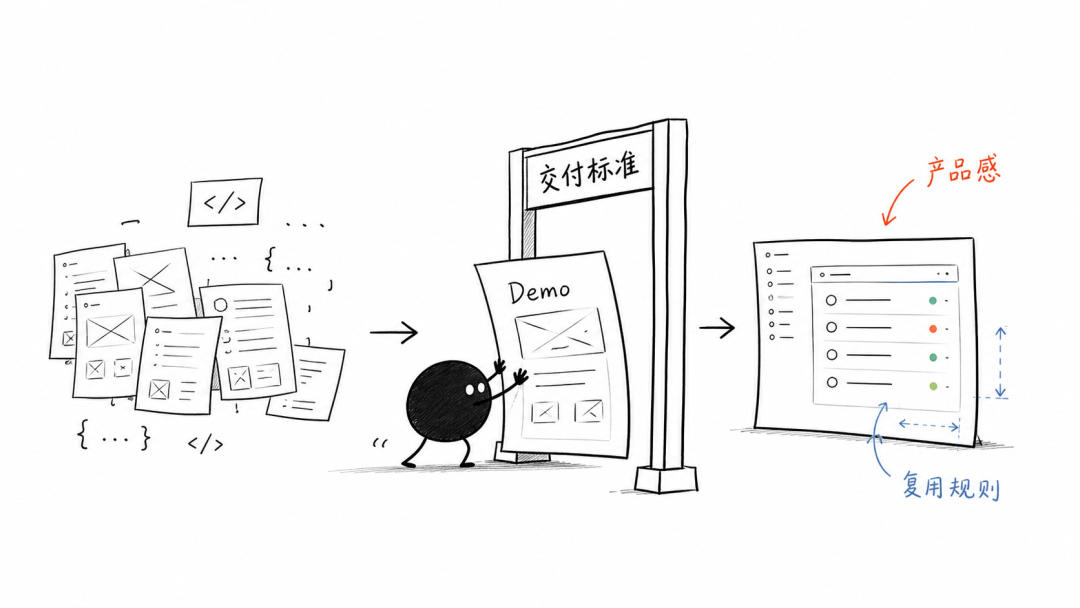
The logical order of the four selected points is very smooth: pain points, mechanism, real testing, and value convergence.
The article contains many skill modules and installation steps, but this content is more suitable for screenshots or main text explanations; Xiaohei placing the images where readers need to form judgments would be more effective.
case 3 single concept / paragraph image generation
The third type is directly giving a concept or a short paragraph, then using Xiaohei Skill to produce an image.
Prompt: Use Xiaohei Skill to generate an illustration for "Everyone has an antenna in their heart; as long as it can still receive signals of beauty, hope, joy, courage, and strength, one can remain forever young and radiant." The image should be grotesque but fresh, and Xiaohei must perform the core action.
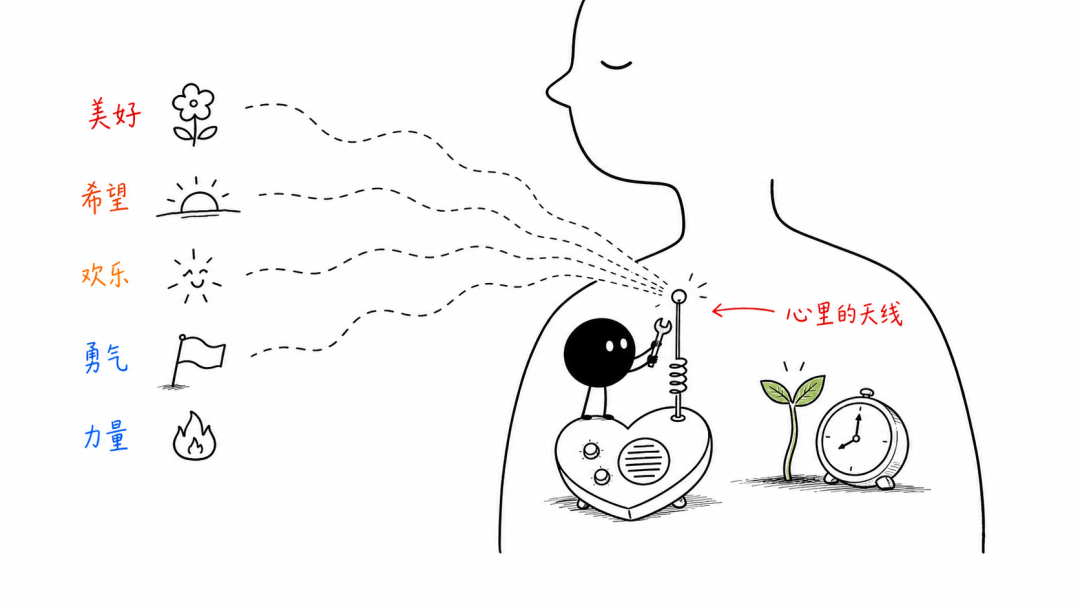
The metaphor is also clear: the five signal words beauty, hope, joy, courage, and strength correspond to flowers, sunrise, smiling faces, flags, and flames; the signal lines enter the antenna in the chest, then connect to a sprout and a clock.
Xiaohei performs the action in the image and does not become mere decoration on the side, which meets the requirements of Xiaohei Skill.
03. Xiaohei Skill personal stylization
Everyone may be thinking: I do not really like this little black figure; can I replace it with another character?
Of course you can. Everyone can customize their own style, and a single prompt can integrate their own IP image into the Skill.
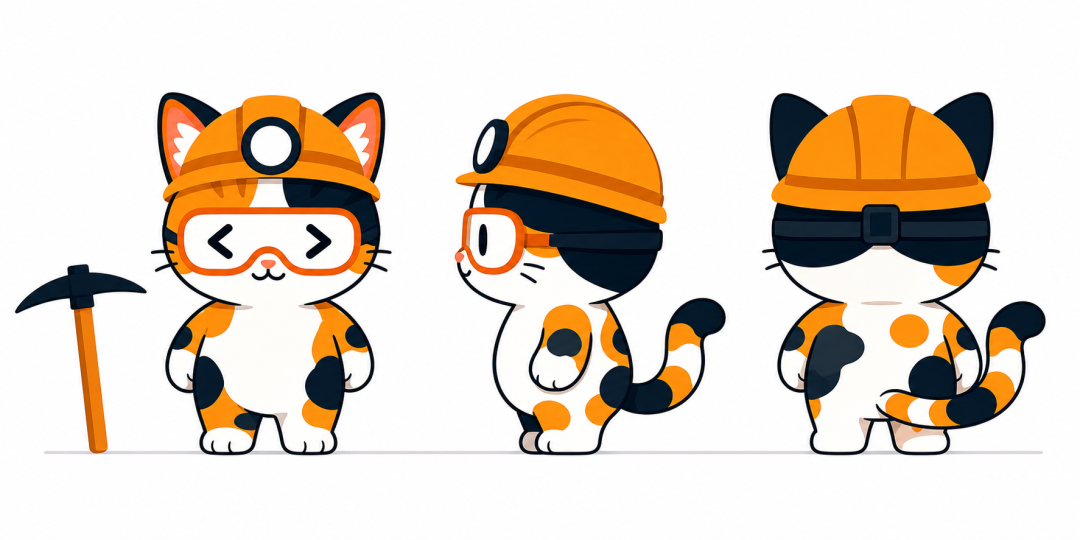
I provided Wawa's three-view drawing:
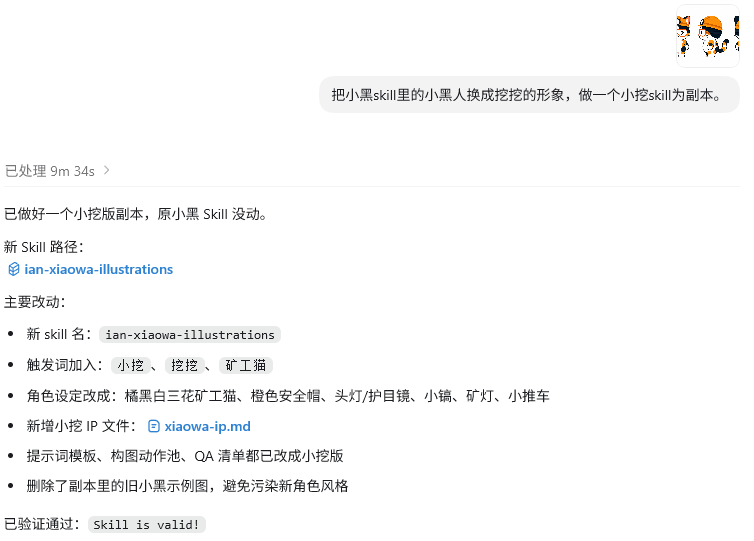
Then enter the prompt in Codex:
Prompt: Replace the little black figure in Xiaohei Skill with Wawa's image, and make a Xiaowa Skill as a copy.
This way we can get a Xiaohei Skill flavored with a personal IP. No, at this point it should be called Xiaowa Skill.
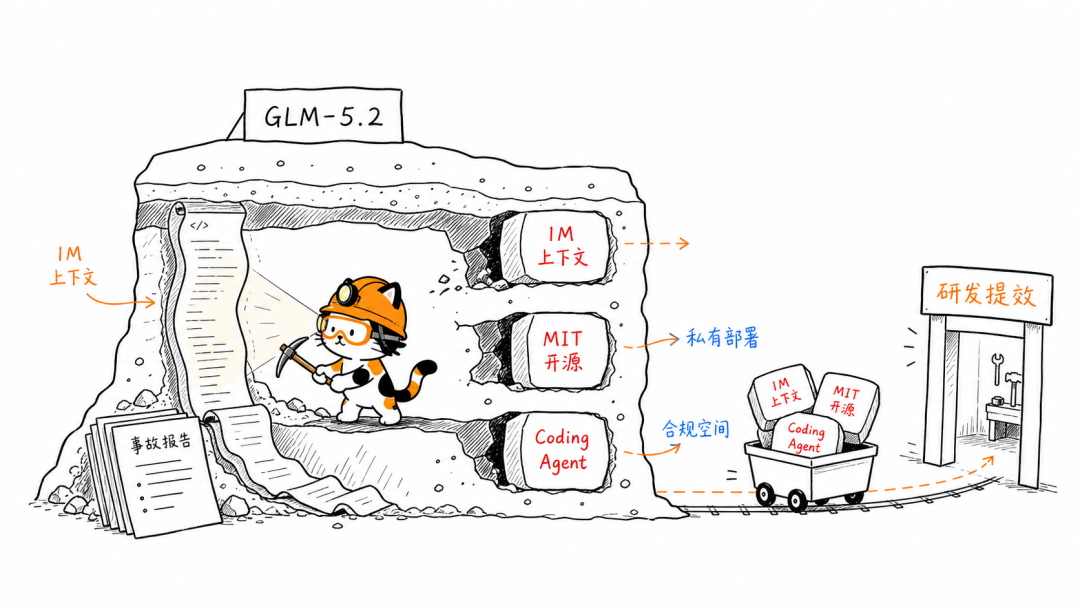
Generate an image and try it.
Prompt: Use Xiaowa Skill to generate an illustration for this passage: The GLM-5.2 update is very valuable when viewed in this context. The 1M context gives the model a chance to handle longer codebases and incident materials; the MIT license and open-source weights give teams more room in private deployment, cost control, and compliance review; Coding Agent capabilities accelerate R&D efficiency improvement, the direction easiest to implement.
Let's have another one, a quote-type image.
Prompt: Use the Xiaowa skill to generate an illustration for this passage: Great dreams are not waited for or shouted into existence, but fought for and built through action.
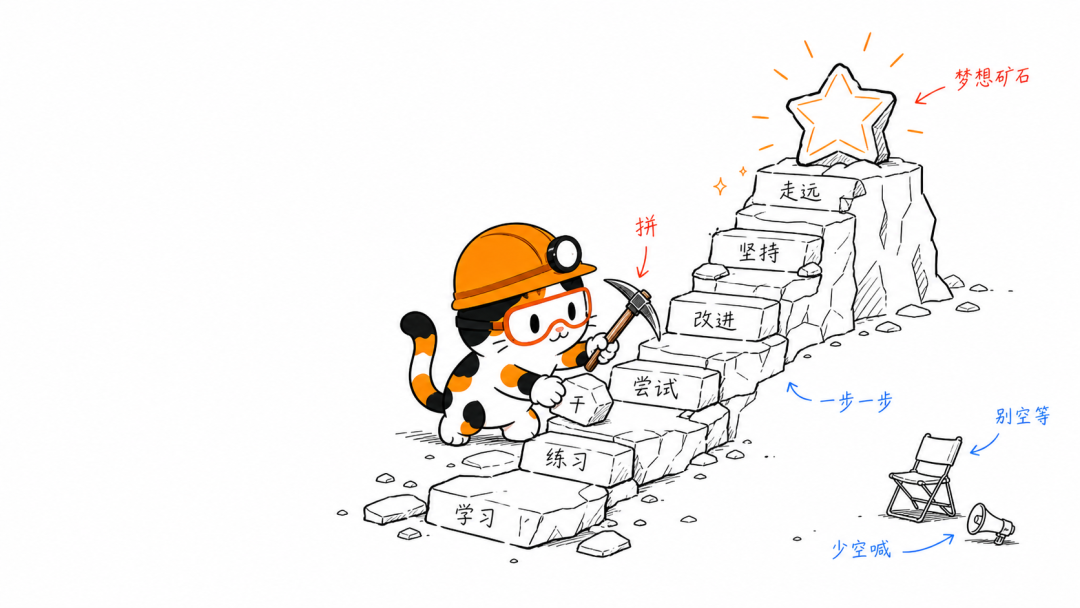
Really nice, let's have another one.
Prompt: Use the Xiaowa skill to generate an illustration for this passage: A general Agent connects the two ends together. The Agent can both understand the material and call on files, browsers, image generation, code, and local export tools. Once the PPT Skill is placed into this workflow, making a PPT shifts from "opening a certain tool" to "assigning a task."
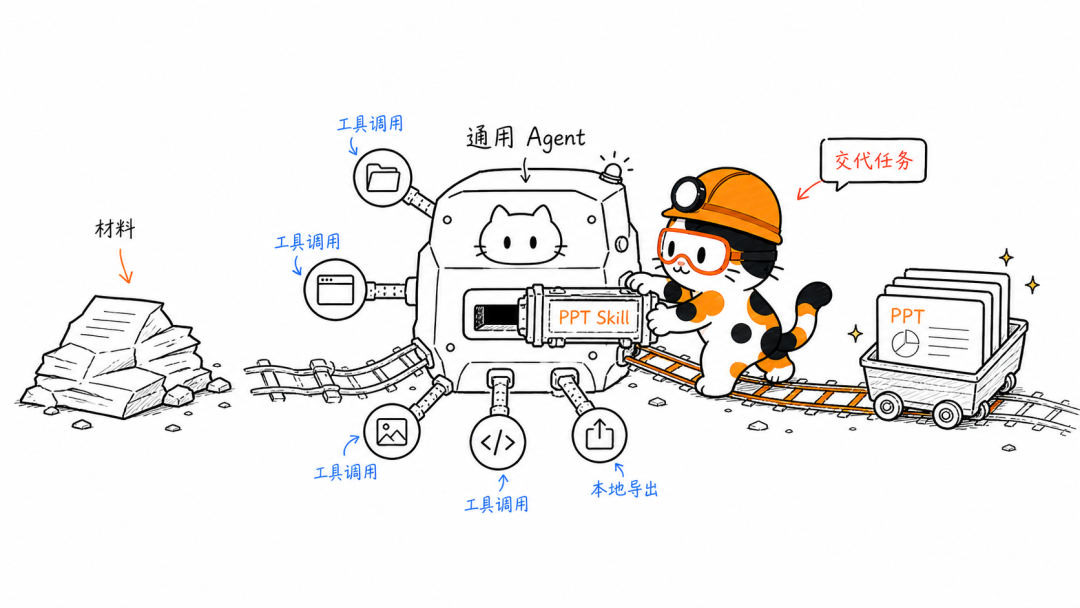
These images already have the "Xiaowa" IP flavor. The recognizable points: orange hard hat, headlamp, goggles, calico cat patches, small pickaxe, mine shaft, and mine cart are all there.
After readers see a few images from the same series, there's a good chance they'll remember this is the little miner cat that digs into concepts.
04. Dig a little
Content production is moving from pure text competition toward image-text structure competition.
WeChat public accounts, blogs, knowledge bases, product docs, and course scripts all need higher-frequency, lower-cost explanatory illustrations. Many teams can already use AI to write first drafts, and illustration strategy and visual style are starting to become the memorable points of an article.
Xiaohei Skill first determines where an article is worth illustrating, then draws abstract ideas, processes, states, and metaphors into clean hand-drawn explanatory images. For content creators, this is more suitable for long-term use than scrambling for assets on the fly, forcing in screenshots, or applying infographic templates.
Xiaohei Skill solves several things: reading fatigue in long articles, fragmented illustration styles, difficulty understanding abstract concepts, and creators lacking stable visual assets. With a personal IP transformation like Xiaowa, it can also become an account's own visual identity system.
As AI writing gradually becomes widespread, whether ideas can be drawn clearly, interestingly, and memorably will become a new point of differentiation for content accounts.
Original link:Github 狂揽 5K Stars,这个配图 Skill 真的超级好用