
What is Get Notes
Get Notes is a freeAI real-time speech-to-textmini program launched by Dedao. It features high-accuracy speech recognition technology that helps users quickly convert speech into text, and provides text polishing to optimize note content. The user interface is simple and easy to use, and it supports recording and text saving, as well as a timeline display, making it convenient to manage and review. It is suitable for a variety of scenarios such as work records, study notes, and personal memos, improving recording efficiency and capturing inspiration anytime, anywhere. It is currently completely free, with no usage limit, and is a capable assistant for boosting productivity.
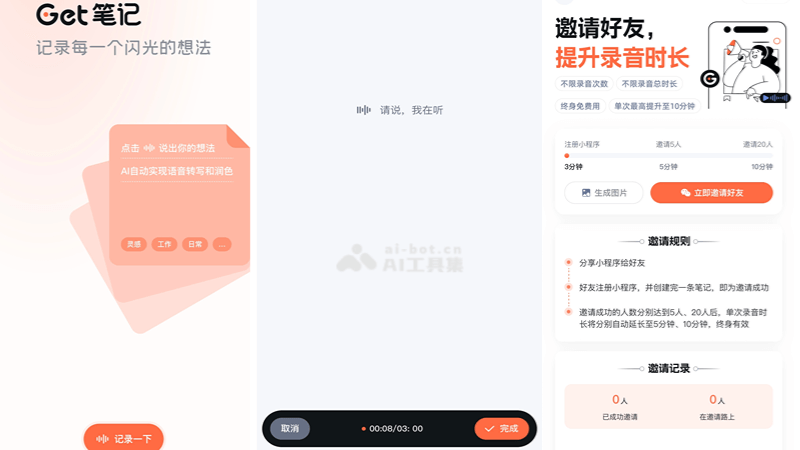
Features of Get Notes
-
Real-time speech transcription: Users speak their thoughts through the recording function, and AI technology can instantly convert speech into text, making it convenient to quickly record information.
-
Intelligent text polishing: The converted text will be intelligently polished by AI, improving the fluency and readability of the text, while removing redundant spoken words such as "um," "and then," etc.
-
Automatic title generation: Based on the user's recording content, AI can intelligently generate a suitable title, helping users quickly grasp the core of the note.
-
Recording and text saving: Users can save recording files and transcribed text, making it easy to review and use later.
How to use Get Notes
-
Open the mini program: InWeChat, search for "Get Notes mini program”。
-
Start recording: After entering the mini program, tap the record button to start recording your voice.
-
Real-time transcription: While you speak, AI will convert your speech into text in real time and display it on the screen.
-
View and edit content: After recording ends, you can view the text transcribed by AI. Manual editing of this text is supported.
-
Text polishing: Use the text polishing function, and AI will help you optimize the text, making the content more fluent and professional.
-
Save the note: After completing editing, save the recording and the transcribed text. You can review and use these notes in the mini program at any time.
Use cases of Get Notes
-
Meeting records: In work meetings, use Get Notes to quickly record discussion points and decisions, saving time on post-meeting organization.
-
Study notes: Students can use it in class to record the teacher's explanations, or record important concepts and thoughts during self-study.
-
Interview records: When journalists or researchers conduct interviews, they can use Get Notes to record the interview content, ensuring the accuracy and completeness of the information.
-
Inspiration capture: For creative workers such as writers and designers, Get Notes can help them record inspiration and ideas anytime, anywhere.
-
Language learning: Language learners can use Get Notes to practice pronunciation and record language practice, and the transcribed text can help learners check and improve.