
What is Genie Studio
Genie Studio is a one-stop embodied intelligence development platform launched by AgiBot, covering the full chain from data collection, model training, simulation evaluation to model inference. Genie Studio supports efficient collection of massive data, with a single machine capable of producing up to 1,000 entries per day, and provides self-developed and open-source robot foundation models, lowering the threshold for training. The platform has 6,000+ simulation scenarios and object assets, supporting user-side scenario reconstruction and visualization of evaluation results. Genie Studio's "one-click real-machine deployment" feature seamlessly migrates algorithms from the cloud to real machines, improving single-card inference performance and helping developers quickly realize the development and implementation of embodied intelligence applications.
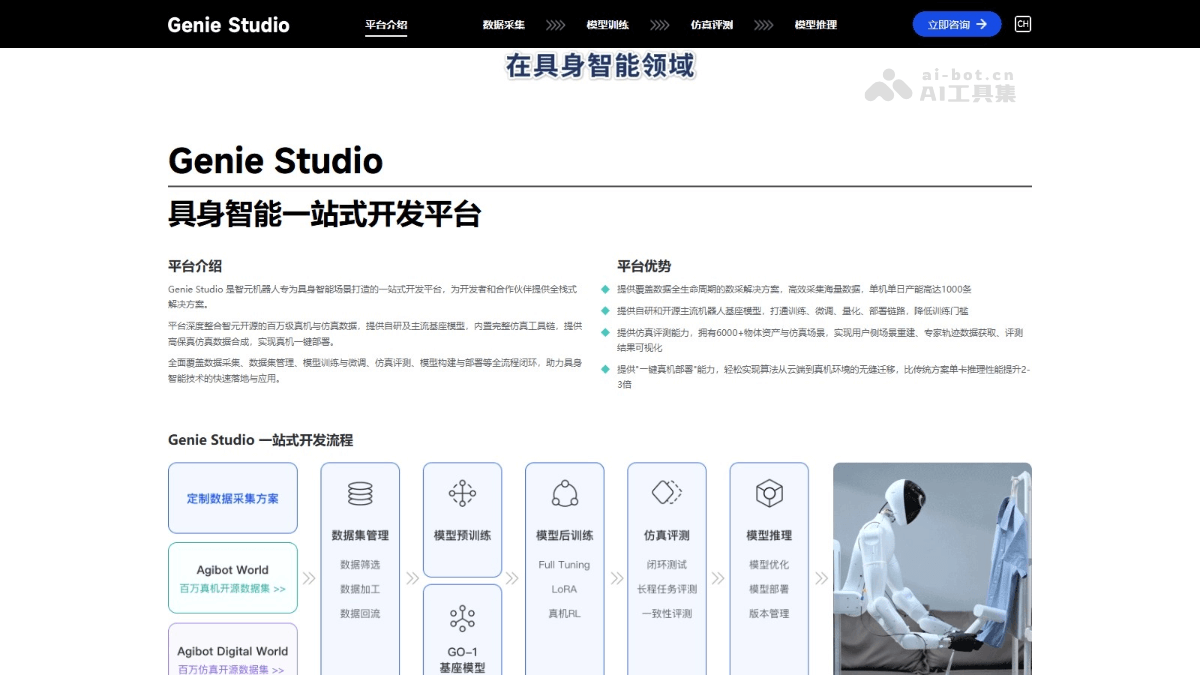
Main features of Genie Studio
- Data collection:
- Multimodal data collection: Supports the collection of data from multiple sensors, including vision, force sense, hearing, etc.
- Template-based task configuration: Task templates enable "one-click" data collection task generation and support multi-label task configuration.
- Multi-body and multi-end-effector data collection: Supports asynchronous collection across multiple robot bodies and end-effector devices.
- Simulation data synthesis: Based on simulation scenario reconstruction and expert trajectory generation strategies, supports automated collection of large-scale synthetic data.
- Model training:
- Pre-training/fine-tuning task templates: Provides seamless access to multiple open-source datasets and supports pre-training and fine-tuning.
- Self-developed training framework: Improves training efficiency and reduces storage and bandwidth consumption.
- Device-cloud cluster management: Supports clustered management of cloud and edge nodes to achieve coordinated resource scheduling.
- Simulation evaluation:
- High-fidelity simulation scenarios: Provides 6,000+ object assets and simulation scenarios and supports diverse task generation.
- Automated evaluation system: Supports standardized evaluation of nearly 100 manipulation tasks, with accurate and reliable evaluation results.
- Simulation teleoperation feature: Supports rapid verification of real-machine teleoperation features in simulation.
- Model inference:
- One-click real-machine deployment: Achieves seamless migration of algorithms from the cloud to real machines and supports multi-system deployment.
- Full-chain evaluation and optimization: Provides capabilities such as effectiveness evaluation, performance analysis, and version management.
- Flexible computing power and hybrid deployment: Supports lightweight operation on the robot body or edge computing collaboration, adapting to diverse hardware environments.
How to use Genie Studio
- Registration and login: Visit Genie Studio'sofficial website. Register an account and log in to the platform.
- Create a project: On the platform homepage or project management interface, click the "Create Project" button. Enter basic information such as the project name and description, and select the project type (such as embodied intelligence tasks, robot applications, etc.).
- Data collection:
- Configure data collection tasks:
- In the data collection module, select the data collection type according to your needs (such as vision, force sense, hearing, etc.).
- Configure data collection devices (such as cameras, sensors, etc.), and set collection parameters (such as frequency, resolution, etc.).
- Quickly generate collection tasks using task templates, supporting multi-label task configuration.
- Execute data collection: Start the collection task, and the platform automatically collects and stores data. For complex tasks, collect fine manipulation data based on teleoperation, and combine it with trajectory automatic generalization.
- Data management and annotation: After collection is completed, annotate and review the data to ensure data quality. Use the visualization tools provided by the platform for data annotation and verification.
- Configure data collection tasks:
- Model training:
- Select a model: In the model training module, select an appropriate pre-trained model or base model (such as the self-developed GO-1 or an open-source model). If you have a private dataset, upload the dataset for collaborative training.
- Configure training task: Set training parameters, such as learning rate, batch size, number of training epochs, etc.
- Training and optimization: The platform automatically performs model training and displays training progress and performance metrics in real time. According to the training results, adjust parameters or optimize the model structure.
- Simulation evaluation:
- Create a simulation scene: In the simulation evaluation module, select or create a simulation scene. The platform provides 6000+ high-fidelity object assets and scene templates. Configure parameters such as scene layout, lighting, and object materials according to requirements.
- Execute simulation evaluation: Deploy the trained model to the simulation environment and run the simulation task. The platform automatically generates evaluation tasks and provides a standardized evaluation system.
- Analyze evaluation results: View the simulation evaluation results, including performance metrics, task completion status, etc. Optimize the model or adjust the simulation scene according to the evaluation results.
- Model inference and deployment:
- One-click real-machine deployment: In the model inference module, click the "One-click real-machine deployment" button. The platform automatically migrates the model from the cloud to the target robot device.
- Performance optimization: Use the full-link evaluation system provided by the platform to perform performance analysis and optimization on the deployed model.
- Application release: Package the optimized model as an application, and deploy and distribute it based on the platform's release system.
Application scenarios of Genie Studio
- Robot research and development: Supports robot behavior development and optimization, and is suitable for a variety of robot research and development scenarios.
- Industrial automation: Helps smart factories and automated production lines improve production efficiency and quality.
- Logistics and warehousing: Optimizes logistics handling and warehousing management, and improves logistics efficiency.
- Service robots: Develop service robots for homes, catering, healthcare, etc., and improve service quality.
- Education and research: Supports robotics education and artificial intelligence research, and supports academic development.