
What is GaussianEditor
GaussianEditor is a 3D editing algorithm based on Gaussian Splatting that supports users in quickly and precisely modifying 3D scenes. Through Gaussian semantic tracing and hierarchical Gaussian Splatting, it provides a high degree of editing control and stability while maintaining rendering quality. The editing process usually takes only 5-10 minutes, significantly improving the efficiency of 3D editing. This technology is particularly suitable for fields such as game development and virtual reality, and has broad application prospects.
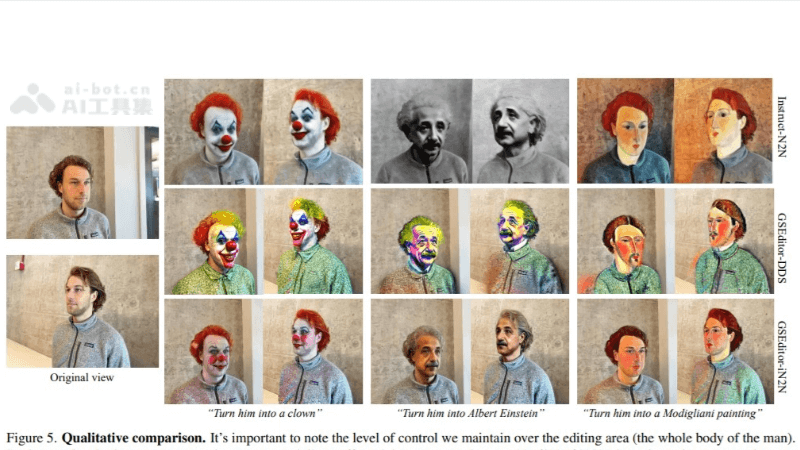
Main features of GaussianEditor
- Fast editing: Provides fast 3D scene editing capabilities, with a single editing session usually taking only 5-10 minutes.
- Gaussian semantic tracing: Classifies and tracks elements in the scene through semantic information, enabling more precise editing control.
- Hierarchical Gaussian Splatting (HGS): A new Gaussian representation method that can stably achieve fine editing results under random generation guidance.
- 3D inpainting algorithm: A specially designed algorithm that allows users to quickly delete unwanted objects from the scene or add new objects.
- Explicit point cloud representation and implicit editing: Combines explicit 3D point cloud representation with implicit editing capabilities, improving the flexibility and accuracy of editing.
Technical principles of GaussianEditor
- 3D Gaussian Splatting:A 3D scene representation technique that represents a scene by decomposing it into a series of Gaussian distributions. Each Gaussian represents a point or small region in the scene, with attributes such as position, scale, orientation, opacity, and color.
- Gaussian Semantic Tracing: Based onsemantic segmentation technology, semantic information in 2D images (such as object categories) is back-projected onto Gaussian points in 3D space, assigning a semantic label to each Gaussian point, thereby achieving precise control over specific elements in the scene.
- Hierarchical Gaussian Splatting (HGS):By applying different degrees of constraints to Gaussian points at different training stages, hierarchical editing of 3D scenes is achieved. Gaussian points in the early training stage are strictly constrained to preserve the original structure of the scene, while Gaussian points in the later training stage allow more variation to capture details.
- 3D inpainting algorithm:When objects are deleted from or added to the scene, the surrounding Gaussian points need to be inpainted to maintain the continuity and consistency of the scene. The 3D inpainting algorithm achieves this goal by recalculating and adjusting Gaussian points.
- Optimized renderer:GaussianEditor uses a highly optimized renderer to render 3D scenes, ensuring the quality and efficiency of the rendering results.
GaussianEditor project address
- GitHub repository:https://github.com/buaacyw/GaussianEditor
- arXiv technical paper:https://arxiv.org/pdf/2311.14521
How to use GaussianEditor
- Preparation stage:Ensure that the required software and libraries are installed on the computer, including the Python environment and related dependency packages. VisitGithubDownload and install the GaussianEditor codebase.
- Data preparation:Prepare the 3D scene data you want to edit. This includes 3D models, point clouds, or other forms of 3D data.
- Environment setup:Set up the development environment according to GaussianEditor's documentation, including configuring a Python virtual environment, installing dependencies, etc.
- Scene Loading:Use the interfaces or tools provided by GaussianEditor to load 3D scene data.
- Editing Operations:Use GaussianEditor's features to perform editing. This may include:
- Use Gaussian semantic tracking to select and mark the specific regions or objects you want to edit.
- Apply layered Gaussian splatting techniques to refine or modify specific parts of the scene.
- Use 3D inpainting algorithms to add or remove elements in the scene.
- Real-Time Rendering and Feedback:During the editing process, use GaussianEditor's rendering capabilities to view the editing results in real time and make adjustments as needed.
- Fine-Tuning and Optimization:Fine-tune the scene based on the rendering results to achieve the desired visual effect.
Application Scenarios of GaussianEditor
- Game Development: In game design, quickly create or modify 3D environments and character models to improve development efficiency.
- Virtual Reality (VR) and Augmented Reality (AR): Customize or optimize 3D scenes for virtual reality and augmented reality applications to enhance the user experience.
- Film and Visual Effects: In film production and the visual effects field, it is used to quickly iterate on and modify 3D assets to meet complex scene requirements.
- 3D Printing: In the field of 3D printing, make fine adjustments to models to ensure the quality of the printed product.
- Architectural Visualization: In architectural design and planning, quickly modify and optimize architectural models for more intuitive presentations.