
What Is FreeAskInternet
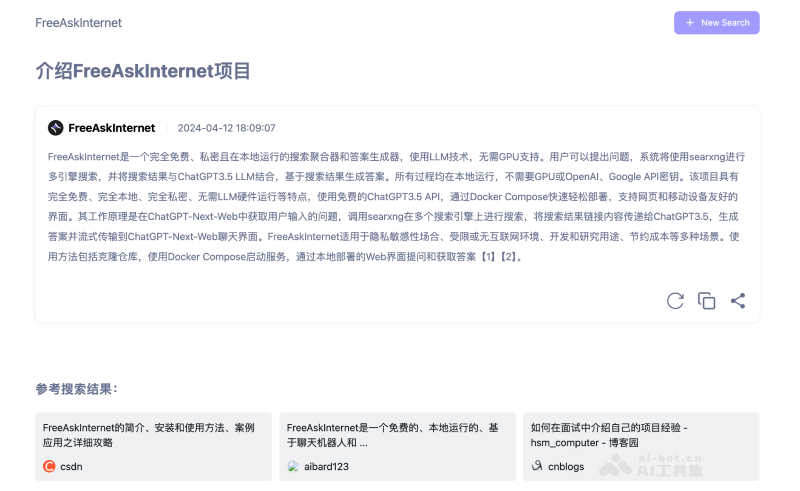
FreeAskInternet is a free and open-source local AI search engine that integrates advanced large language models (LLMs) such as GPT-3.5 with the SearXNG meta search engine to provide users with search and intelligent answer generation services. The project is completely free and open-source, runs locally, and does not require GPU support, ensuring the privacy and security of user data. FreeAskInternet supports custom LLMs, such asOllama, and simplifies the deployment process through Docker Compose, allowing users to quickly set up a powerful AI search and question-answering system on their own computers.

Features of FreeAskInternet
- Localized Search Aggregation: Combined with the SearXNG meta search engine, FreeAskInternet can perform multi-engine searches locally and aggregate information from different sources.
- Intelligent Answer Generation: Uses integrated large language models (such as ChatGPT3.5, Kimi, Qwen, ZhipuAI, etc.) to generate accurate answers based on search results.
- Completely Free: Users can use all features of FreeAskInternet without paying any fees.
- Privacy Protection: All data processing is completed locally, and user data is not uploaded, ensuring privacy and security.
- No GPU Required: Unlike AI models that usually require high-performance GPU support, FreeAskInternet can run on ordinary computers, lowering hardware requirements.
- Custom Support: Users can use custom large language models through Ollama according to their own needs, adding personalized options.
- Easy Deployment: Enables rapid deployment through Docker Compose, simplifying the installation and configuration process.
- Multi-Language Model Support: In addition to the built-in free API, FreeAskInternet also supports multiple language models, providing a broader range of choices.
- User-Friendly Interface: Provides a search-based chat dialog box, allowing users to naturally enter questions and get answers.
GitHub project address:https://github.com/nashsu/FreeAskInternet
How to Use FreeAskInternet
- Environment Preparation: Make sure Docker and Docker Compose are installed on your computer; this is a prerequisite for running FreeAskInternet.
- Get the Project Code: Open a terminal or command prompt and use Git to clone the FreeAskInternet GitHub repository locally:
git clone https://github.com/nashsu/FreeAskInternet.git - Enter the Project Directory:
cd FreeAskInternet - Start the Service: Run Docker Compose to start the FreeAskInternet service:
docker-compose up -d, which will automatically download the required Docker images and start the service in the background. - Access the Web Interface: After the service starts, visit in your browser
http://localhost:3000, and you will see the FreeAskInternet web interface. - Ask Questions and Get Answers: Enter your question in the chat dialog box on the web interface, and FreeAskInternet will use the integrated search engine and language model to search for and generate an answer for you.