
What is find-skill
find-skills is a "meta Skill" launched by Vercel Labs and a core component of the open Agent Skills ecosystem. find-skills is built into the vercel-labs/agent-skills package. After installation, you can directly search, discover, and one-click install various Skills from the community through natural language in AI tools such as Cursor, solving the pain points of finding Skills being difficult, fragmented processes, and cumbersome installation. It is an entry-level tool for the Skills CLI ecosystem.
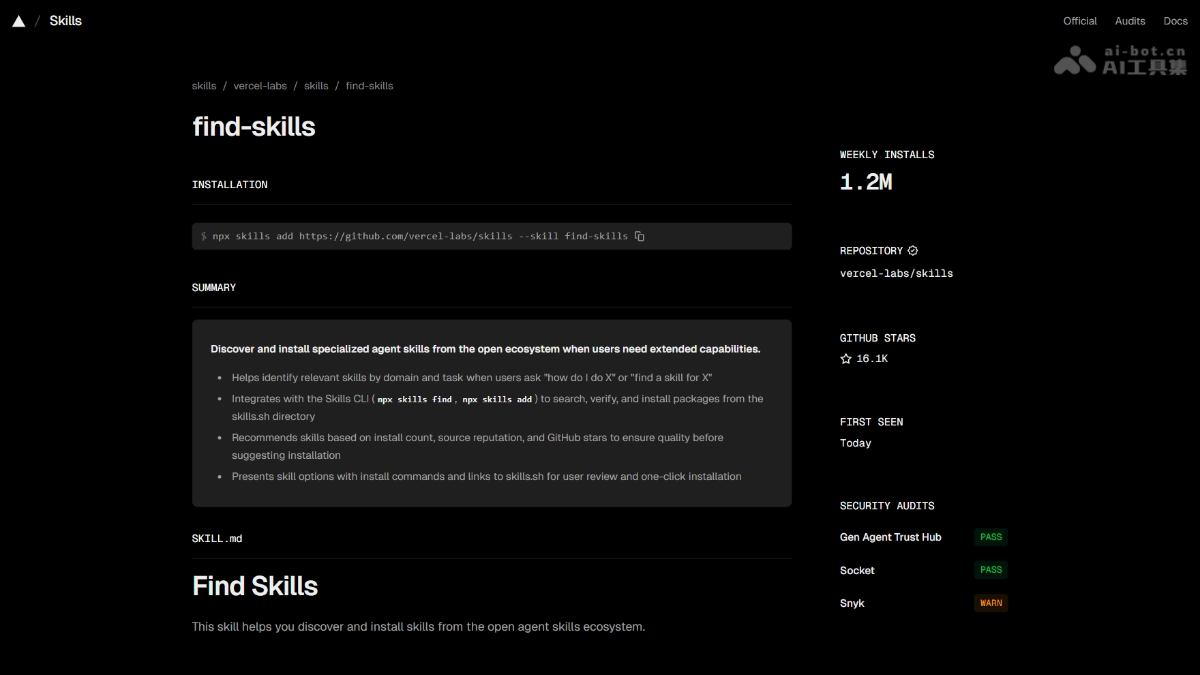
Main features of find-skill
-
Natural language search: Enter your needs directly in the AI conversation, and it automatically calls
npx skills findto retrieve matching Skills. -
Leaderboard-prioritized recommendations: Prioritizes recommending highly popular and highly trusted Skills from the skills.sh installation leaderboard.
-
Multi-dimensional filtering: Supports filtering results by domain (Web, testing, DevOps, etc.), install count, and author source.
-
One-click installation guidance: Search results include precise installation commands, which can be copied and executed directly or installed automatically by the Agent.
-
Security risk assessment: Displays security detection results such as Gen, Socket, and Snyk before installation, alerting to potential risks.
-
Multi-Agent compatibility: Supports 10+ mainstream tools such as Cursor, Codex, Cline, Kimi Code CLI, and GitHub Copilot.
Technical principles of find-skill
- CLI layer:
skillscommand-line tool acts as a package manager, responsible for interacting with the local file system and executing operations such asfind、add、check、update. - Index layer: Through the skills.sh server, aggregates public repositories on GitHub that conform to the Skills specification, and builds a searchable index by install count, Stars, and domain classification.
- Agent integration layer: Skills define trigger conditions and behavioral instructions using the Markdown specification. After installation, they are mounted into the Agent's context; when the user expresses the intent to "find a certain type of Skill", the Agent recognizes the trigger condition of
find-skills, automatically callsnpx skills find [query], and parses the returned results, presenting them in a structured table.
How to use find-skill
- Install the meta Skill package: Execute in the terminal:
npx skills add vercel-labs/agent-skillsFollow the prompts to select the Skill to load (by default,
find-skillsis checked), the target AI Agent (such as Cursor), the installation scope (Project / Global), and the installation method (Symlink recommended). Confirm to complete.- Search for Skills in the AI tool:Enter in the Cursor dialog box:
npx skills find "ui automation"The Agent will automatically access skills.sh to retrieve related Skills and return the Skill name, install count, and installation command in table form.
- Install the target Skill: Copy the returned installation command (such as
npx skills add charleswiltgen/axiom@axiom-ui-testing), execute it in the terminal or AI dialog box, and confirm as prompted to complete the installation.
Key information and usage requirements of find-skill
- Prerequisite environment: Node.js must already be installed on the machine (the official LTS version is recommended), which can be verified with
node -v. - Installation scope selection
-
Project level: Takes effect only in the current directory, suitable for single-project use.
-
Global level: Available globally and reusable across projects; recommended for personal long-term use Skills.
-
- Installation method comparison
-
Symlink (recommended): Creates a symbolic link, single source of truth, update once and all Agents sync, saves disk space; but if the source file is deleted, all Agents are affected.
-
Copy to all agents: Each Agent has an independent copy, no interference with each other; takes up more space, updates must be done one by one.
-
- Security self-check requirements
-
Prioritize Skills with 1K+ installs, official sources (vercel-labs, anthropics, microsoft), or GitHub 100+ Stars.
-
Be wary of Skills that read and write the local file system or execute Shell commands; be sure to review the security detection report before installation.
-
Core advantages of find-skill
-
Zero-configuration, ready to use: No need to leave the IDE or switch documentation; complete the entire "find → select → install" process directly in the conversation.
-
Community ecosystem aggregation: Connects both GitHub and skills.sh sources, covering mainstream domains such as Web, testing, deployment, and documentation.
-
Transparent install counts: Data-driven recommendations; high-install Skills are community-validated, reducing the chance of pitfalls.
-
Seamless multi-Agent adaptation: Install once, and tools such as Cursor, Codex, and Kimi CLI can all use it, with no repeated configuration.
-
Security first: Integrates Gen, Socket, and Snyk scanning to identify malicious behavior and vulnerability risks before installation.
find-skill project address
- Project website:https://skills.sh/vercel-labs/skills/find-skills
Comparison of find-skill with similar competitors
| Comparison dimension | find-skills (Vercel) | skill-creator (Anthropic) | GoSkill |
|---|---|---|---|
| Positioning | Discover and install community Skills | Create custom Skills | Long-task advancement and Skill management |
| Usage | npx skills find Command search |
Ask the Agent to create a Skill in conversation | GitHub repository + CLI installation |
| Ecosystem source | skills.sh + GitHub dual source | Anthropic Skills official repository | Open-source community repository |
| Installation scope | Project / Global / Symlink | Project-level or global | Mainly project-level |
| Security assessment | Integrates Gen, Socket, Snyk | Relies on official review | Requires self-review |
| Multi-Agent support | 10+ (Cursor, Codex, Kimi, etc.) | Mainly for the Claude ecosystem | General-purpose CLI, not limited to an Agent |
| Core advantage | Community leaderboard + one-click installation | Zero-code Skill creation | Long-task automated orchestration |
Application scenarios of find-skill
- Quickly fill development skill gaps: When you temporarily need capabilities such as React performance optimization, PR Review, or Changelog generation, search and load the corresponding Skill in seconds.
- Team Skill standardization: The team uniformly installs
vercel-labs/agent-skills, ensuring members use the same high-quality Skill combination and reducing environment differences. - Security admission review: Before introducing a third-party Skill, use its security assessment feature to quickly judge author credibility and code risk.
- Cross-tool capability migration: Skills found in Cursor can be directly synced to other Agents such as Cline and Codex for capability reuse.