
If you are still piecing together a long-form writing workflow using a "web-based large model + local Word/cloud drive," 2026 may be a good time to switch tools.
Over the past year, AI novel-writing software has roughly split into two paths: one pursuing "one-click book generation and batch quick production";
the other insists on serving real creators, embedding AI into character, setting, chapter, and context management to create a long-form workbench that can sustain continuous progress. FeelFish clearly stands with the latter.
With the FeelFish 4.0 officially released, it is an AI writing PC client built specifically for novel creators, further upgraded from a useful agent into a more completeprofessional novel creation workbench. This article will help you quickly decide whether to try it from the angles of product positioning, core capabilities, key experiences in 4.0, and whether it suits you.

1. FeelFish is not a chat box, but a novel project workbench
FeelFish 's positioning is very clear:organize characters, settings, chapters, and context around novel projects, so AI truly participates in creation.
Compared with directly opening DeepSeek / Qwen / ChatGPT, the difference is not "whether it can generate text," but:
- Novel materials are structured: chapters, outlines, characters, settings, and records are all in the same local project
- AI can directly read and write project files, and conversation is creation, rather than copying and pasting back and forth
- Intelligent context helps long-form writing maintain style and logical consistency
- Supports custom multi-agents / custom solutions, forming teams to collaborate according to your creative workflow
- The resource market provides intelligent solutions, skills, and agents, which can be expanded as needed
In one sentence:It is not "another AI chat box," but turning a large model into a writing team that understands your project.
The professional writing client covers Windows, macOS, and HarmonyOS PC;starting with FeelFish 4.0, it also adds mobile remote control capability, with the computer as the AI brain and the phone ready to connect at any time.
2. What should you look for when choosing AI novel software in 2026?
Before reviewing, let's establish a few realistic criteria. What long-form creators truly struggle with is not "whether AI can write a passage," but:
- Whether consistency can be maintained throughout(character design, foreshadowing, writing style, worldbuilding)
- Whether tool switching can be reduced(outlines, main text, revisions, and materials should not be scattered everywhere)
- Whether human-AI collaboration is smooth(after you revise, AI continues revising; not only full rewrites)
- Whether the workflow can be customized(web fiction, serious literature, and scripts do not have the same workflow)
- Whether manuscripts are safe(losing drafts, accidental deletion, and version rollback are the bottom line for creators)
Almost all upgrades in FeelFish 4.0 hit these five points.
3. Core Experience Review
1. Conversation is creation: AI works directly in the project
FeelFish is based on large language model agents, helping you create and modify characters, settings, chapters, and other content, and can automatically operate novel files. For long-form authors, this means:
- Reduce the need to "copy into the chat box → then paste back into the document"
- Revisions can be made with project context
- The creative rhythm feels more like "revising the manuscript together with an editor / assistant"

One point to emphasize: AI is an assistant; the worldview, conflicts, suspense, and overall direction are still in the author's hands. FeelFish's goal is not to produce "digital slop," but to let professional creators polish their work more efficiently and enjoyably.
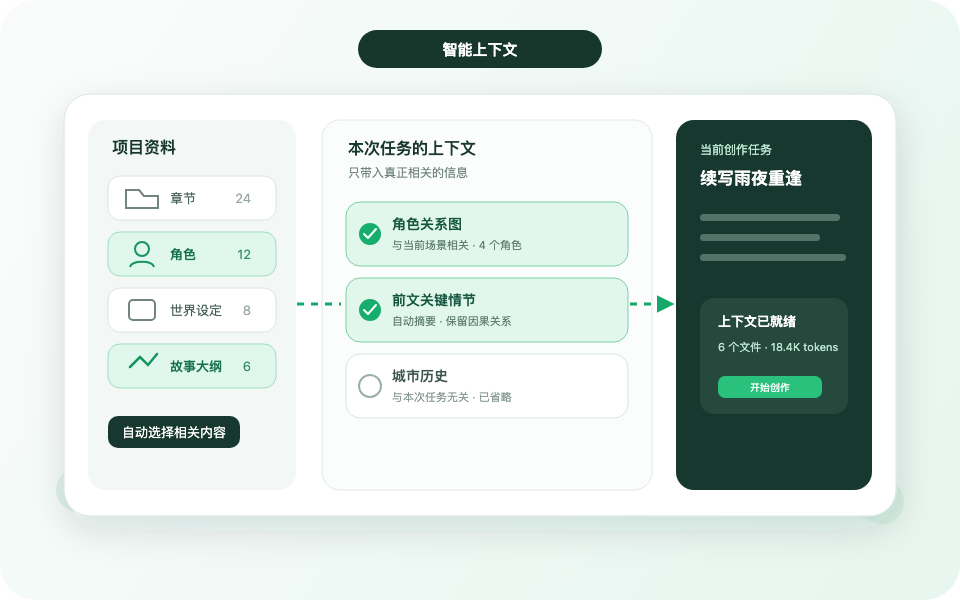
2. Intelligent context: the hardest thing in long-form is "not breaking character"
When you write long-form directly with a large model, the easiest thing to derail is forgetting beyond the context window. FeelFish uses intelligent context to automatically remember and manage existing content, helping style and logic stay more coherent; combined with character profiles and setting folders, the model can more easily understand your creative intent.
It's not the mystical "AI understands you better"; it's engineering that manages the novel's knowledge base. The longer you write, the more obvious the advantage.
3. Multi-agent + custom solutions: build a team around your workflow
The custom solutions of the 3.0 era have already earned considerable praise; by FeelFish 4.0, the form of collaboration goes further.
You can create different departments by task, for example:
- Editorial Department: mainline creation and manuscript revision
- Quality Control Department: review the quality of previous chapters
- Materials Department: collect materials for subsequent creation
- Secretarial Department: answer software usage questions and provide daily creative suggestions
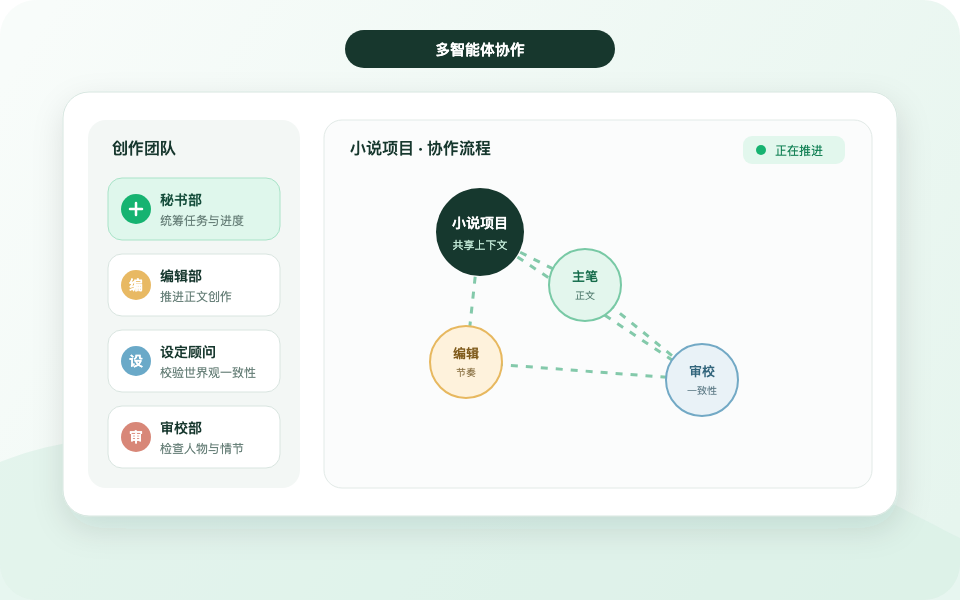
Each department can be configured with its own intelligent solution, and combined with Skills, solutions in the resource marketplace, and agents, even complex long-form works can be advanced by role, instead of cramming everything into one chat window.
For large-screen users, FeelFish 4.0 also supports opening the dialog box in an independent window, making full use of screen space and bringing efficiency closer to a true professional workbench.
4. Freedom of model choice: keep up with the frontier without being tied to a single model
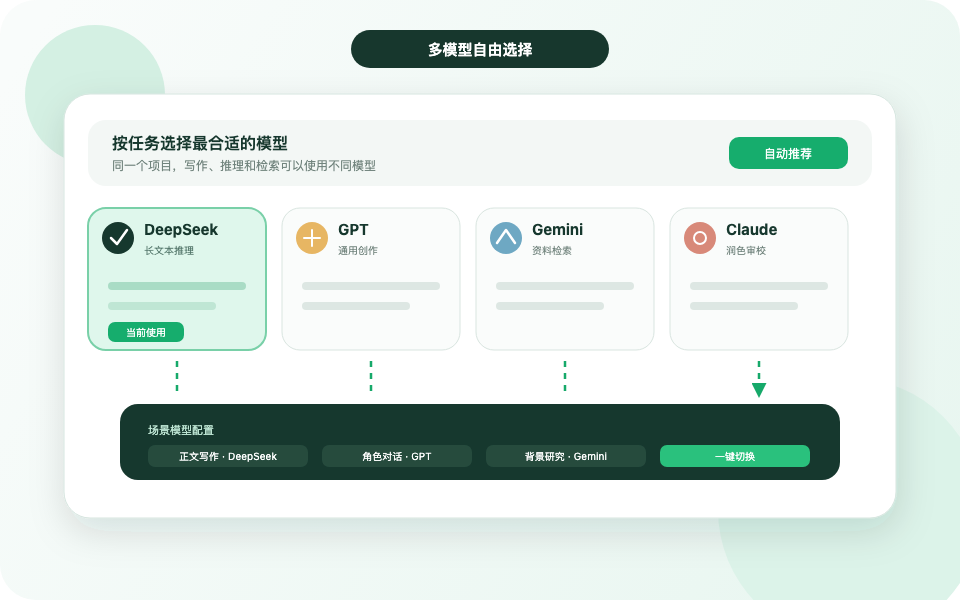
FeelFish supports a variety of frontier large models such as DeepSeek and Qwen, and you can switch flexibly. Different creative scenarios call for different model trade-offs: some prioritize cost, some prioritize prose, some prioritize reasoning. Being able to choose models is itself a capability a long-distance tool should have.
IV. Key points from hands-on testing of FeelFish 4.0's new features
If 3.0 solved "solutions can be customized," then 4.0 solves "whether the workbench is professional and complete enough."
The following are the most noteworthy upgrades this time.
📱 Mobile remote control: creation doesn't have to stop when you leave the computer
4.0 supports using the computer as the AI brain and continuing to advance through mobile remote control:
- View current progress and the latest file content
- Send new instructions at any time to let the agent continue optimizing
- Even when temporarily out, you can connect seamlessly, without having to wait until you're back at your workstation to "resume work"
Currently, mobile control is based on the web version and can be enabled from the lower-left corner of the software; a mobile client is also on the way. For part-time writers and people who revise manuscripts during their commute, this is a very practical experience upgrade.

🧩 Multi-department parallelism: one project, multiple production lines
Previously it leaned toward "single-agent conversation"; now multiple department conversations can run at the same time. While the editorial department writes new chapters, the quality inspection department reviews old chapters and the material department stockpiles future clues—advancing a long work shifts from "serial grinding" to "parallel collaboration."
Combined with independent conversation windows and the secretarial department, FeelFish feels more like a creative team that can be dispatched at any time, rather than just a chat assistant.

✍️ Annotation and citation: human-machine collaboration finally "hits exactly where you point"
Good content depends on human-machine collaboration. In 4.0, you can select any content and annotate or cite it into an agent conversation:
- After manually revising a passage, have the AI continue polishing it
- After the AI produces a first draft, you circle the problems and give precise feedback
- More accurate expression of requirements, less rework
This is extremely critical for professional authors: what is truly efficient is not "the AI writes everything," but "you set the direction, and the AI executes precisely."
🔒 Content security upgrade: automatic cloud drive sync + project time machine
Losing a manuscript is what creators fear most. 4.0 has made notable enhancements in security and recovery:
- Advanced / Professional members: automatic sync after enabling the cloud drive (no longer manual like 3.0), content uploaded to the cloud in real time, and versions retained for 30 days
- Local time machine: every change on the computer side is fully recorded, supporting rollback of the whole project or a single file to any point in time
- Secretarial department assistance for recovery: in abnormal situations, the secretarial department can help quickly locate historical content
If you use FeelFish as your main writing environment, this is worth turning on directly—a sense of security significantly affects your creative state.
🎨 Personalization and detail polishing: write for a long time, and write comfortably
When typing for long periods, the interface's feel affects your state. 4.0 adds built-in themes and supports custom themes; you can have the secretarial department help you make an exclusive theme, and you can also use AI-generated images as backgrounds.
There are also a batch of details that "once used, you can't go back": custom shortcuts, reverse file order, project list covers, content recitation, full-text Q&A, intelligent context specifying directories, and more. Individually they are not big, but together they noticeably reduce friction.

Five, compared with "using a large model directly," is it worth it?
|
Comparison dimension |
Using a large model directly |
FeelFish 4.0 |
|
Scenario adaptation |
General chat, novel workflow assembled by yourself |
Built-in settings for creative scenarios such as novels/screenplays |
|
Long-form consistency |
Easily limited by context length |
Intelligent context + character/setting management |
|
File operations |
Mainly rely on copy and paste |
Agents directly read and write project files |
|
Collaboration form |
Mainly single-session |
Multi-department, multi-agent, custom solutions |
|
Mobile continuity |
Each platform goes its own way |
Desktop as the main brain + mobile remote control |
|
Manuscript safety |
Depends on your own backup habits |
Automatic cloud drive sync + local Time Machine |
If you only occasionally generate a few hundred words of inspiration, a web-based large model is enough
If you want to steadily advance tens of thousands of words or more, manage character settings and foreshadowing, and repeatedly revise drafts,a dedicated workbench will save a lot of hidden time costs.
Six, who is it for? Who is it not so suitable for?
More suitable for
- Web fiction / long-form authors who need to keep updating and maintain context
- Creators who value character settings, worldbuilding, and foreshadowing management
- People who want to build a personal pipeline using methods like "editorial department + quality control + materials"
- People who want to focus on local projects while also taking into account cloud sync and version rollback
- People who need to keep directing AI to revise drafts on their phone when out
May not be so suitable for
- Users who only want "fully automatic one-click book generation and don't want to participate at all" (FeelFish clearly does not take this route)
- People who don't want to learn at all how to collaborate with AI (using AI well is itself a skill)
- Light users who only need very short content and temporary generation
FeelFish's attitude is very clear: it will work hard to make it easier for newcomers to write high-quality works, but it will not rely on full automation to pile up low-quality content; even if someone creates an automated process, it should be customized around an individual's creative mode, which is exactly the value of custom solutions.
Seven, overall review: is FeelFish 4.0 worth getting?
Recommendation index:⭐⭐⭐⭐⭐(for creators who seriously write long-form works)
What is most impressive about FeelFish 4.0 is not that some single point "writes better," but that it completes the puzzle pieces needed for professional creation:
- Project-based management lets AI truly enter your book
- Multi-department collaboration makes complex processes parallelizable
- Annotated references make human-AI collaboration more precise
- Remote control keeps creation from being interrupted
- Cloud drive and Time Machine let you dare to revise boldly and experiment boldly
If you agree that "excellent content cannot do without true human-AI collaboration," rather than fantasizing that AI will become a writer for you, then FeelFish 4.0 will be a 2026 AI novel-writing software very worth trying seriously.
Experience now
Download FeelFish Desktop client, experience it firsthand with a local novel project: character and setting management, intelligent context, multi-agent collaboration, as well as the remote control and content safety capabilities of 4.0.
- Official website:https://www.feelfish.com
- Features:https://www.feelfish.com/zh/features
- Download the client:https://www.feelfish.com/zh/download
- Learn about pricing:https://www.feelfish.com/zh/pricing
Write longer, and write better. Put AI into a true creative workbench, starting with FeelFish 4.0.