
FaceChain is an open-source AI generation framework for personal portraits and personal digital avatars launched by Alibaba DAMO Academy (similar to a free and open-source version of Miaoya Camera). Users only need to provide at least one photo to generate their own personal digital avatar. This AI framework utilizes the text-to-image capability of the Stable Diffusion model and combines LoRA model training for portrait stylization with face-related perception and understanding models. After training the input images, it infers and outputs generated personal portrait images.

FaceChain's Features
- Customized Avatar Training: Users only need to provide at least one personal head-and-shoulders photo, which can be used for LoRA stylized training to generate a digital avatar with a personalized style.
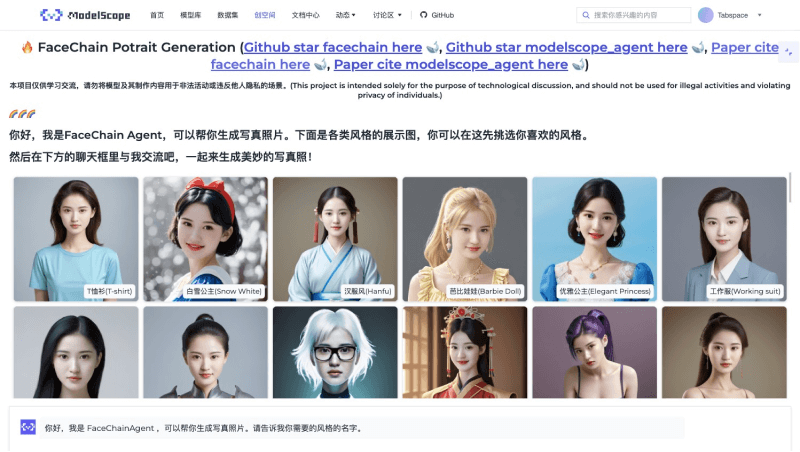
- Generate Personal Portraits in Various Styles: FaceChain can generate personal portraits in multiple styles, including Hanfu style, work photos, Barbie doll, school uniform style, Christmas style, gentleman style, comic style, etc., meeting users' diverse personalized needs.
- Supports Invocation via SD WebUI Plugin: FaceChain supports invocation through the SD WebUI plugin. Users can interact with the AI model through the SD interface to conveniently generate and edit personal avatars.
- Supports Pose Control: Users can control the pose of the generated digital avatar, making it possible to create personal avatars with dynamic or specific actions.
- Custom Prompt Words: Users can change the clothing, accessories, etc. of the digital avatar by entering specific prompt words, achieving more personalized customization.
FaceChain Official Website Entry
- FaceChain's GitHub code repository:https://github.com/modelscope/facechain
- FaceChain's research paper:https://arxiv.org/abs/2308.14256
- FaceChain's ModelScope address:https://www.modelscope.cn/brand/view/FaceChain
- FaceChain's Hugging Face address:https://huggingface.co/spaces/modelscope/FaceChain
How to Use FaceChain
FaceChain supports the use of model training and inference capabilities in the Gradio interface, supports experienced developers in using Python scripts for training and inference, and also supports installation as a plugin in SD WebUI. This article uses the online Gradio version running in the ModelScope community to experience and use FaceChain:
- VisitFaceChain's ModelScope demo page, and under the "Character Image Training" tab, select and upload 1-10 personal face/avatar photos (avoid situations such as multiple faces or face occlusion in the images)
- After uploading, click "Start Training" to start customized avatar training. Each image takes about 1.5 minutes
- After training is completed, switch to the "Avatar Portrait" tab on the right, adjust and set the relevant parameters, and you can generate your style photos
- In addition, you can also directly usethe FaceChain Agent version. Without complex operations, you can get various portrait photos simply through conversation. This method is more recommended