
What is Eagle
Eagle is a multimodal large model launched by NVIDIA, excelling at processing images up to 1024×1024 pixels, significantly improving visual question answering and document understanding capabilities. The Eagle model adopts a multi-expert vision encoder architecture and, through a simple and efficient feature fusion strategy, achieves in-depth understanding of image content. The Eagle model has been open-sourced, is applicable to multiple industries, and has the potential to drive progress in AI technology in the field of visual understanding.
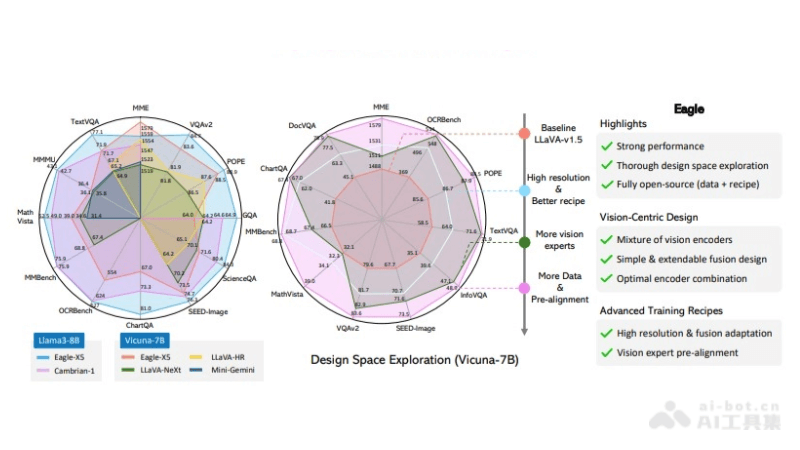
Eagle's main features
- High-resolution image processing: Can process images up to 1024×1024 pixels, capture details, and is suitable for OCR and fine-grained object recognition.
- Multimodal understanding: Combines visual and language information to understand and reason about image content, improving performance on multimodal tasks.
- Multi-expert vision encoder: Integrates multiple specialized vision encoders, optimized for different tasks such as object detection and text recognition.
- Simple and effective feature fusion: Effectively fuses features from different vision encoders through direct channel concatenation.
- Pre-alignment training: Through the pre-alignment training stage, reduces the representation gap between vision encoders and the language model, enhancing model consistency.
Eagle's technical principles
- Multimodal architecture: The Eagle model adopts a multimodal architecture, meaning it can process and understand information from different modalities (such as vision and language). This architecture enables the model to process image and text data simultaneously, performing excellently in tasks such as visual question answering and document understanding.
- Mixture of vision encoders: A core feature of the Eagle model is the use of a mixture of multiple vision encoders. The encoders can be models pretrained for different vision tasks (such as object detection, text recognition, and image segmentation). In this way, Eagle can understand image content from multiple perspectives.
- Feature fusion strategy: Eagle adopts a simple yet effective feature fusion strategy, implemented through direct channel concatenation. This means that features from different vision encoders are merged together to form a unified feature representation for further processing by the model.
- High-resolution adaptability: The Eagle model can adapt to high-resolution image input, can capture more details, and performs better in tasks that require fine visual information.
Eagle's project address
- GitHub repository:https://github.com/NVlabs/Eagle
- arXiv technical paper:https://arxiv.org/pdf/2408.15998
How to use Eagle
- Environment preparation:Ensure the computing environment has sufficient hardware resources, especially GPUs, to support model training and inference.Install the necessary software dependencies, such as Python, deep learning frameworks (such as PyTorch or TensorFlow), and other libraries that may be needed.
- Obtain the model:Visit the open-source code repository of the Eagle modelGitHubonClone or download the code repository to the local environment.
- Data preparation:Prepare or obtain the dataset used for training or testing the model. This may include images, text, or other multimodal data.Preprocess the data according to the model's requirements, such as adjusting image resolution, formatting text data, etc.
- Model configuration:Read the model documentation to learn about different configuration options, such as model architecture, training parameters, etc.Adjust the configuration file or command-line parameters according to your needs.
- Model Training:Use the provided training script and the prepared dataset to start training the model.Monitor the training process to ensure that the model is converging and that the performance metrics meet expectations.
- Model Inference:After training is complete, use the model to perform inference on new data to solve specific multimodal tasks, such as image captioning, visual question answering, etc.This process can be automated by writing an inference script.
Eagle's Application Scenarios
- Image Recognition and Classification: In scenarios that require recognition and classification of image content, Eagle can identify objects, scenes, and activities in images.
- Visual Question Answering (VQA): Eagle can understand natural language questions and provide accurate answers based on image content.
- Document Analysis and Understanding: In industries such as law, finance, and healthcare, Eagle can be used to analyze and understand scanned documents, tables, and medical images.
- Optical Character Recognition (OCR): Eagle's high-resolution processing capability makes it perform excellently in OCR tasks, accurately extracting text information from images.