
What is Docling
Docling is an open-source document parsing and conversion tool that can efficiently parse documents in multiple formats (including PDF, DOCX, PPTX, images, and HTML) and export them to Markdown or JSON format. Docling supports advanced PDF understanding and OCR capabilities, and can integrate with tools such as LlamaIndex and LangChain to enhance document retrieval and question-answering capabilities. Docling provides a concise command-line interface to help users process documents quickly.
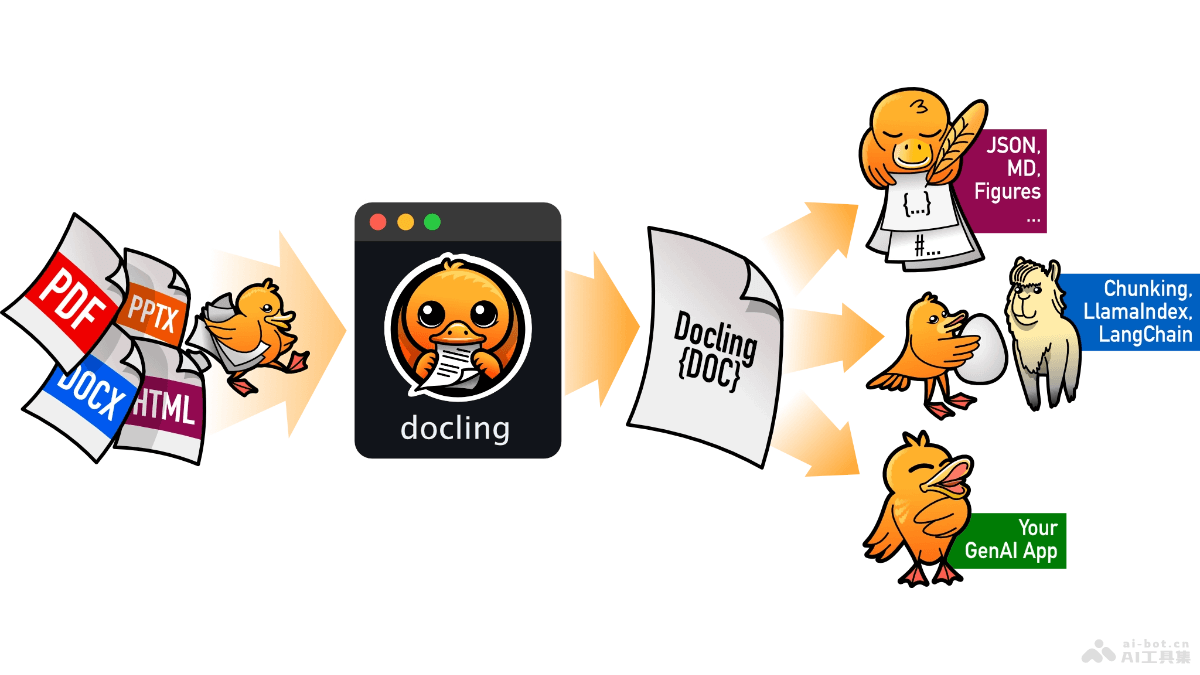
Docling's main features
- Multi-format support: Docling can read and parse a variety of popular document formats, including PDF, DOCX, PPTX, images, HTML, AsciiDoc, and Markdown, and supports exporting documents to Markdown and JSON formats.
- Advanced PDF understanding: Docling has advanced understanding capabilities for PDF documents, including recognition of page layout, reading order, and table structure.
- Unified document representation: Based on the
DoclingDocumentformat, Docling provides a unified and expressive document representation format that expresses content such as text, tables, and images in documents, as well as the document's hierarchical structure. - OCR support: Docling supports optical character recognition (OCR), can recognize text in scanned PDFs, and enables Docling to process scanned or handwritten documents.
- Tool integration: Docling is easy to integrate with tools such as LlamaIndex and LangChain, providing support for RAG (Retrieval-Augmented Generation)/QA (Question Answering) applications.
Docling's technical principles
- Document parsing: Docling uses specialized parsers to read and parse documents in different formats and convert document content into internal data structures.
- Layout and structure recognition: For formats such as PDF, Docling uses layout analysis technology to recognize the positions and reading order of elements on the page, as well as the structure of tables and text.
- Content extraction: Docling extracts elements such as text, tables, and images from documents and converts them into a unified
DoclingDocumentformat. - OCR technology: For images or scanned PDF documents, Docling uses OCR technology to convert text in images into machine-readable text.
- Data structures and JSON pointers:
DoclingDocumentuses JSON pointers to reference parent and child items, building the document's hierarchical structure and content relationships. - Output formatting: Formats the parsed data structures as Markdown or JSON for further processing and analysis.
Docling's project address
- Project official website:ds4sd.github.io/docling
- GitHub repository:https://github.com/DS4SD/docling
- arXiv technical paper:https://arxiv.org/pdf/2408.09869
Docling's application scenarios
- Automated document processing: Automatically convert paper documents or electronic documents into structured data for easy storage and analysis.
- Data science and machine learning: Provide preprocessed structured data for machine learning models for training and prediction.
- Content migration: When a content management system or document storage system is upgraded, convert documents in old formats into formats supported by the new system.
- Information retrieval: Build or enhance enterprise search systems to improve the accuracy and efficiency of document search.
- Knowledge management: Help enterprises or organizations extract key information from large numbers of documents and build knowledge bases.