
What is DiffBrush
DiffBrush is a training-freeimage generationand editing framework launched by Beijing University of Posts and Telecommunications, Tsinghua University, China Telecom Artificial Intelligence Research Institute, and Northwestern Polytechnical University, which supports users in intuitively controlling image generation based on hand-drawn sketches. DiffBrush uses pre-trained text-to-image (T2I) models and, based on techniques such as color guidance, instance and semantic guidance, and latent space regeneration, precisely controls the color, semantics, and instance distribution of generated images. DiffBrush is compatible with a variety of T2I models (such asStable Diffusion, SDXL, etc.), supports LoRA style adjustment, and users can simply draw the outline and color of instances on the canvas to generate images that meet their needs. DiffBrush solves the limitations of traditional T2I models that rely on text prompts, lowers the threshold for AI painting, and provides users with a more intuitive and efficient way to create.
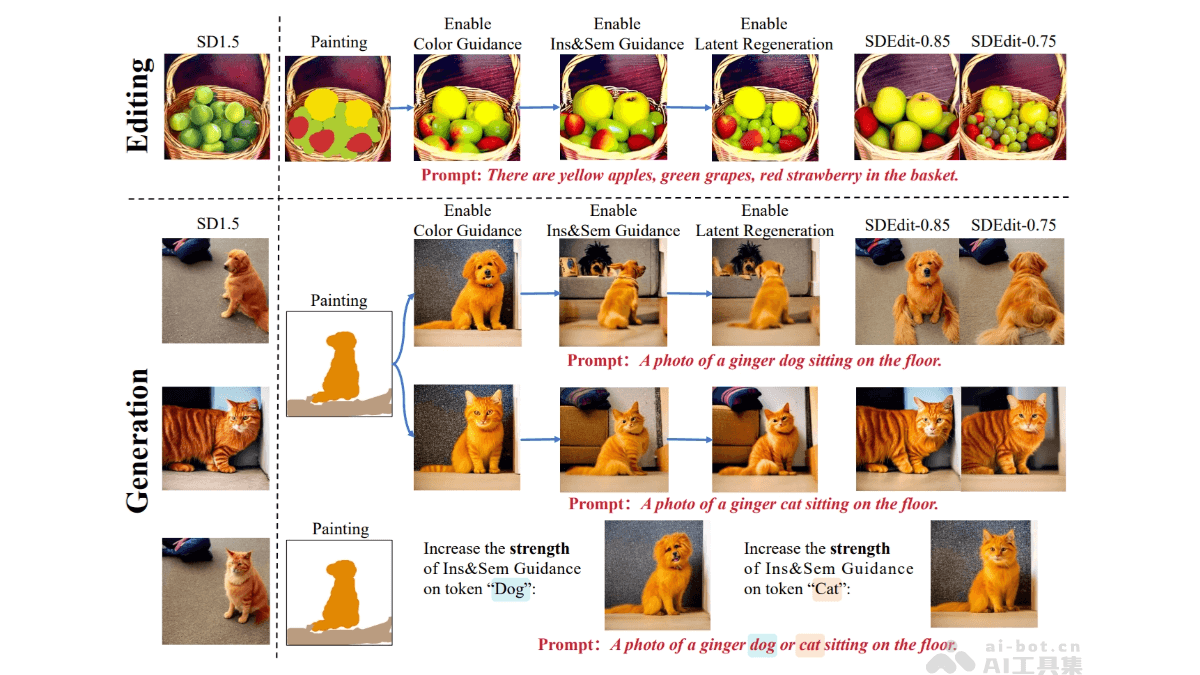
Main features of DiffBrush
- User-friendly image generation: Users control the content of generated images with hand-drawn sketches, without the need for complex text prompts or technical knowledge.
- Color control: Based on the color information drawn by the user, precisely control the colors of the corresponding regions in the generated image.
- Instance and semantic control: Draw the outlines of instances and annotate semantic information to control the position and semantic attributes of specific objects in the generated image.
- Image editing: Edit on the basis of an existing image, for example, adding, modifying, or replacing objects in the image.
- Stylized generation: Supports combination with LoRA (Low-Rank Adaptation) style adjustment to generate images with different artistic styles, such as oil painting, traditional Chinese painting, etc.
- Multi-model compatibility: Compatible with a variety of T2I models (such as Stable Diffusion, SDXL, Flux, etc.), with broad applicability.
Technical principles of DiffBrush
- Guidance mechanism of diffusion models: Based on the diffusion process of pre-trained T2I models (such as Stable Diffusion). Diffusion models gradually denoise and map random noise into real images. DiffBrush modifies the denoising direction in the diffusion process to guide the generated image toward the user's hand-drawn sketch.
- Color guidance: Based on the high similarity between the latent space and the color space of diffusion models, adjust the features in the latent space to achieve precise control of the colors of generated images. The color information drawn by the user is encoded into the latent space, and energy functions (such as MSE loss) are used to guide the colors of the generated image to be consistent with the user's needs.
- Instance and semantic guidance: Realize instance and semantic control based on the attention mechanisms in diffusion models (such as cross-attention and self-attention). The instance outlines drawn by the user are used as supervision targets for attention maps. By adjusting the distribution of attention maps, ensure that the positions and semantics of objects in the generated image are consistent with the user's needs.
- Latent space regeneration: Based on iterative optimization of the initial noise distribution to approach the target distribution of the user's hand-drawn sketch, adjust the latent space in the early stage of the diffusion process to further optimize the quality of the generated image.
- User interaction and compatibility: Combine the user's hand-drawn sketch with text prompts and use a simple user interface to achieve intuitive interaction. DiffBrush supports a variety of pre-trained T2I models, and users can adjust hyperparameters such as guidance strength as needed to achieve the best generation results.
DiffBrush project address
- arXiv technical papers:https://arxiv.org/pdf/2502.20904
Application scenarios of DiffBrush
- Creative drawing: Artists and designers can quickly transform hand-drawn ideas into high-quality images, support multiple styles, and conveniently realize artistic concepts.
- Image editing: Add, replace, or modify content on existing images, completing operations with simple hand drawing, suitable for ordinary users and designers.
- Educational tool: Used in art and design teaching, helping students understand color, composition, and creative expression through hand drawing.
- Game design: Quickly generate sketches of game scenes, characters, or animations, support stylized output, and facilitate creative iteration.
- Advertising design: Quickly generate advertising images based on creative sketches, meet clients' requirements for color and layout, and improve design efficiency.