
What is DBCopilot
DBCopilot is the first domestic database intelligent assistant launched by Volcano Engine, released on the Volcano Engine Database Workbench DBW console. Through AI technology, it covers the three core scenarios of data storage, management, and retrieval, combining basic algorithms and large model capabilities to change the interaction method of database platforms. In data storage, DBCopilot supports natural language questions, allowing users to complete complex operations such as instance management through everyday language and obtain intelligent migration planning suggestions. In data management, it can monitor database load in real time, accurately locate problems and automatically repair them, providing 24/7 online intelligent diagnosis and optimization services. In data retrieval, it can convert natural language instructions into SQL statements, support intelligent error correction and one-click generation of data visualization charts, upgrading data queries from "hour-level" to "minute-level".
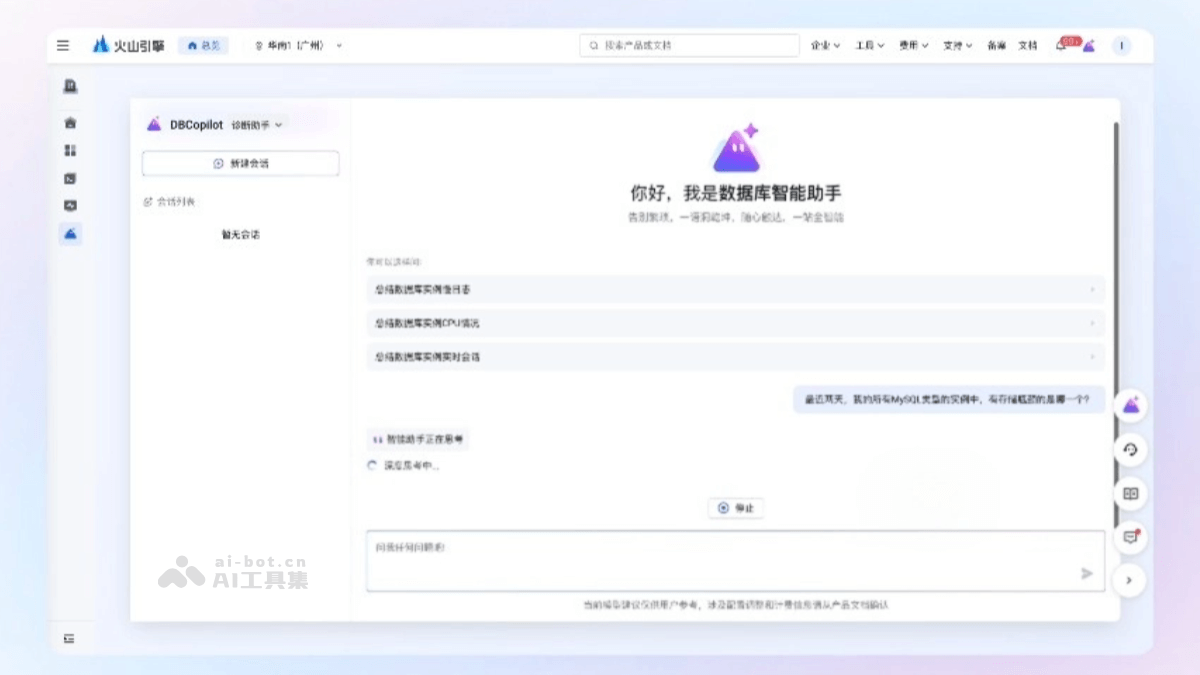
Main features of DBCopilot
- Store data
- Natural language questions: Users can consult technical or product questions through everyday language and get professional answers in seconds without having to look up information themselves.
- Efficient instance management: Easily query and inventory database instances, with data status clear at a glance, saying goodbye to management blind spots.
- Intelligent migration planning: The upcoming "Migration Planning Master" will act like navigation, helping users simulate the best migration path, avoid risks, and ensure smooth and efficient database migration.
- Manage data
- Intelligent diagnosis: The "Intelligent Diagnosis Advisor" monitors database load in real time, accurately locating potential problems and risks, with risk status clearly visible.
- Database optimization: The "Optimization Inspection Butler" proactively scans database operations, identifies inefficient SQL in real time, and provides one-click optimization solutions to keep performance online.
- Automatic repair: The "Closed-loop Execution System" automates the entire process, from problem discovery and solution generation to repair execution, making management efficient and worry-free.
- Retrieve data
- Natural language to SQL generation: The "AI SQL Assistant" supports everyday language input (such as "check the product with the highest sales this month"), automatically generating accurate SQL statements without the need to memorize complex syntax.
- Intelligent SQL error correction: The "Error Handling Master" diagnoses errors in real time, directly locating the problem and providing modification suggestions to efficiently resolve syntax errors.
- Data visualization: "Intelligent Visualization" converts result data into clear charts with one click, quickly obtaining key insights.
- Data lineage tracking: The upcoming "Data Lineage Map" visually displays data sources, processing procedures, and application paths, making flow relationships clear at a glance.
How to use DBCopilot
- Log in to the DBW console: Visit Volcano Engine'sofficial website, and log in to the DBW console.
- Select region and feature module: Select the region in the top menu bar, and click DB Intelligent Assistantin the left navigation bar to enter the DBCopilot page.
- Diagnosis Assistant
- New session: In the DBCopilot page, in the left area, click DBCopilot and select from the drop-down list after Diagnostic Assistant, then click New Session, and modify the new session name as needed.
- Enter a question: Enter a question in the input box in the right area of the page, such as "Summarize whether the current instance has any abnormalities" or "Please summarize the initiating users of the current active connections of this instance", to obtain diagnostic results.
- Intelligent Customer Service
- New Session: In the DBCopilot page, in the left area, click DBCopilot and select Intelligent Customer Servicefrom the drop-down list, then click New Session, and modify the new session name as needed.
- Enter a question: Enter a question in the input box in the right area of the page, such as "SQL statement for creating a table" or "Ask about the database workstation overview", to obtain accurate and timely answers.
- SQL Assistant
- Implement Text-to-SQL through the DBCopilot SQL Assistant: Log in to the data interaction console, select the target database, and click SQL Assistant, in the DBCopilot SQL Assistant area, enter your requirement, such as "query table data". DBCopilot will return a SQL command. Click Execute Now to view the results.
- Implement Text-to-SQL in the command execution area: Log in to the data interaction console, select the target database, and enter your requirement in the command execution area in the format
-- 自然语言. Press Enter, select the generated SQL statement, and click Execute or press the F8 key to view the results. - SQL Error Correction and Rewriting: Log in to the data interaction console, select the target database, enter a SQL command in the command execution area, select the command, and click Execute or press the F8 key. If execution fails, you can click Execution Result in the area and click SQL Intelligent Suggestions, view and copy the accurate command, and execute it again.
- SQL Result Set Chart Structure: Log in to the data interaction console, select the target database, enter a SQL command in the command execution area, select the command, and click Execute or press the F8 key. In the Execution Result area, click AI Chart to view the SQL result set chart structure.
DBCopilot Application Scenarios
- Developers quickly generate SQL statements: When writing SQL, developers often encounter syntax problems or logical errors. Through DBCopilot's natural language to SQL feature, developers only need to enter a daily language description (such as "query the product with the highest sales this month"), and the system can automatically generate accurate SQL statements, greatly improving development efficiency.
- SQL intelligent error correction and optimization: When errors occur in the SQL statements entered by developers, DBCopilot's "Error Handling Master" can diagnose the errors in real time, directly locate the problem, and provide modification suggestions to help developers quickly fix errors.
- Data visualization and insights: For complex data analysis tasks, DBCopilot's "Intelligent Visualization" feature can transform query results into clear charts with one click, helping developers and business personnel quickly gain key insights and better understand the business logic behind the data.
- Real-time Intelligent Diagnosis: In daily database operations and maintenance, DBCopilot's "Intelligent Diagnosis Advisor" can monitor database load in real time, accurately identify potential issues and risks, and clearly display risk status to operations and maintenance personnel.
- Automatic Repair and Closed-loop Management: When a problem is detected, DBCopilot's "Closed-loop Execution System" can handle the entire process automatically, from problem discovery and solution generation to repair execution, with no manual intervention required throughout the process, improving operations and maintenance efficiency and reducing problems caused by human error.