
What is University Question Search Sauce
University Question Search Sauce is an AI learning assistant under Zuoyebang aimed at college students, with multiple functions such as AI Q&A, photo search Q&A, text search, answer-finding floating window, resource library, scan-code book search, and favorites. The app covers final exam questions from thousands of universities, includes various test question materials such as CET-4 and CET-6, postgraduate entrance exams, and civil service exams, and supports multiple question search methods, with fast question search, accurate results, and rich materials. University Question Search Sauce provides convenience for college students' study and life, helping solve learning difficulties.
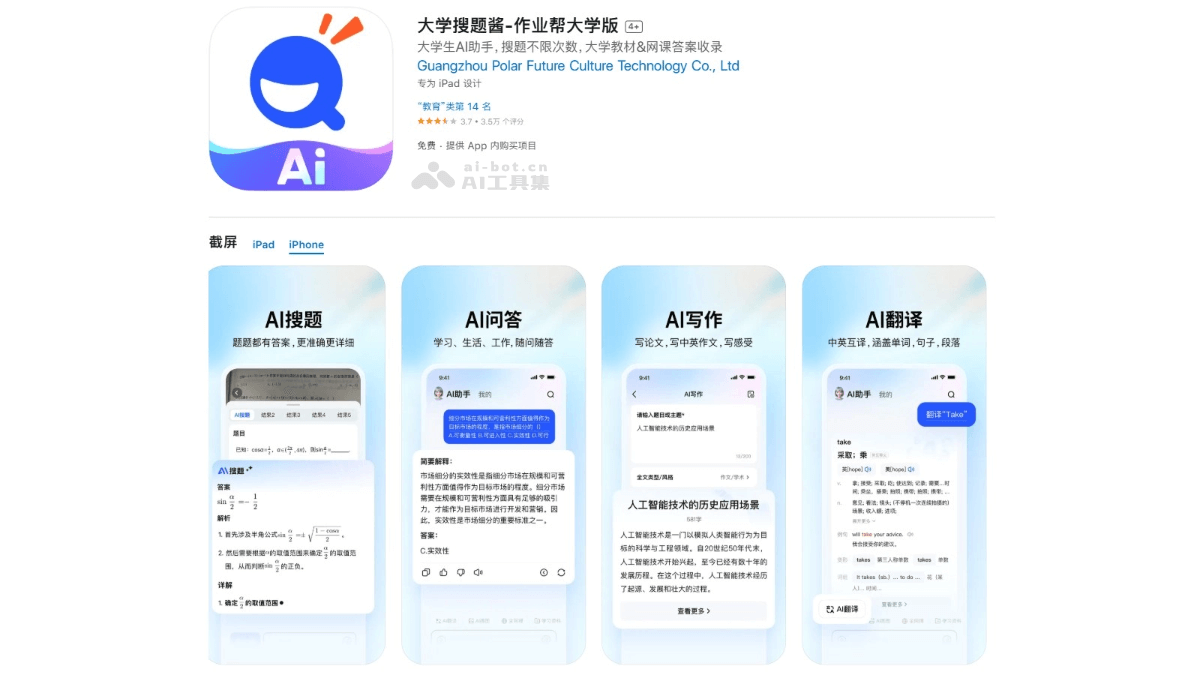
Main functions of University Question Search Sauce
- Photo search Q&A: Users upload questions by taking photos, and the software quickly recognizes them and provides answers and explanations.
- Text search: Users manually enter or copy and paste the question text to search and obtain answers.
- AI translation: Supports Chinese-English mutual translation, including sentences, words, and paragraphs.
- Scan-code book search: Scan the barcode of a textbook to quickly obtain the answers and explanations for the entire textbook's after-class exercises.
- AI Q&A: Users ask various questions related to study, life, or work, and AI provides corresponding answers.
- Answer-finding floating window: When answering questions online on a mobile phone, turn on the answer-finding floating window to make it convenient for users to take screenshots and search questions.
- Resource library: Provides rich learning materials, including various exam past papers, review materials, thesis and job-hunting tips, etc., for users to download for free.
- Favorites function: Users can save needed textbooks, online courses, and other learning resources with one click, making it convenient to find and use them later.
How to use University Question Search Sauce
- Download and installation:
- PC version: Visit theofficial websiteof University Question Search Sauce, download and install the browser extension or App, and complete login according to the prompts.
- Mobile version: iOS users visitApple App Store, Android users visitTencent MyApp, and complete login according to the prompts.
- Photo search Q&A: Use the mobile phone camera to aim at the question, take a clear photo, and wait for the software to recognize and display the answer and explanation.
- Text search: Manually enter the question text, or copy and paste the question into the search box, click the search button, and obtain the answer and explanation.
- Scan-code book search: Aim at the textbook cover or barcode to scan, and the software displays the answers and explanations for the textbook's after-class exercises.
- Answer-finding floating window: Use the floating window to take screenshots and search questions, and quickly obtain answers.
- Resource library: Browse and search for needed exam past papers, review materials, thesis and job-hunting tips, etc.
- AI Q&A: Enter questions in the App to obtain AI answers.
Application scenarios of University Question Search Sauce
- Online course learning: When encountering difficult problems, use "Photo search Q&A" or "Text search" to quickly obtain answers and explanations.
- Textbook exercises: When unable to do after-class exercises, use "Scan-code book search" or photo question search to find answers and problem-solving ideas.
- Exam preparation: When preparing for various exams, download past exam papers and review materials from the "Resource Library," and use question search to get explanations.
- Clubs and Internships: When participating in club activities or internships, use "AI Q&A" to get answers to questions, and refer to practical documents in the Resource Library.
- Everyday Problems: When encountering various problems in study or life, ask questions anytime based on "AI Q&A" to get help.