
What is Dangcingai
Dangcingai is an AI automatic dubbing tool. Just paste a video link or upload a local file to generate multilingual dubbed videos with one click. The tool supports 10 languages including Chinese, English, Japanese, and Korean, and 9 voice options, providing three modes: automatic dubbing, original audio translation, and custom text. AI can automatically analyze the video visuals and original audio, generate scripts, and synthesize natural speech, and can also adjust the proportion of original audio retained. Dangcingai makes cross-language video creation as easy as copy and paste, suitable for content re-creation, knowledge transfer, and multilingual distribution by self-media.
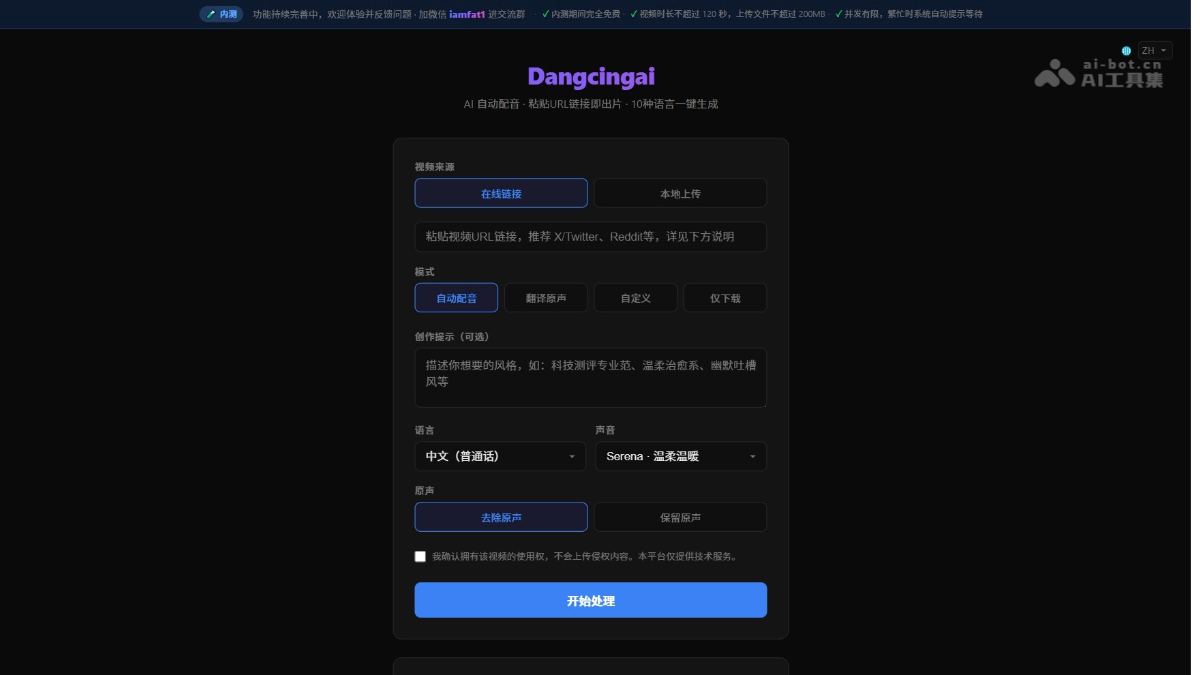
Dangcingai's main features
-
Video acquisition: Supports pasting links from 50+ platforms or local uploads, automatically capturing video content.
-
AI dubbing: Provides three creation modes: automatic dubbing, original audio translation, and custom text.
-
Multilingual support: Covers 10 languages: Chinese, English, Japanese, Korean, French, German, Spanish, Portuguese, Russian, and Italian, meeting global communication needs.
-
Voice selection: Provides 9 professional voices, including 5 male and 4 female voice styles.
-
Intelligent generation: AI automatically analyzes the visuals and original audio to generate dubbing scripts that match the video duration.
-
Audio control: Can completely remove the original audio, or retain the original audio and overlay AI dubbing at 10%-80% volume.
-
Style customization: Uses creation prompts to guide AI in generating commentary content in a specific style.
-
Online delivery: No software installation required; preview and download the generated dubbed video directly on the web.
How to use Dangcingai
-
Visit the official website: Visit the Dangcingai official website https://dangcingai.com/,进入主界面。
-
Select video source: Click "Online Link" to paste the video URL, or select "Local Upload" to import a file (≤120 seconds, ≤200MB).
-
Select processing mode: Choose one of four modes: automatic dubbing, original audio translation, custom text, or download only.
-
Set language and voice: Select the target language from 10 languages, and choose a suitable voice style from 9 voices.
-
Configure original audio processing: Choose to remove the original audio, or retain the original audio and adjust the overlay volume ratio.
-
Add creation prompts(optional): Enter a style description, such as "humorous rant style" or "documentary commentary style".
-
Start processing: Click the "Start Processing" button and wait for AI to automatically complete video analysis and dubbing synthesis.
-
Get the result: After processing is complete, preview the video online; if satisfied, download and save it.
Dangcingai's official website address
- Official website address:https://dangcingai.com/
Dangcingai's application scenarios
-
Cross-language sharingQuickly convert favorite videos into multilingual versions and share them with friends or fans who speak different languages.
-
Content Remixing: Re-dub popular overseas videos with Chinese narration, or export Chinese content to overseas markets in the opposite direction.
-
Knowledge Repurposing: Translate technical tutorials, educational courses, or popular science videos to break down language barriers and spread knowledge.
-
Self-Media Operations: Generate multilingual versions of the same video with one click, expanding content reach and audience groups.
-
Language Learning: Re-dub familiar videos in the target language to improve listening and comprehension skills in real contexts.