
What is CustomCrafter
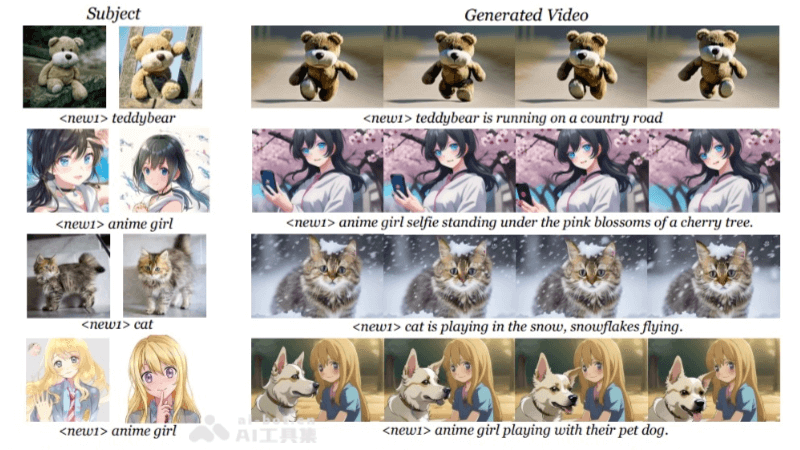
CustomCrafter is a custom video generation framework jointly proposed by Tencent and Zhejiang University. It can generate high-quality personalized videos based on text prompts and reference images while preserving the capabilities of motion generation and concept composition. By designing a series of flexible modules, CustomCrafter enables the generation of desired videos through learning from a small number of images without additional videos. CustomCrafter supports custom subject identity and motion patterns, generating videos with text prompts by preserving the capabilities of motion generation and concept composition.
Main Features of CustomCrafter
- Text-prompt and Reference-image Video Generation: CustomCrafter can generate videos based on user-provided text prompts and reference images, meaning users can specify the video content and style they want to generate.
- Preserved Motion Generation Capability: The framework can preserve the coherence and smoothness of motion when generating videos, and can generate videos with natural motion even without additional video guidance.
- Concept Composition Capability: CustomCrafter can combine different concepts together to generate creative and diverse video content.
- Learning from a Small Number of Images: The framework design allows the model to learn from a small number of images without requiring a large amount of video data, reducing the complexity of data collection and processing.
- Spatial Subject Learning Module: CustomCrafter uses the LoRA method to build a spatial subject learning module. The module updates the attention layer parameters in the spatial transformer model to better capture appearance details.
Technical Principles of CustomCrafter
- Video Diffusion Model (VDM): CustomCrafter generates videos based on a video diffusion model. VDM is a generative model that generates data, specifically video frames here, by gradually removing noise.
- Spatial Subject Learning Module: To enhance the model's ability to capture the appearance details of new subjects, CustomCrafter designs a plug-and-play module. The module is implemented by updating the Query, Key, and Value parameters of the attention layers in the spatial transformer model.
- Dynamic Weighted Video Sampling Strategy: CustomCrafter observed that VDM tends to restore video motion in the early stages of denoising, and focuses on restoring subject details in the later stages. Based on this observation, CustomCrafter proposes a strategy that reduces the influence of the spatial subject learning module in the early stages of denoising to preserve VDM's ability to generate motion, and increases the influence of this module in the later stages of denoising to repair the appearance details of the specified subject.
- Two Stages of the Denoising Process: CustomCrafter divides the denoising process into two stages: the motion layout repair process and the subject appearance repair process. During the motion layout repair process, the influence of the spatial subject learning module is reduced to maintain motion coherence; during the subject appearance repair process, the influence of this module is restored to ensure the fidelity of the subject's appearance.
CustomCrafter Project Address
- GitHub Repository:https://github.com/customcrafter
- Project Homepage:https://customcrafter.github.io/
- arXiv Technical Paper:https://arxiv.org/pdf/2408.13239v1
How to Use CustomCrafter
- Environment Preparation: Ensure that all necessary software and libraries are installed in the computing environment, such as Python, deep learning frameworks (such as PyTorch or TensorFlow), etc.
- Get CustomCrafter: Visit CustomCrafter's GitHub repository orproject homepage, download or clone the code repository locally.
- Install dependencies: According to the project's
requirements.txtorsetup.pyfile, install the required dependency packages. - Data preparation: Prepare or collect the text prompts and reference images used for video generation. This data will serve as the input to the model.
- Configure parameters: According to the type and style of video to be generated, configure the model parameters, including but not limited to text prompts, reference image paths, the resolution and frame rate of the output video, etc.
- Model training(if needed): If CustomCrafter needs to be trained or fine-tuned to adapt to a specific dataset or generation task, perform model training according to the guidance in the project documentation.
- Video generation: Using the configured parameters and input data, run CustomCrafter's video generation script or command-line tool to generate video.
Application scenarios of CustomCrafter
- Film and television production: In the production of movies, TV series, or short films, CustomCrafter can be used to quickly generate animations or special effects for specific scenes, reducing the cost and time of actual filming.
- Virtual reality (VR) and augmented reality (AR): In VR and AR applications, CustomCrafter can generate realistic virtual characters or environments, providing an immersive experience.
- Game development: Game designers can use CustomCrafter to generate dynamic scenes or character animations in games, improving visual effects and player experience.
- Advertising and marketing: Marketers can use CustomCrafter to quickly generate attractive video advertisements to adapt to different markets and audiences.
- Social media content creation: Social media users can use CustomCrafter to generate unique video content, increasing fan interaction and the attractiveness of the content.