
What is Cunzhi
Cunzhi is an open-source AI conversation enhancement tool that solves the problem of AI assistants prematurely ending conversations. The tool features intelligent interception: when the AI wants to end the conversation, it automatically pops up a continue option, allowing users to engage in deeper exchanges. Cunzhi supports memory management, supports storing development specifications and preferences by project, provides a concise interactive interface, and supports Markdown and multiple input methods. Cunzhi is easy to install, supports cross-platform use, and users can use it by configuring an MCP client and setting prompts, creating a personalized AI interaction experience.
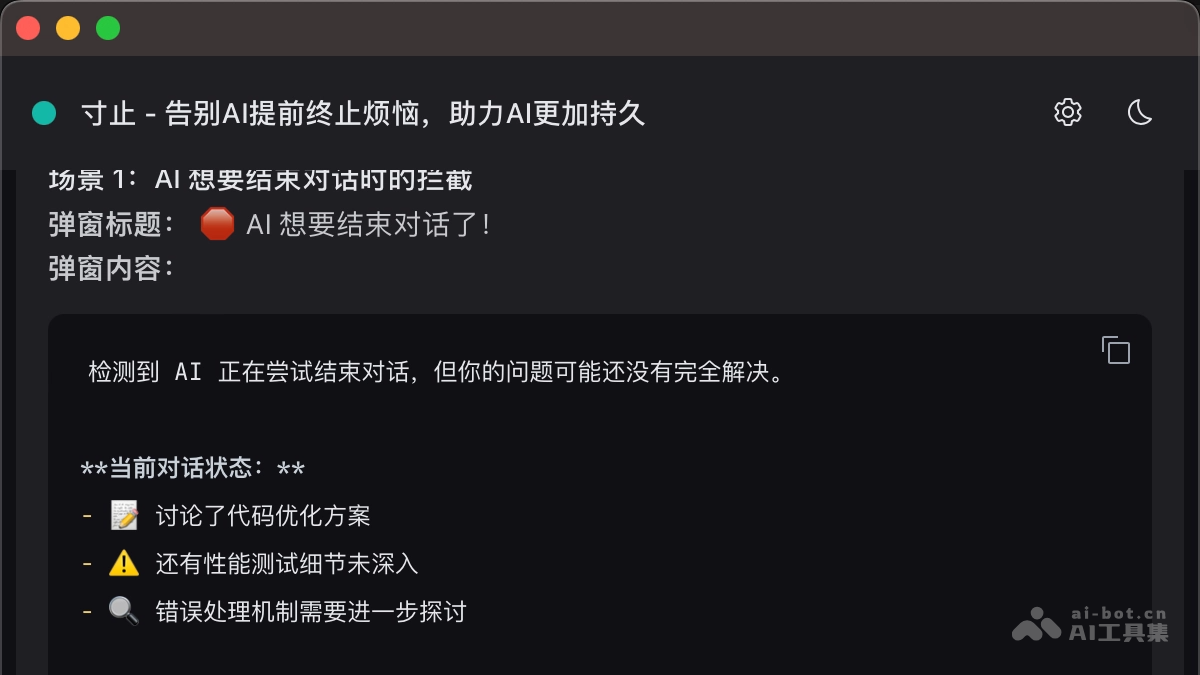
Main features of Cunzhi
- Intelligent interception: When the AI assistant wants to end the conversation, Cunzhi automatically pops up a dialog box, providing predefined continue options for users to quickly select.
- Memory management: Supports storing development specifications and user preference settings and other information according to different projects.
- Supports Markdown: Supports Markdown syntax, allowing users to format conversation content with Markdown, making conversations clearer and more organized, and making it easy to display formatted content such as code, lists, and headings.
- Multiple input methods: Provides multiple input methods to meet the usage habits and needs of different users, enabling users to interact with the AI assistant more conveniently.
- Easy installation: The installation process is simple and quick, taking only 3 seconds to complete, and it supports cross-platform use. Whether on macOS, Windows, or Linux, users can install and use it conveniently.
How to use Cunzhi
- Quick installation:
- macOS users:
- Open Terminal and run the following command to install:brew tap imhuso/cunzhi && brew install cunzhi。
- If you encounter a 404 download error, follow these steps to troubleshoot:
- Clear the old tap cache:brew untap imhuso/cunzhi。
- Reinstall:brew tap imhuso/cunzhi && brew install cunzhi。
- Windows/Linux users: Manual download is recommended for installation.
- macOS users:
- Manual download:
- Install: Visit Cunzhi's Releases page:https://github.com/imhuso/cunzhi/releases。根据自己的操作系统,下载对应的版本:
- Linux:cunzhi-cli-v*-linux-x86_64.tar.gz
- macOS (Intel):cunzhi-cli-v*-macos-x86_64.tar.gz
- macOS (Apple Silicon):cunzhi-cli-v*-macos-aarch64.tar.gz
- Windows:cunzhi-cli-v*-windows-x86_64.zip
- After the download is complete, extract the files and add "Cunzhi" and "Wait a moment" to the system PATH.
- Configuration and usage:
- Configure the MCP client: Add the following content to the MCP client configuration file (such as Claude Desktop):
- Install: Visit Cunzhi's Releases page:https://github.com/imhuso/cunzhi/releases。根据自己的操作系统,下载对应的版本:
{
  "mcpServers": {
    "寸止": {
      "command": "寸止"
    }
  }
}-
-
- Open the settings interface: Open Cunzhi's settings interface to perform the relevant configuration.
- Configure prompts: In the "Reference Prompts" tab of the settings interface, view the automatically generated prompts, click the copy button, and add the prompts to your AI assistant.
- Start using: After completing the above configuration, start using Cunzhi for conversational exchanges.
-
Cunzhi project address
- GitHub repository:https://github.com/imhuso/cunzhi
Application scenarios of Cunzhi
- Long conversation scenarios: Cunzhi can prevent the AI assistant from ending the conversation too early. It is suitable for complex problem solving, story creation, etc., allowing users to continue communicating until a solution is found or creation is completed.
- Multitasking scenarios: CUNZHI helps developers manage development standards and preferences for different projects, quickly switch project contexts, improve development efficiency, and reduce communication costs.
- Personalized interaction scenarios: Users can customize exclusive AI interaction experiences based on CUNZHI, set specific conversation styles, priority rules, etc., making the AI assistant more aligned with personal work and communication habits.
- Cross-platform collaboration scenarios: CUNZHI supports cross-platform use, allowing users to communicate seamlessly across different devices, and team members to uniformly use CUNZHI to collaborate with AI assistants, improving efficiency and consistency.
- Learning scenarios: CUNZHI can be used for knowledge acquisition and reinforcement, such as language learning, professional knowledge learning, etc., ensuring a coherent learning process.