
What is Context7
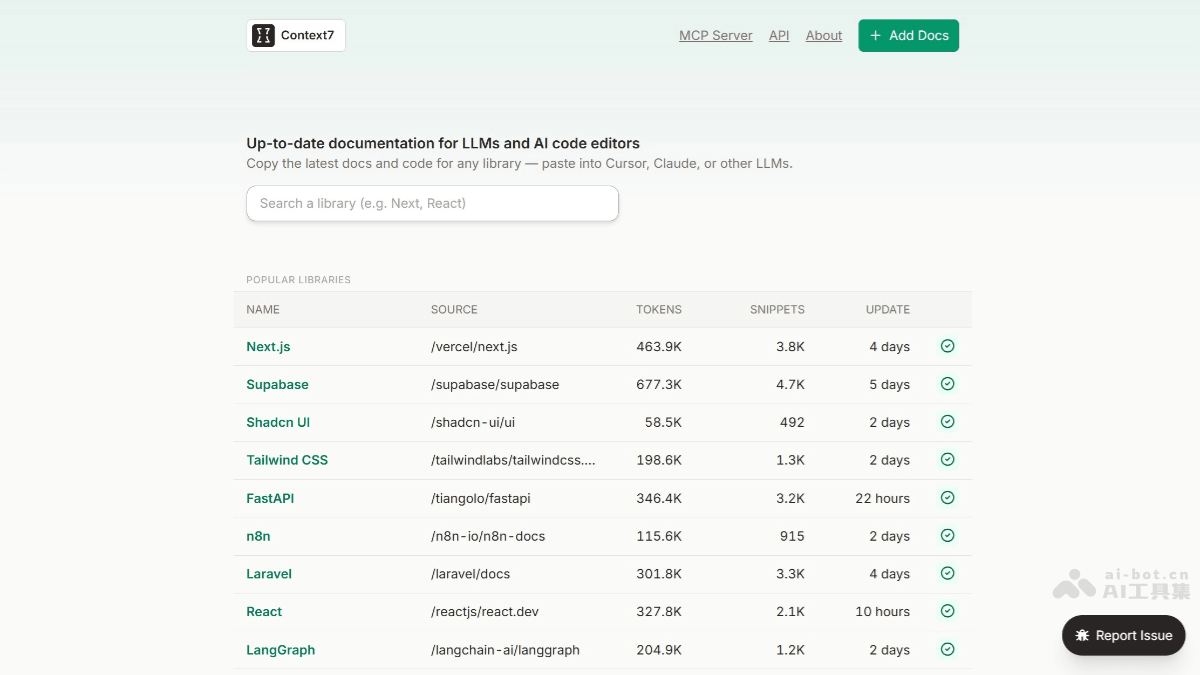
Context7 is an AI programming assistance tool launched by Upstash, providing the latest, version-specific documentation and code examples for large language models (LLMs) and AI code editors. Through steps such as parsing documentation, enriching content, vectorizing, and re-ranking, it ensures developers can obtain accurate and up-to-date code examples and documentation. Context7 supports a variety of tools, such as Cursor, Windsurf, Claude Desktop, etc., and achieves integration through the Model Context Protocol (MCP).
When using Context7, developers only need to add use context7 to the prompt to automatically retrieve relevant context, improving the accuracy and reliability of code generation. It is suitable for rapidly updating frameworks or niche packages, significantly reducing the risk of generating incorrect or outdated code. Context7's installation and configuration are relatively simple, supporting multiple installation methods, including through Smithery, Docker, etc.
Main features of Context7
- Real-time documentation retrieval: Pulls the latest documentation and code examples from official sources (such as GitHub, official documentation websites), ensuring that the information developers obtain is up to date.
- Version-specific: Can match the corresponding documentation and code examples according to the version of the target library, avoiding issues caused by version inconsistency.
- Seamless integration: Only need to add
use context7to the prompt to trigger documentation injection, integrating with a variety of MCP-compatible clients (such as Cursor, Windsurf, Claude Desktop, etc.). - Reduce hallucinated code: Reduces the possibility of AI generating nonexistent APIs or outdated code, improving the accuracy of code generation.
- Multi-platform support: Compatible with a variety of development tools, such as Cursor, Windsurf, VS Code, etc.
- Precise context extraction: Extracts clean, relevant code snippets from the latest documentation, containing only code and descriptions, with no extra content.
- Broad library support: Currently supports more than 6,000 popular libraries, and basically all mainstream frameworks can be found.
- Free to use: For personal use, up to 50 free queries per day.
- resolve_library_id: Find the specific package referred to by providing fuzzy keywords for a specified library.
- get_library_docs: Retrieve the documentation content of a specified package, providing real documentation rather than search results.
How Context7 works
- Parsing: Extract code snippets and examples from documentation.
- Enrichment: Use LLMs to add brief explanations and metadata.
- Vectorization: Embed content for semantic search.
- Re-ranking: Use a custom algorithm to score the relevance of results.
- Caching: Serve requests from Redis for optimal performance.
Installation and configuration of Context7
- Node.js: Requires Node.js >= v18.0.0.
- Installation methods:
- Install via Smithery:
- Claude Desktop:
npx -y @smithery/cli install @upstash/context7-mcp --client claude -
Install in Cursor:
-
Open
Settings->Cursor Settings->MCP->Add new global MCP server。 -
Or in
~/.cursor/mcp.jsonAdd the following configuration to the file:
{ "mcpServers": { "context7": { "command": "npx", "args": ["-y", "@upstash/context7-mcp"] } } } -
-
Install in Windsurf:
{ "mcpServers": { "context7": { "command": "npx", "args": ["-y", "@upstash/context7-mcp"] } } } -
Install in VS Code:
{ "servers": { "Context7": { "type": "stdio", "command": "npx", "args": ["-y", "@upstash/context7-mcp"] } } } -
Install using Docker:
-
Create
Dockerfile:
FROM node:18-alpine WORKDIR /app # Install the latest version globally RUN npm install -g @upstash/context7-mcp # Expose default port if needed (optional, depends on MCP client interaction) # EXPOSE 3000 # Default command to run the server CMD ["context7-mcp"]-
Build image:
docker build -t context7-mcp .-
Configure MCP client:
{ "mcpServers": { "Сontext7": { "autoApprove": [], "disabled": false, "timeout": 60, "command": "docker", "args": ["run", "-i", "--rm", "context7-mcp"], "transportType": "stdio" } } } -
- Install via Smithery:
Context7 project address
- Project official website:context7.com
- GitHub repository:https://github.com/upstash/context7
Context7 application scenarios
- Multi-turn dialogue management for customer service: In customer service scenarios, when users switch topics multiple times during inquiries, Context7 can maintain context coherence and avoid redundancy.
- Long document analysis: For long documents (such as legal contracts), Context7 can process them in segments and integrate key clauses, breaking through the native context length limits of LLMs.
- Real-time data analysis: In real-time data analysis scenarios such as e-commerce user behavior monitoring, Context7 can combine historical behavior and real-time streaming data to generate recommendations or risk warnings.
- AI-assisted programming: When using an AI programming assistant, such as Cursor, add
use context7, Context7 will automatically pull the relevant latest documentation and code examples for the AI model to generate more accurate answers.