
What is Computer Use OOTB
Computer Use OOTB is an open-source GUI framework that enables automated control of computers based on the Claude 3.5 Computer Use API. The framework supports cross-platform operation, allowing users to easily deploy GUI automation models on Windows and macOS systems without complex setup. CU-OOTB supports remote control of computers from any device over the internet, including mobile devices such as phones, providing convenient remote operation capabilities.
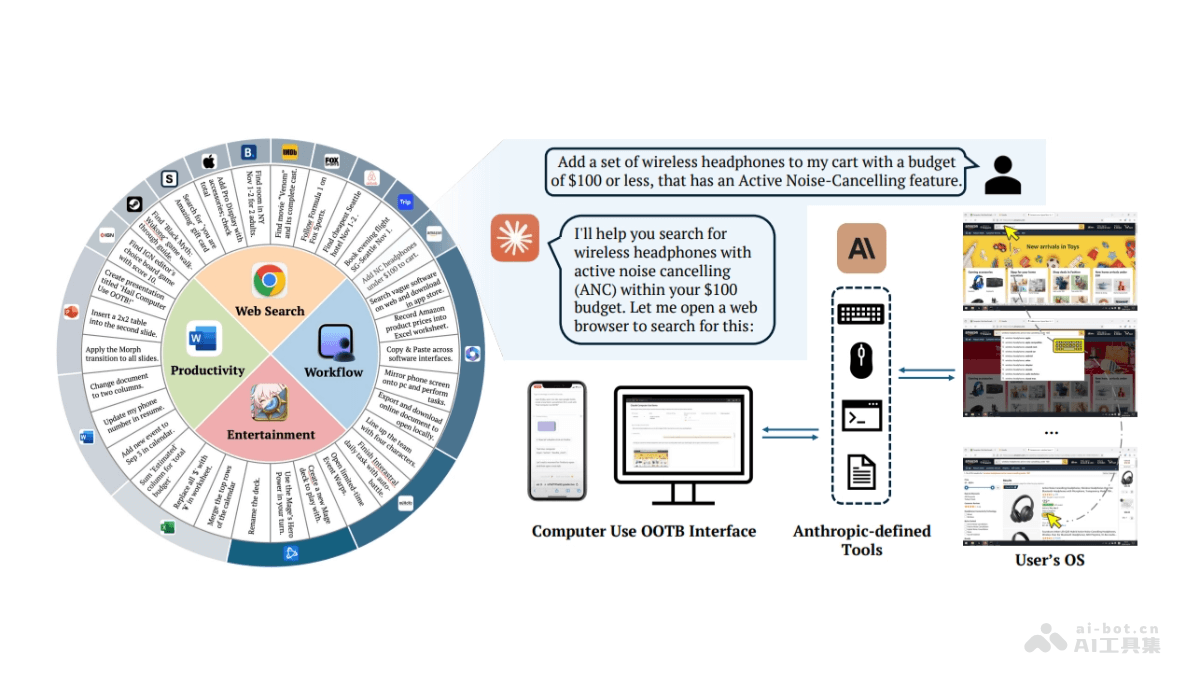
Main features of Computer Use OOTB
- Cross-platform support: Computer Use OOTB supports local deployment on Windows and macOS operating systems, providing a unified framework for GUI automation.
- API-based automation: Uses the Claude 3.5 Computer Use API to achieve end-to-end automation from user instructions to desktop operations.
- Plug and play: As a plug-and-play solution, it simplifies the deployment process, allowing users to quickly start using GUI automation features.
- Remote control: Supports remote control of computers from any device over the internet, including mobile devices, improving operational flexibility.
Technical principles of Computer Use OOTB
- Anthropic-defined Tools: Uses the toolset defined by Anthropic, including computer interaction tools, text editing tools, and Bash tools, to perform specific desktop operations.
- Visual information processing: Observes the environment through real-time screenshots, without relying on metadata or HTML, and can adapt to the highly dynamic nature of GUI environments.
- Reasoning-action paradigm: Based on the observation-action paradigm, the model observes the environment before deciding on an action, ensuring the action suits the current GUI state.
- Historical visual context maintenance: The model maintains a context of historical screenshots, which accumulate during task operations, helping the model make more informed decisions when performing actions.
- State observation and feedback: After performing an action, the model takes another screenshot to confirm the effect of the action and dynamically decides whether to retry or terminate execution.
Project address of Computer Use OOTB
- Project official website:computer-use-ootb.github.io
- GitHub repository:https://github.com/showlab/computer_use_ootb
- arXiv technical paper:https://arxiv.org/pdf/2411.10323
Application scenarios of Computer Use OOTB
- Remote work support: Supports users in remotely accessing and controlling workstations to perform daily work tasks, such as file editing, report writing, and data analysis.
- Automated testing: In software development, automates testing of desktop applications to ensure software stability and performance.
- Education and training: Creates interactive teaching content, automates demonstrations and experiments in the teaching process, and enables remote laboratory operations.
- Home automation: Controls smart home devices, such as lighting, temperature control, and other home management systems.
- Game automation: Performs repetitive tasks in video games, such as character leveling and resource collection.